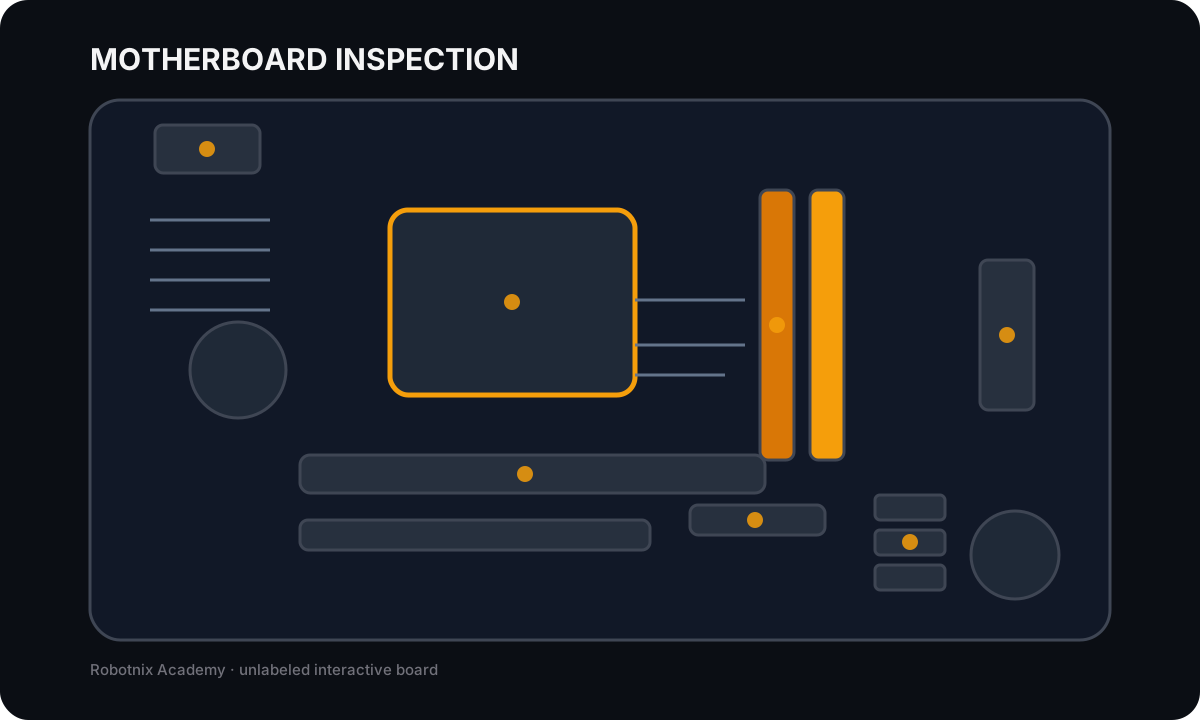
1. A user reports that a PC will not start after being moved to another desk. The power LED is dark. What should be checked before opening the case?A. RAID levelB. CPU architectureC. Windows servicesD. Outlet, power cable, PSU switch, and external power path2. A technician wants another person to reproduce a hardware fault. Which ticket detail is most valuable?A. Exact symptom, evidence, steps already taken, and resultB. Only the user's nameC. Only the final replacement partD. A guess with no test data3. Which action best follows an evidence-first troubleshooting method?A. Change three settings togetherB. Test one justified theory with a controlled changeC. Replace the most expensive partD. Ignore the last known change4. A system powers on and emits a memory-related POST indication immediately after a RAM upgrade. What is the strongest first theory?A. DNS failureB. Bad monitor inputC. RAM seating or compatibilityD. Printer driver failure1 Visual evidence: Use the location of marker 1 and the board layout. The image intentionally does not label the component.5. Inspect the motherboard evidence. Which component is at marker 1 and must match the supported processor platform?A. CPU socketB. DIMM slotC. PCI Express slotD. SATA port6. What is the most important reason to distinguish x86-64 from ARM?A. One is always fasterB. Only ARM uses RAMC. Only x86 can run an OSD. Instruction-set and software/platform compatibility differ7. What is a TPM commonly used to support?A. CPU coolingB. Hardware-backed cryptographic/security functionsC. Printer paper pickupD. Monitor backlighting8. Which statement about Secure Boot is most accurate?A. It helps verify trusted boot softwareB. It is a RAID modeC. It replaces antivirusD. It configures DHCP9. A workstation needs the fastest practical local storage for frequent application loading. Which option best fits?A. Optical discB. TapeC. NVMe SSDD. Floppy disk10. A laptop has an M.2 slot. Why must the technician still check the manual before buying a drive?A. All M.2 devices are GPUsB. M.2 has no size standardsC. M.2 cannot store dataD. The slot may support different lengths and SATA or PCIe/NVMe interfaces11. Which RAID design improves availability by mirroring a pair of drives?A. RAID 0B. RAID 1C. RAID 6 onlyD. Spanning12. Why should important data still be backed up when RAID is used?A. RAID does not protect against every deletion, corruption, theft, or disasterB. RAID cannot store filesC. Backups increase CPU clock speedD. RAID only works on optical discs13. Firmware detects an SSD correctly, but the operating system shows no usable volume. Which conclusion is justified?A. The SSD is definitely deadB. The monitor is defectiveC. The investigation should move toward controller/partition/filesystem/OS stateD. The PSU must be replaced14. Which observation most strongly supports a failing mechanical HDD theory?A. A correct DNS responseB. A bright monitorC. A normal POST beepD. Repeated clicking plus worsening SMART/IO errors15. A new GPU fits the PCIe slot but the PSU lacks the required connectors. What is the right response?A. Use any cable that fitsB. Stop and verify PSU capacity and connector compatibilityC. Disable the CPU fanD. Install it unpowered16. Which voltage rail is commonly important for major PC loads such as CPU/GPU power conversion and fans?A. 1.2 V onlyB. 240 V DCC. 12 VD. Ethernet PoE only17. A PC runs normally at idle but throttles and shuts down during a benchmark. What should be inspected?A. Cooling/temperature evidence and power deliveryB. Browser cookiesC. Printer languageD. DNS suffix18. Which display specification describes how often a screen updates per second?A. Color gamutB. Pixel densityC. Connector keyingD. Refresh rate19. A monitor works with another computer, and the PC works through a different video output. What does that evidence suggest?A. The entire PC is deadB. The failing boundary is narrowed toward one cable/output/port/configuration pathC. RAM must be replacedD. The SSD is corrupt20. Which final step best demonstrates that a repair is complete?A. The technician feels confidentB. The user leavesC. The original function is retested, results are documented, and remaining risk is recordedD. The case is closed before verificationGrade locally (0/20)