Unit 1
Hardware evidence
Computing
Computer Systems: CompTIA A+ Aligned
A hands-on Computer Systems course covering PC hardware, mobile devices, printers, networking, virtualization, operating systems, security, troubleshooting, and professional IT support. The course is aligned to the current CompTIA A+ Core 1 (220-1201) and Core 2 (220-1202) knowledge and skill objectives while remaining a high-school instructional course rather than an official CompTIA training product.
Course systems map
Six units. Two A+ cores. One technician workflow.
Use the unit map to see where hardware, networking, operating systems, security, operations, assessments, and the final service challenge connect.CompTIA A+ aligned · not endorsed220-1201 · Core 1220-1202 · Core 2New Jersey CSDT aligned
- Course scale
- 18 weeks · 90 lessons
- Evidence model
- Inspect → theory → controlled action → verify
- Assessment model
- Local grading · visual evidence · retry
- Capstone
- Technician Service Challenge
Unit 1 · Weeks 1–4
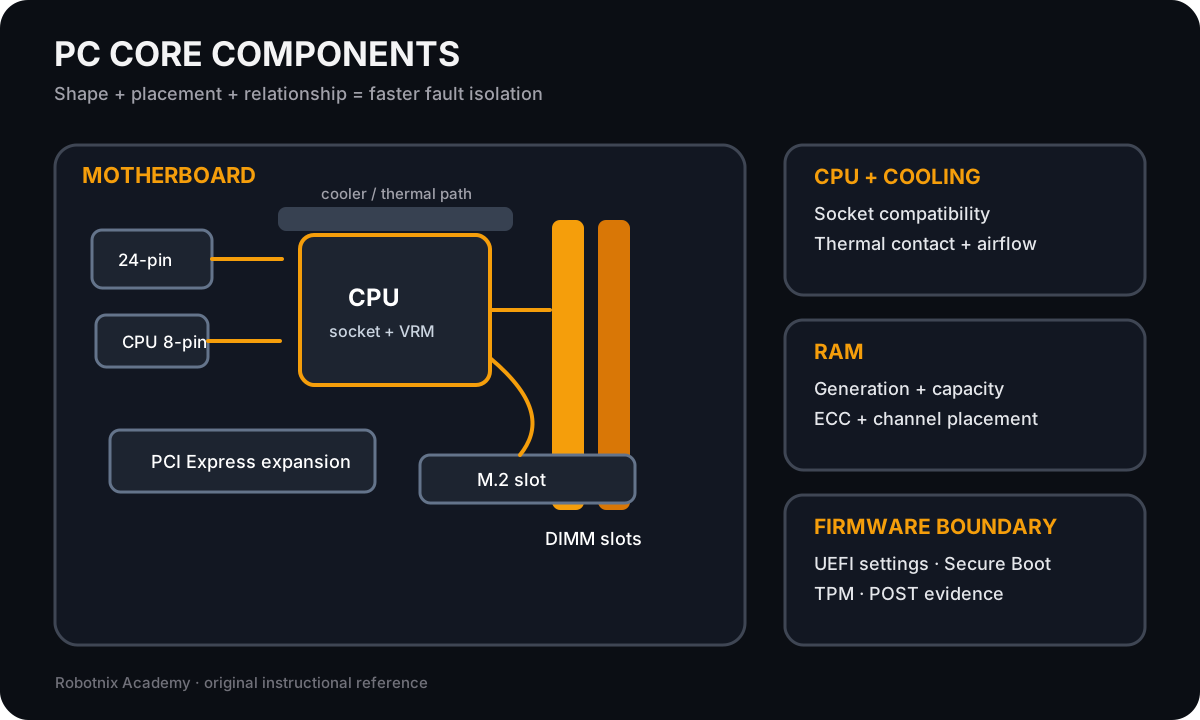
Technician Foundations and PC HardwareHardware · compatibility · troubleshootingA+ Core 1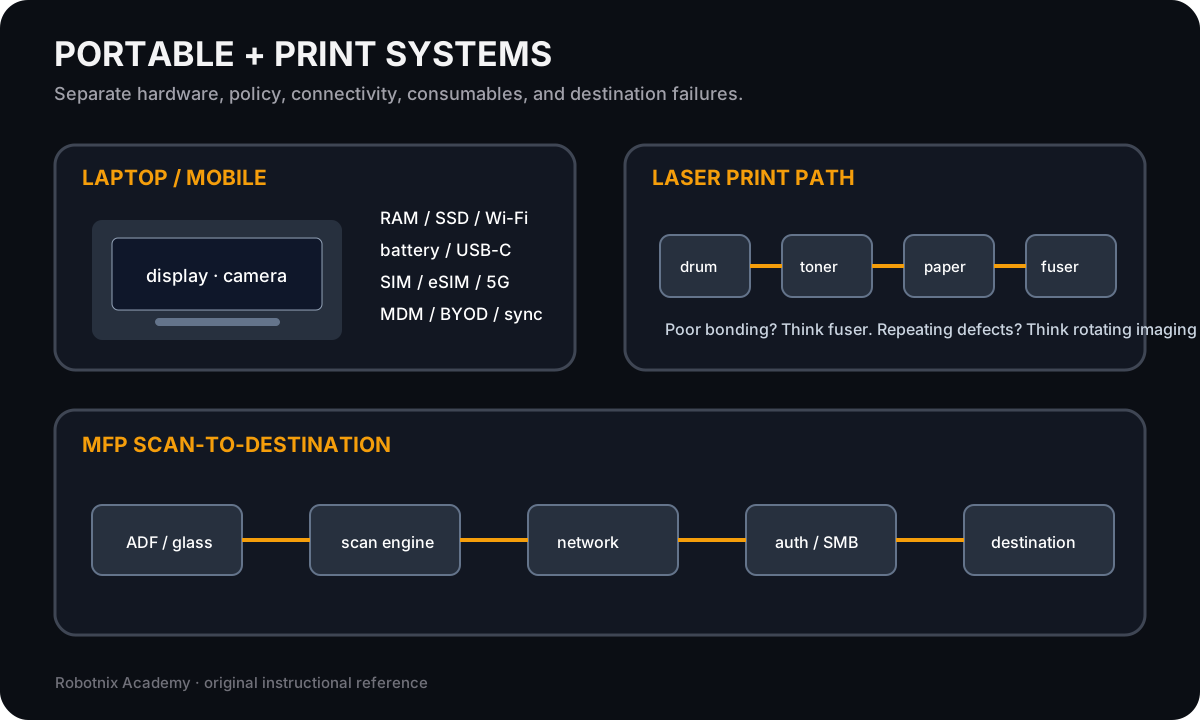
Unit 2 · Weeks 5–6
Mobile Devices, Printers, and Peripheral SystemsMobile · printers · peripheralsA+ Core 1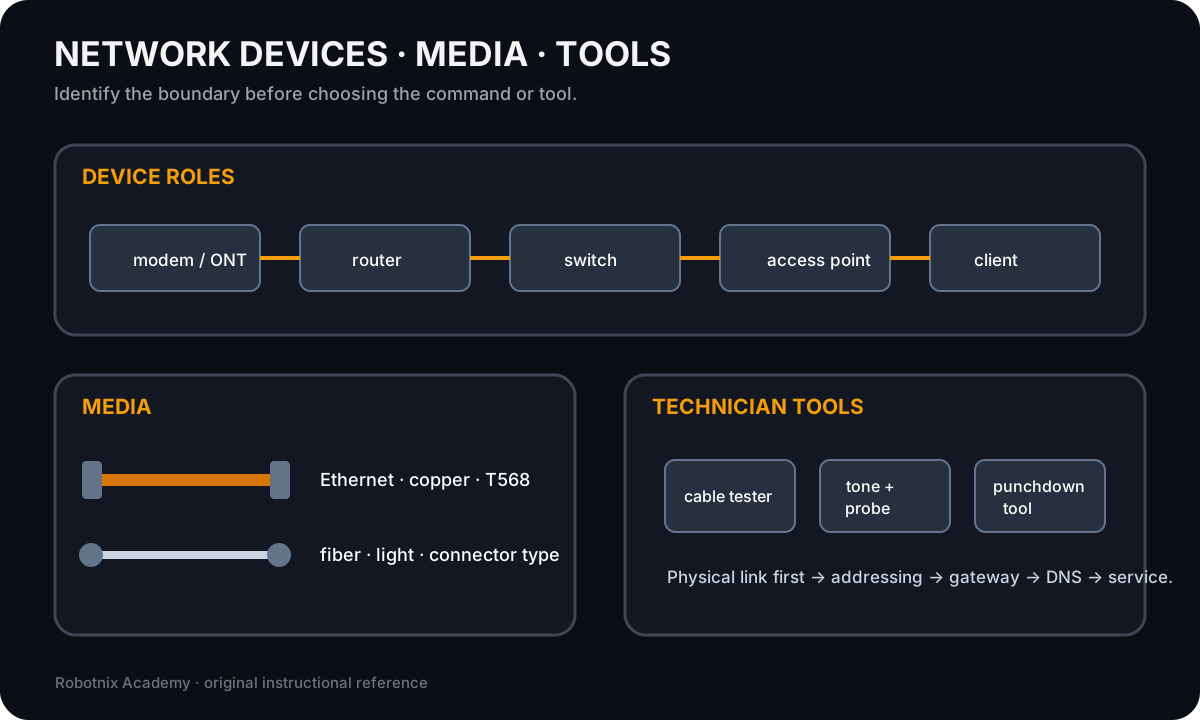
Unit 3 · Weeks 7–9
Networking and Internet SystemsNetworking · tools · fault isolationA+ Core 1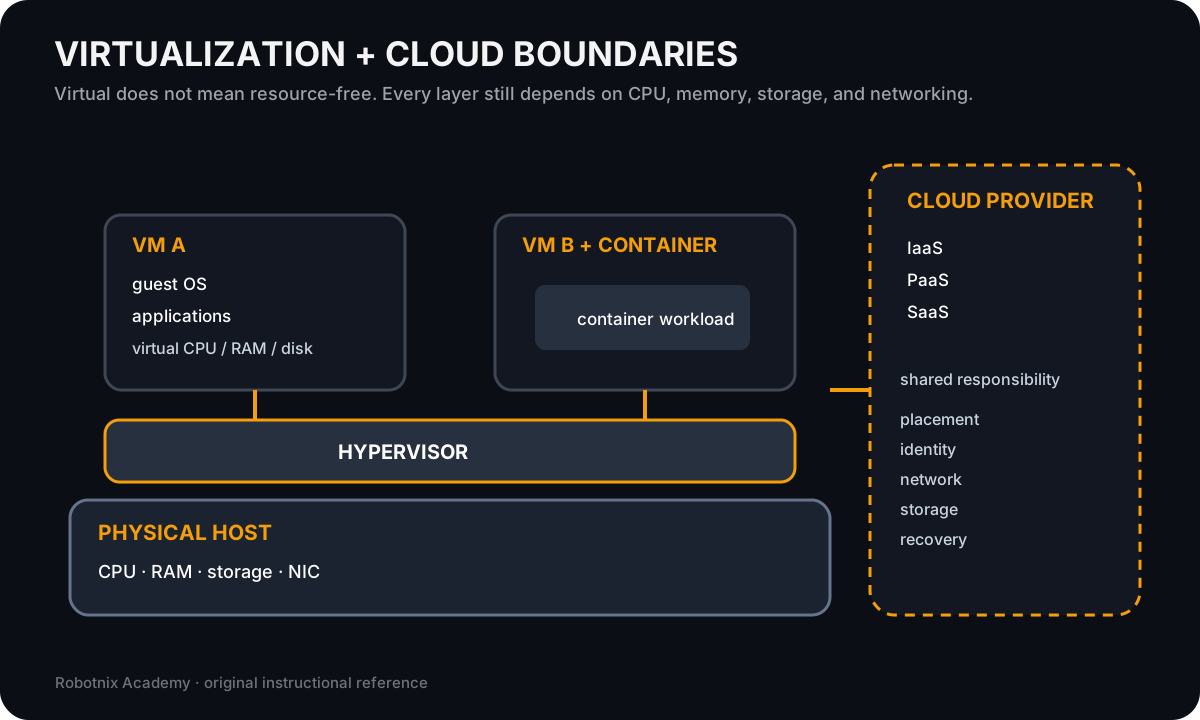
Unit 4 · Weeks 10–12
Virtualization and Operating SystemsVMs · Windows · cross-platform supportCore 1 + Core 2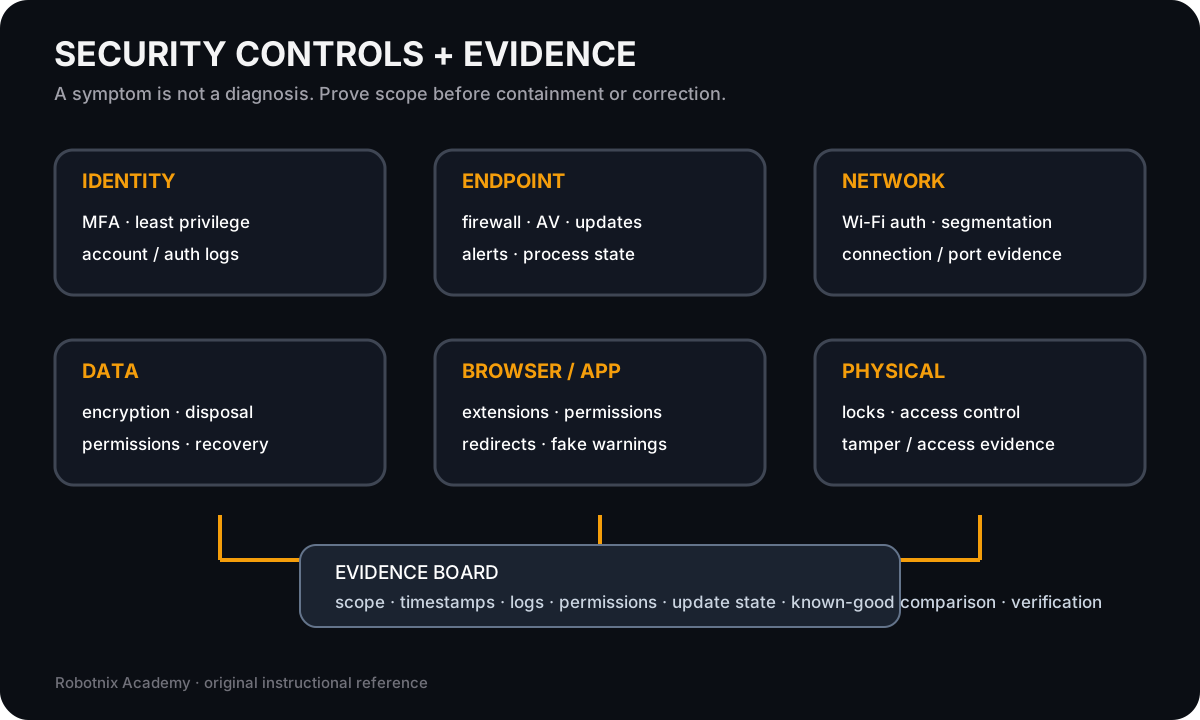
Unit 5 · Weeks 13–15
Security and Software TroubleshootingSecurity · hardening · software evidenceA+ Core 2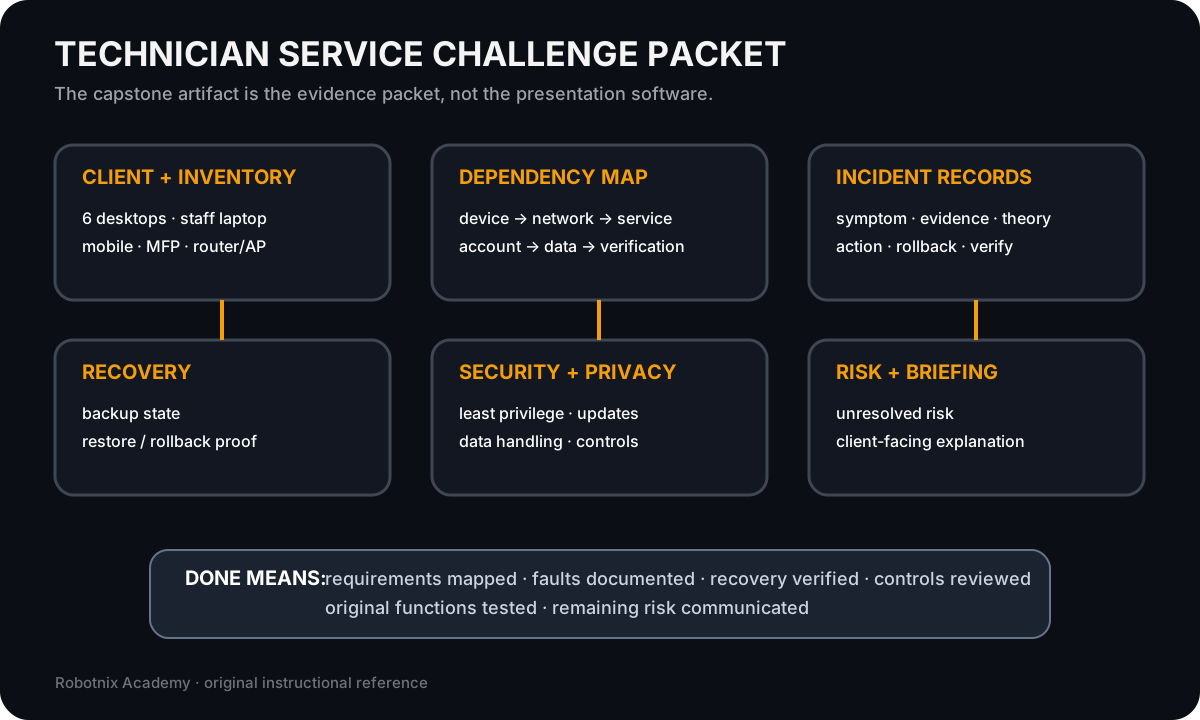
Unit 6 · Weeks 16–18
IT Operations, Integrated Review, and Technician CapstoneOperations · review · service challengeCore 2 + integratedAssessment map
Practice, prove, integrate
Each unit has a local practice/test pair. The midterm and final integrate evidence across multiple technician domains.Unit 2
Mobile + printUnit 3
Network evidenceMidterm
Core 1 integrationUnit 4
OS + virtualizationUnit 5
Security + softwareUnit 6
Operations + capstoneFinal
Core 1 + Core 2Featured technician media
Don’t just read the system. Inspect it.
Jump into the course’s highest-value visual and interactive learning surfaces.3D hardware
Diagnose inside the desktopOrbit the PC, isolate CPU/RAM/GPU/storage/power, then use service symptoms to choose the first hardware boundary.Open →Network investigation
Trace the SOHO systemUse React Flow plus the bounded terminal to separate gateway, Wi-Fi, DHCP, DNS, and service-path evidence.Open →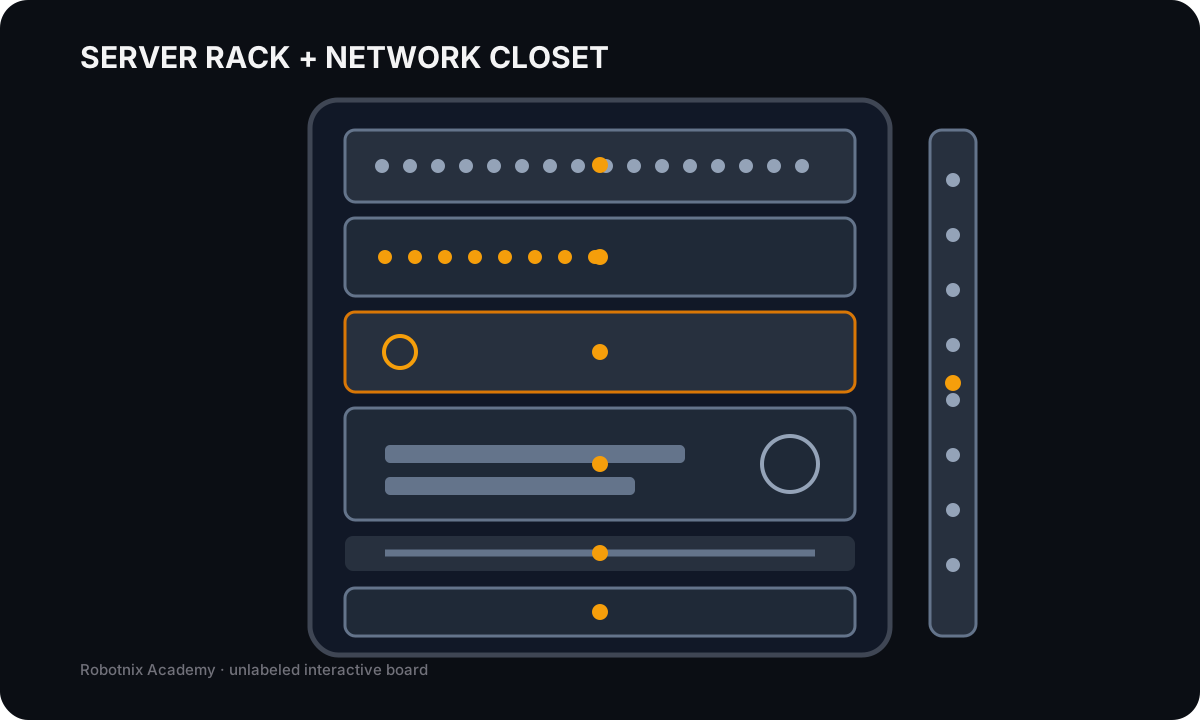
3D service environment
Separate rack data and powerInspect the Harborview rack, switch between front/rear views, and prove whether the data path or power path is actually failing.Open →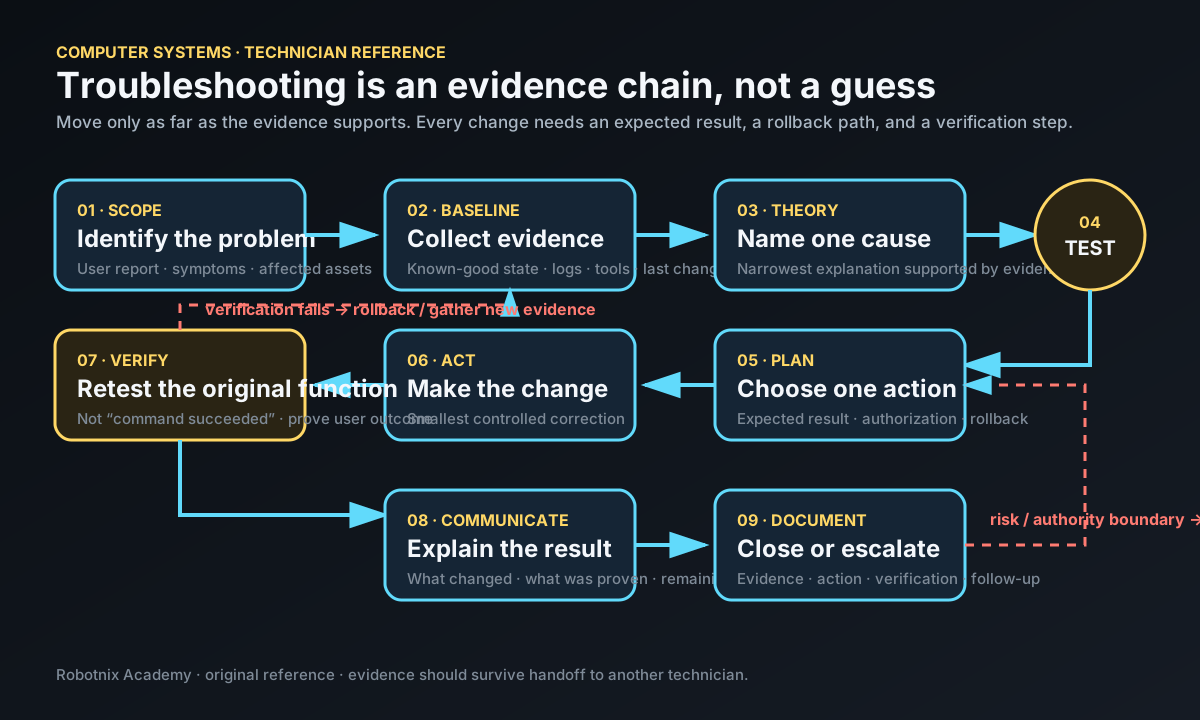
Visual study deck
Print the reference sheetsOpen the Robotnix-original hardware, connector, network, OS, security, troubleshooting, operations, and capstone sheets in one print-friendly view.Open →Week 017 entries
- overviewWeek 1: Technician Foundations and Hardware Orientation210 instructional minutes | five 42-minute lessons→
- Lesson 1Lesson 1: The Technician MindsetA computer that will not start does not need a guess. It needs a process.→
- Lesson 2Lesson 2: Open the BoxToday we stop treating the desktop as one object.→
- Lesson 3Lesson 3: Ports, Cables, and InterfacesA connector is not just a shape. It tells you what kind of signal, power, or data path the system expects.→
- Lesson 4Lesson 4: Firmware, POST, and the Boot PathA computer can have every major component installed and still fail before the operating system ever starts.→
- Lesson 5Lesson 5: Your First Service TicketThis is the first time you put the technician process together.→
- LabLab: System Trace StudioCreate an annotated diagram for the research-and-share task from Lesson 3. You may use paper, a slide, or a drawing tool. Do not use a real account, network scan, or administrator setting.→
Week 026 entries
- overviewWeek 2: Motherboards, CPUs, RAM, and Compatibility210 instructional minutes | five 42-minute lessons→
- Lesson 1Lesson 1: Motherboard as the Compatibility MapCore path: 42 minutes→
- Lesson 2Lesson 2: CPU Architecture, Sockets, Cores, and CoolingCore path: 42 minutes→
- Lesson 3Lesson 3: RAM Generations, ECC, and Channel ConfigurationCore path: 42 minutes→
- Lesson 4Lesson 4: Compatibility LabCore path: 42 minutes→
- Lesson 5Lesson 5: Diagnose the No-POST and Board-Level SystemCore path: 42 minutes→
Week 036 entries
- overviewWeek 3: Storage, SATA, NVMe, SAS, M.2, and RAID210 instructional minutes | five 42-minute lessons→
- Lesson 1Lesson 1: Storage Media, Form Factors, and WorkloadsCore path: 42 minutes→
- Lesson 2Lesson 2: SATA, NVMe, PCIe, SAS, M.2, and mSATACore path: 42 minutes→
- Lesson 3Lesson 3: RAID Is Not BackupCore path: 42 minutes→
- Lesson 4Lesson 4: Storage Selection LabCore path: 42 minutes→
- Lesson 5Lesson 5: Diagnose the Missing or Failing DriveCore path: 42 minutes→
Week 046 entries
- overviewWeek 4: Power, Cooling, Expansion, and Displays210 instructional minutes | five 42-minute lessons→
- Lesson 1Lesson 1: Power Has a PathCore path: 42 minutes→
- Lesson 2Lesson 2: Cooling Is Part of ReliabilityCore path: 42 minutes→
- Lesson 3Lesson 3: Expansion Cards and Display TechnologiesCore path: 42 minutes→
- Lesson 4Lesson 4: Power and Expansion Planning LabCore path: 42 minutes→
- Lesson 5Lesson 5: Hardware, Video, and Projector Fault IsolationCore path: 42 minutes→
Week 056 entries
- overviewWeek 5: Laptops and Mobile Devices210 instructional minutes | five 42-minute lessons→
- Lesson 1Lesson 1: Laptop Hardware and Replacement DecisionsCore path: 42 minutes→
- Lesson 2Lesson 2: Batteries, Displays, Cameras, and Input HardwareCore path: 42 minutes→
- Lesson 3Lesson 3: Mobile Accessories, Networks, MDM, and SyncCore path: 42 minutes→
- Lesson 4Lesson 4: Mobile Device Support LabCore path: 42 minutes→
- Lesson 5Lesson 5: Mobile Device Troubleshooting ChallengeCore path: 42 minutes→
Week 066 entries
- overviewWeek 6: Printers and Peripheral Systems210 instructional minutes | five 42-minute lessons→
- Lesson 1Lesson 1: Printer Technologies and Deployment DecisionsCore path: 42 minutes→
- Lesson 2Lesson 2: Print Mechanisms and MaintenanceCore path: 42 minutes→
- Lesson 3Lesson 3: Deploy, Share, Scan, and SecureCore path: 42 minutes→
- Lesson 4Lesson 4: Printer Deployment and Peripheral Support LabCore path: 42 minutes→
- Lesson 5Lesson 5: Printer Troubleshooting ChallengeCore path: 42 minutes→
Week 076 entries
- overviewWeek 7: Network Hardware, Media, and IP Foundations210 instructional minutes | five 42-minute lessons→
- Lesson 1Lesson 1: Network Hardware and Internet Edge DevicesCore path: 42 minutes→
- Lesson 2Lesson 2: Copper, Fiber, Coax, and Connector StandardsCore path: 42 minutes→
- Lesson 3Lesson 3: IPv4, IPv6, Gateways, and Addressing ModesCore path: 42 minutes→
- Lesson 4Lesson 4: Internet and Network Types SOHO LabCore path: 42 minutes→
- Lesson 5Lesson 5: Local Network Fault IsolationCore path: 42 minutes→
Week 086 entries
- overviewWeek 8: Network Services, Ports, Wi-Fi, and Configuration210 instructional minutes | five 42-minute lessons→
- Lesson 1Lesson 1: DNS, DHCP, NAT, VLAN, and VPNCore path: 42 minutes→
- Lesson 2Lesson 2: TCP, UDP, and the Complete A+ Port SetCore path: 42 minutes→
- Lesson 3Lesson 3: Wi-Fi, Bluetooth, NFC, and RFIDCore path: 42 minutes→
- Lesson 4Lesson 4: Network Services and SOHO Design LabCore path: 42 minutes→
- Lesson 5Lesson 5: Service and Wi-Fi Failure ChallengeCore path: 42 minutes→
Week 096 entries
- overviewWeek 9: Network Tools and Troubleshooting210 instructional minutes | five 42-minute lessons→
- Lesson 1Lesson 1: Troubleshoot in LayersCore path: 42 minutes→
- Lesson 2Lesson 2: Complete Technician Network Tool SetCore path: 42 minutes→
- Lesson 3Lesson 3: Read IP, Route, DNS, and Connectivity EvidenceCore path: 42 minutes→
- Lesson 4Lesson 4: Complete Network Symptom LabCore path: 42 minutes→
- Lesson 5Lesson 5: Network Incident DefenseCore path: 42 minutes→
Week 106 entries
- overviewWeek 10: Virtualization and Cloud Computing210 instructional minutes | five 42-minute lessons→
- Lesson 1Lesson 1: Why Virtualize?Core path: 42 minutes→
- Lesson 2Lesson 2: Hypervisors, VDI, Containers, and VM RequirementsCore path: 42 minutes→
- Lesson 3Lesson 3: Cloud Models, Services, and CharacteristicsCore path: 42 minutes→
- Lesson 4Lesson 4: Virtual and Cloud Design LabCore path: 42 minutes→
- Lesson 5Lesson 5: Virtualization and Cloud Troubleshooting ChallengeCore path: 42 minutes→
Week 116 entries
- overviewWeek 11: Windows Installation, Administration, and Networking210 instructional minutes | five 42-minute lessons→
- Lesson 1Lesson 1: Windows Editions, Features, and RequirementsCore path: 42 minutes→
- Lesson 2Lesson 2: Install and Upgrade WindowsCore path: 42 minutes→
- Lesson 3Lesson 3: Windows GUI Tools and SettingsCore path: 42 minutes→
- Lesson 4Lesson 4: Windows Command Line and Networking LabCore path: 42 minutes→
- Lesson 5Lesson 5: Windows Technician PracticalCore path: 42 minutes→
Week 126 entries
- overviewWeek 12: Cross-Platform Operating Systems and Applications210 instructional minutes | five 42-minute lessons→
- Lesson 1Lesson 1: Operating System Families, Filesystems, and LifecycleCore path: 42 minutes→
- Lesson 2Lesson 2: macOS Features and ToolsCore path: 42 minutes→
- Lesson 3Lesson 3: Linux Client Tools and System ComponentsCore path: 42 minutes→
- Lesson 4Lesson 4: Application Installation and Cloud Productivity LabCore path: 42 minutes→
- Lesson 5Lesson 5: Cross-Platform Technician PracticalCore path: 42 minutes→
Week 136 entries
- overviewWeek 13: Security Controls, Windows Security, and Device Hardening210 instructional minutes | five 42-minute lessons→
- Lesson 1Lesson 1: Physical and Logical Security ControlsCore path: 42 minutes→
- Lesson 2Lesson 2: Windows Security, Permissions, and IdentityCore path: 42 minutes→
- Lesson 3Lesson 3: Wireless Authentication and Device HardeningCore path: 42 minutes→
- Lesson 4Lesson 4: Secure Endpoint Configuration LabCore path: 42 minutes→
- Lesson 5Lesson 5: Security Controls PracticalCore path: 42 minutes→
Week 146 entries
- overviewWeek 14: Threats, Malware Response, and Secure Client Systems210 instructional minutes | five 42-minute lessons→
- Lesson 1Lesson 1: Social Engineering, Attacks, and VulnerabilitiesCore path: 42 minutes→
- Lesson 2Lesson 2: Malware Types, Defensive Tools, and RemovalCore path: 42 minutes→
- Lesson 3Lesson 3: Secure SOHO Networks and BrowsersCore path: 42 minutes→
- Lesson 4Lesson 4: Data Destruction and Security Triage LabCore path: 42 minutes→
- Lesson 5Lesson 5: Security Incident PracticalCore path: 42 minutes→
Week 156 entries
- overviewWeek 15: Software Troubleshooting Technician Practical210 instructional minutes | five 42-minute lessons→
- Lesson 1Lesson 1: Troubleshoot Windows OS IssuesCore path: 42 minutes→
- Lesson 2Lesson 2: Troubleshoot Mobile OS and Application IssuesCore path: 42 minutes→
- Lesson 3Lesson 3: Troubleshoot Mobile Security IssuesCore path: 42 minutes→
- Lesson 4Lesson 4: PC Security Troubleshooting LabCore path: 42 minutes→
- Lesson 5Lesson 5: Domain 3 Technician PracticalCore path: 42 minutes→
Week 166 entries
- overviewWeek 16: Operational Procedures and Professional IT Support210 instructional minutes | five 42-minute lessons→
- Lesson 1Lesson 1: Documentation, Assets, and Change ManagementCore path: 42 minutes→
- Lesson 2Lesson 2: Backup, Safety, and Environmental ControlsCore path: 42 minutes→
- Lesson 3Lesson 3: Privacy, Licensing, Policy, and Incident EvidenceCore path: 42 minutes→
- Lesson 4Lesson 4: Professional Communication and Remote SupportCore path: 42 minutes→
- Lesson 5Lesson 5: Scripting and AI Operations PracticalCore path: 42 minutes→
Week 176 entries
- overviewWeek 17: Integrated Technician ScenariosWhen the ticket does not tell you whether the problem is hardware, networking, Windows, mobile, security, software, or process, how do you decide where to look first?→
- Lesson 1Lesson 1: Triage the Whole SystemCore path: 42 minutes→
- Lesson 2Lesson 2: Choose the EvidenceCore path: 42 minutes→
- Lesson 3Lesson 3: Correct, Roll Back, and VerifyCore path: 42 minutes→
- Lesson 4Lesson 4: Mixed Incident LabCore path: 42 minutes→
- Lesson 5Lesson 5: Technician Review BoardCore path: 42 minutes→
Week 186 entries
- overviewWeek 18: Technician Service ChallengeCan you take one realistic client environment from intake to verified working state and explain every important decision you made along the way?→
- Lesson 1Lesson 1: Intake, Inventory, and BaselineCore path: 42 minutes→
- Lesson 2Lesson 2: Configure the Service EnvironmentCore path: 42 minutes→
- Lesson 3Lesson 3: Diagnose the Seeded FaultsCore path: 42 minutes→
- Lesson 4Lesson 4: Security, Recovery, and VerificationCore path: 42 minutes→
- Lesson 5Lesson 5: Service Record and Technical BriefingCore path: 42 minutes→