Unit 03 · lesson
Variables and Values
Core path: 30 minutes
How does a program remember information while it is running?
Week 2 was mostly about the environment around the program. Now we finally move inside the running program and start tracking state.
That word will show up a lot.
State simply means information the program currently has at a particular moment.
Start with the value, then give it a name
Python can work directly with values:
print(42)
print("Hello")
print(3.14)
But values become much more useful when the program can refer to them later.
player_name = "Nova"
score = 100
Read the second line as an action:
Assign the value
100to the namescore.
Do not read it as a permanent mathematical truth that score equals 100 forever.
In Python, = is assignment.
What the pieces mean
For:
score = 100there are three important parts:
score    =    100
name     action value
The name lets later code refer to the value:
print(score)Python looks up what score currently refers to and uses that value.
A variable is not a permanent box
You may have heard:
A variable is a box that stores a value.
That can get you through the first five minutes of programming. It becomes misleading later when objects, lists, aliasing, and function arguments enter the picture.
For Python, use this stronger mental model:
A variable is a name that refers to a value or object.
When you see a variable-reference visual, read it like this:
score  ─────►  100
 name          value
The arrow means refers to.
It does not mean "moves into." It does not mean "contains forever." It does not mean data is physically traveling through the screen.
That arrow vocabulary matters because later one object can be referenced by more than one name.
Reassignment changes the current state
Run:
score = 100
print(score)

score = 150
print(score)
Output:
100
150
The name score remained available. The value associated with that name changed.
Conceptually:
before reassignment
score ──► 100

run: score = 150

After reassignment
score ──► 150
The old value does not remain accessible through the name score merely because it used to be there.
This line is not algebra
score = score + 5If you read that as a mathematical equation, it looks impossible.
Programming assignment has an order:
- evaluate the expression on the right;
- get the current value of
score; - add
5; - produce a new value;
- assign that new result back to the name
score.
If score starts at 10:
score currently refers to 10
        ↓
10 + 5
        ↓
15
        ↓
score now refers to 15Watch reassignment replace a reference
Python evaluates the right side first, produces a new value, then binds the variable name to that result.
Drag nodes to inspect the relationships. Motion shows the active path; the plain background keeps attention on the relationships instead of graph-paper decoration.
View static diagram
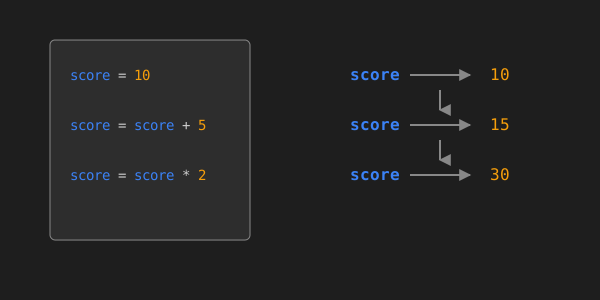
When you watch the interactive model, pay attention to which value changes and which name remains stable.
The shorthand:
score += 5expresses the same general update more compactly.
Names are part of your architecture
Python accepts short names:
x = "Nova"
y = 82
But another developer has to decode them.
Compare:
player_name = "Nova"
battery_level = 82
The second version communicates what the state represents.
Python convention commonly uses snake_case:
player_high_score = 950
battery_percentage = 82
Naming is not about making code look professional. It is about reducing the amount of hidden meaning another reader has to reconstruct.
Watch state change over time
Run:
battery = 100
print(battery)

battery = battery - 15
print(battery)

battery = battery - 20
print(battery)
Before running it, predict every output.
Then run the same state trace and compare your prediction with the actual evidence:
Run the code to see output.
Predict all three battery values before running. Then identify the exact point where battery refers to 85 and which statement changes it again.
Then trace:
initial battery → 100
first update    → 85
second update   → 65
Now answer:
At which point in the program does the variable
batteryhave the value85?
That question matters because variables do not have one eternal value. Their meaning depends partly on when you inspect them during execution.
Use the program to reveal its own state
username = "pixel_knight"
score = 250
accuracy = 91.7

print(username)
print(score)
print(accuracy)
Change all three values and run again.
Then add:
print("score before bonus:", score)
score += 50
print("score after bonus:", score)
You are using output as evidence about program state.
That habit becomes debugging later.
One misconception worth killing now
A variable name is not the data itself.
If you write:
score = 100
points = score
points does not become the word score. It receives a reference to the value that score currently resolves to in this simple case.
Later, when mutable objects arrive, that relationship gets more interesting. For now, keep the basic distinction clear:
name ≠ valueThe name is how the program refers to the value.
Vocabulary lab
Flip the idea, not just the card
Explain the term before you reveal the back. Then compare your explanation with the definition, example, and warning.
Read all terms without animation
- Variable
- A name used to refer to a value or object in a program. Example: score refers to the integer value 100 after score = 100 runs. Do not confuse it with: The value itself.
- Value
- A piece of data a program can use or produce. Example: 'Nova', 100, and 91.7 are values. Do not confuse it with: A variable name that refers to data.
- Assignment
- The operation that associates a name with a value using =. Example: score = 100 assigns the value 100 to the name score. Do not confuse it with: A mathematical equality statement.
- Reassignment
- Assigning a new value to a name that was already in use. Example: score = 150 after score previously referred to 100. Do not confuse it with: Changing the spelling of a variable name.
- State
- The information a program or part of a program currently holds at a particular moment. Example: battery = 65 describes one piece of current program state. Do not confuse it with: The complete history of every value the program used earlier.