Unit 03 · lesson
Data Has Types
Core path: 25 minutes
Why does Python treat 10 differently from "10"?
Remember our mystery from Week 01?
print("10 + 5")    # 10 + 5
print(10 + 5)      # 15
print("10" + "5") # 105
Those expressions look similar to a human. Python sees different data types and therefore different operations.
Four types we'll start with
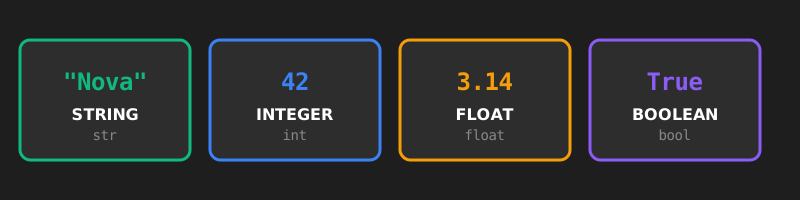
Diagrams open at a readable shape-aware scale. Zoom or expand when you need more detail.
- Strings (
str) represent text:name = "Nova". - Integers (
int) represent whole numbers:score = 100. - Floats (
float) represent decimal values:temperature = 72.5. - Booleans (
bool) representTrueorFalse:game_over = False.
Quotation marks matter. "42" and 42 contain similar characters on screen, but Python does not treat them as the same kind of value.
Ask Python
print(type("Robotnix"))
print(type(42))
print(type(3.14))
print(type(True))
Use type() as an investigation tool when the program's behavior does not match your assumption.
Now inspect several values directly and change one literal to see whether the type changes with it:
Run the code to see output.
The displayed characters can look similar while the underlying types differ. Change one literal and use the output to prove what type Python actually created.
Guided example: trace the types before the operation
Predict the type and result of each expression before running it:
a = 100
b = "100"
c = 100.0

print(a + 5)
print(b + "5")
print(c + 5)
The useful step is not memorizing the answers. Trace the operands first:
a + 5     → int + int     → 105
b + "5"   → str + str     → "1005"
c + 5     → float + int   → 105.0
Now make this fail:
age = 15
print("I am " + age + " years old.")
Failure analysis: Python is not refusing to print an age. The operation is wrong for the operand types: string concatenation cannot directly combine a str with an int. Fix the representation with an f-string or an explicit conversion.
Expressions and formatted output
An expression is code that produces a value. For readable output, prefer an f-string:
name = "Nova"
score = 850
print(f"{name} has {score} points.")
Success check
Given any short expression in this lesson, you should be able to identify the type of each value, predict the operation Python will attempt, and explain a type-related failure without guessing.
Vocabulary lab
Flip the idea, not just the card
Explain the term before you reveal the back. Then compare your explanation with the definition, example, and warning.
Read all terms without animation
- Data Type
- A category that determines how Python interprets and operates on a value. Example: str, int, float, and bool are data types. Do not confuse it with: A variable name such as score.
- Expression
- Code that is evaluated to produce a value. Example: 10 + 5 produces the value 15. Do not confuse it with: A variable name by itself does not describe the operation that produced its value.
- Concatenation
- Joining strings together in sequence. Example: 'Hello' + 'World' produces 'HelloWorld'. Do not confuse it with: Numeric addition, which combines number values mathematically.
- F-string
- Python syntax that inserts values into formatted text. Example: f'{name} has {score} points.' Do not confuse it with: Blindly joining mixed types with the plus operator.
- Type Conversion
- Creating a value of another type when the program needs a different representation. Example: int('42') creates the integer 42. Do not confuse it with: Changing a variable name without changing the value's type.