Week 17 · lesson
Wireshark: Read a Capture Without Touching the Network
Wireshark is a packet-analysis tool.
In this course, you will inspect a course-owned synthetic packet capture. You are not being asked to capture traffic from the school network, public Wi-Fi, classmates, or other real systems.
That boundary matters because real packet captures can contain information belonging to other people.
Download the GSC capture
Use this exact file:
Download gsc-week17-baseline.pcapng
Integrity check:
SHA-256
7c90d1e262225d962030a35d803cbf849ac4d273a525086c5782fda5b7871dd3
The capture contains only fictional/documentation addressing and synthetic traffic created for this course.
If you are working on a Chromebook, open the file in the teacher-approved Wireshark VM, remote lab, or cyber range. Do not turn this exercise into live capture.
Recognize the real Wireshark interface
Before opening the GSC capture, orient yourself to the actual Wireshark interface.
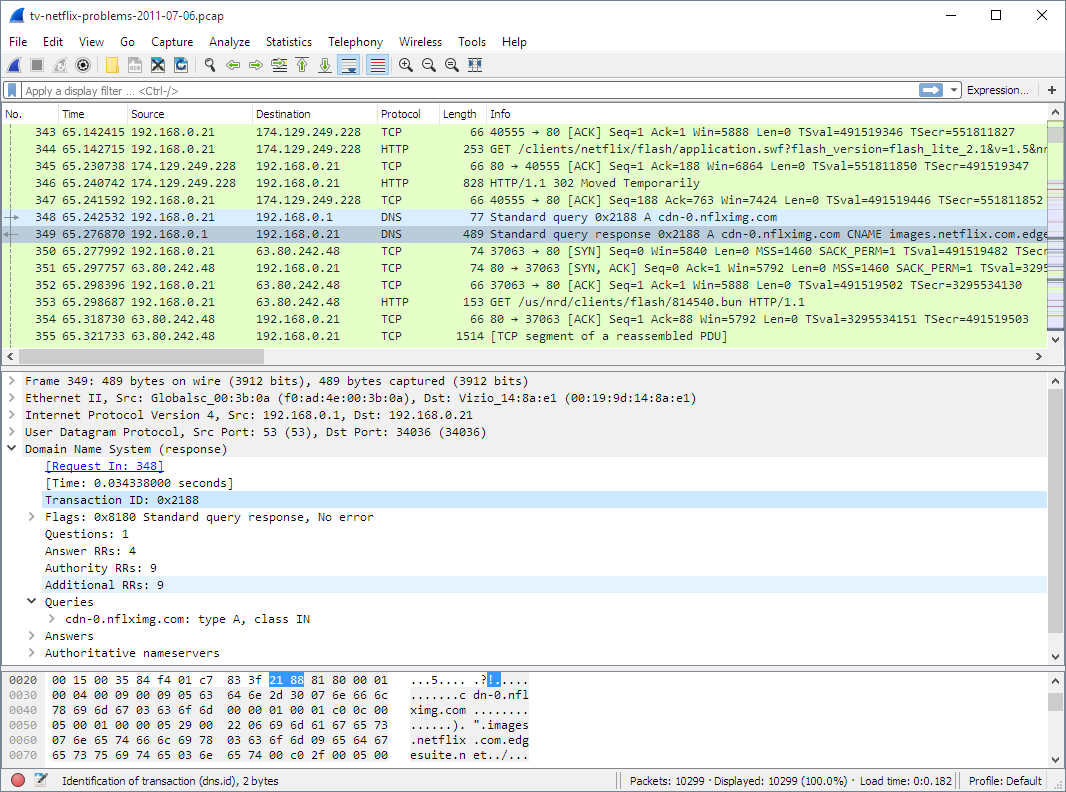
Interface orientation image: Wireshark User's Guide, Figure 3.1, “The Main window.” The figure uses the Guide's own example capture. Your graded GSC work uses the separate synthetic file above.
The three panes you need first are:
- Packet List - one-row summaries of the packets currently visible.
- Packet Details - expandable protocol fields for the selected packet.
- Packet Bytes - the selected packet's underlying bytes, commonly shown in hexadecimal with an ASCII interpretation.
Selecting one packet changes the evidence displayed in the Details and Bytes panes. They are three views of the same selected packet, not three different captures.
A packet capture is recorded evidence
A .pcap or .pcapng file can contain recorded network frames or packets.
Opening a supplied capture gives the class a stable dataset:
- everyone analyzes the same packets
- the evidence does not change while you work
- the dataset contains no student/private traffic
- no student needs live capture privileges
Read the packet list
Wireshark commonly shows fields such as:
- packet number
- time
- source
- destination
- protocol
- length
- summary/info
Those columns are a starting point, not a complete explanation.
Display filters reduce the view
A display filter changes what Wireshark shows. It does not rewrite the capture file.
Use only the supplied file and filters such as:
arpip.addr == 192.0.2.10tcpdnsA filter narrows the evidence so you can answer a specific question.
Use a question before a filter
Weak workflow:
Click around until something looks suspicious.
Stronger workflow:
I want to identify ARP traffic involving the fictional server
192.0.2.10, so I will filter for ARP and record the packet numbers and address fields.
The question determines the evidence you need.
Packet details are layered
A packet may contain several protocol layers.
For a simplified web conversation, you may inspect:
- Ethernet
- IPv4
- TCP
- HTTP/application data
Each layer answers a different question.
Do not assume the source/destination at one layer means the same thing as another layer.
Five-question capture exercise
Using only gsc-week17-baseline.pcapng, answer:
- How many ARP packets are present?
- Which device asks for
192.0.2.10? - Which MAC address is supplied in the ARP reply?
- Which IPv4 addresses appear most often in the supplied sample?
- Which protocols appear in the packet-list summary?
For each answer, record:
- filter used
- packet number(s)
- observed field
- conclusion
Build a packet evidence card
Choose one packet and record:
Packet number
Timestamp
Link-layer source/destination
Network-layer source/destination
Protocol
Important field
What it supports
What it does not prove
Suspicious versus unfamiliar
A packet can be unfamiliar because you have not learned the protocol yet.
That does not make it malicious.
Use this rule:
Explain normal protocol purpose before classifying abnormal behavior.
Week 18 will add TCP state, ports, packet switching, and routed-path reasoning.
Evidence for Lesson 2
Submit:
- five-question capture worksheet
- one packet evidence card
- screenshot/export containing only the approved synthetic capture
- one paragraph explaining why a display filter is not evidence of an attack by itself
Finish with:
The packet field that answered my question was ________, because ________.
Wireshark is powerful because it makes network evidence visible. The discipline comes from asking a bounded question before looking for an answer.