Week 05 · lesson
Lesson 1: Laptop Hardware and Replacement Decisions
A laptop contains many of the same functional systems as a desktop.
That does not mean you can repair it the same way.
Portability forces manufacturers to trade space, weight, battery life, cooling, and serviceability against one another. The result is a machine where a component may be removable, soldered, glued, integrated into a larger assembly, connected through fragile ribbon cables, or accessible only after other parts are removed.
So identifying the component is only the first question.
The second is:
How is this exact model designed to be serviced?
Serviceability is model-specific
Two laptops can both contain 16 GB of RAM and an SSD while having completely different repair options.
Laptop A:
RAM: two removable SODIMMs
storage: removable M.2 SSD
wireless: removable M.2 card
battery: internal but replaceable
Laptop B:
RAM: soldered
storage: soldered
wireless: integrated
battery: bonded into chassis assembly
The specification sheet may look similar from the user's perspective.
The service plan is not similar at all.

Diagrams open at a readable shape-aware scale. Zoom or expand when you need more detail.
Laptop internals inspection board
Identify serviceable laptop parts and separate a physical hardware problem from a policy, power, or wireless problem.
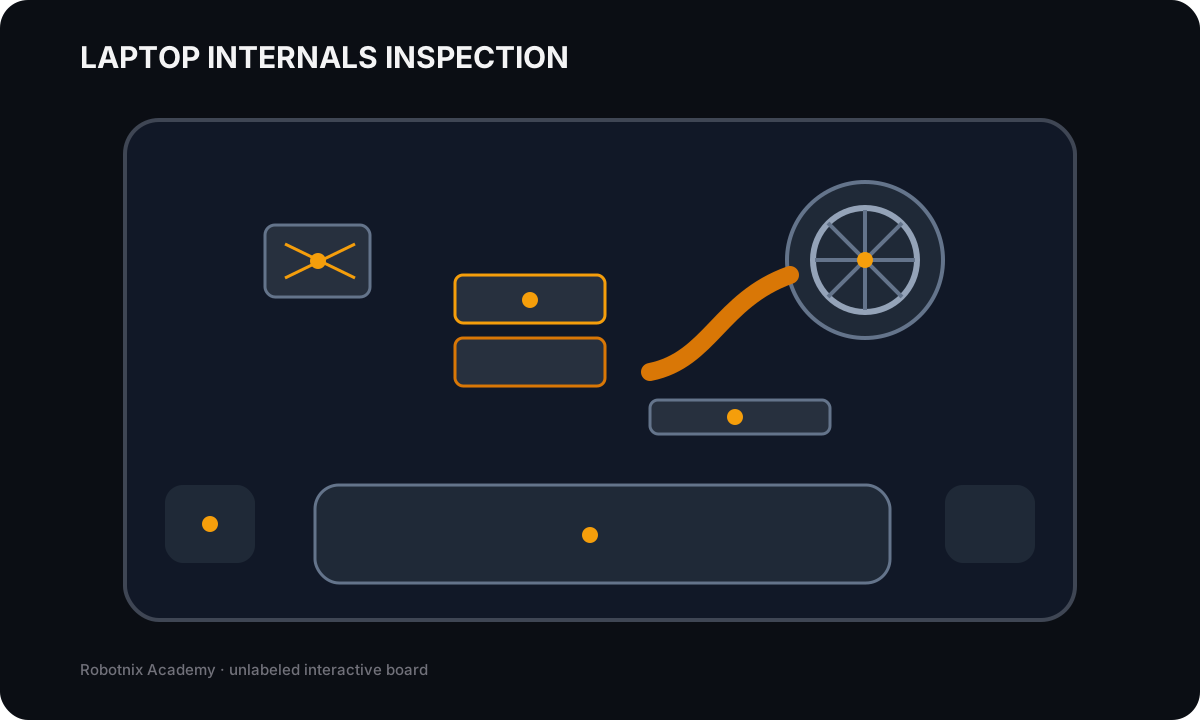
Battery
Job: Stores DC energy for portable operation and feeds the laptop power-management system.
Service clue: Unexpected shutdowns, swelling, charging failures, or rapid discharge require power-state evidence before blaming the motherboard.
Read the inspection board as text
- Battery: Stores DC energy for portable operation and feeds the laptop power-management system. Service clue: Unexpected shutdowns, swelling, charging failures, or rapid discharge require power-state evidence before blaming the motherboard.
- Fan and heat pipe: Moves heat from CPU/GPU surfaces to a radiator and out of the chassis. Service clue: Thermal shutdowns, throttling, loud fans, or high temperatures point toward airflow, dust, fan operation, thermal contact, or firmware controls.
- SODIMM memory: Provides removable system memory in a compact laptop form factor. Service clue: Memory symptoms still require generation, capacity, seating, and supported configuration checks; desktop DIMMs are physically different.
- M.2 SSD: Provides compact solid-state storage using the supported M.2 interface. Service clue: A missing boot device can be storage hardware, interface support, firmware boot order, partition/OS state, or drive failure.
- Wi-Fi card and antenna leads: Provides wireless network connectivity and connects to chassis antennas. Service clue: Weak or missing Wi-Fi after service can come from a loose antenna lead, disabled radio, driver problem, policy state, or access-point issue.
- Speaker assembly: Provides local audio output through compact chassis speakers. Service clue: No sound is not automatically a failed speaker; verify mute/volume, output device, driver state, application routing, and only then the hardware path.
Documentation becomes part of the hardware decision
Before opening a portable system, use the exact model information to locate approved documentation when available.
Useful evidence can include:
- maintenance or service manual;
- exploded-view diagram;
- replacement-part list;
- connector location;
- screw map;
- battery-disconnect procedure;
- cable-routing guidance;
- supported memory or storage specification.
This prevents a common repair mistake: assuming one laptop opens like another because both have a bottom cover.
Hardware tends to punish assumptions with tiny plastic clips.
RAM may be replaceable, partially replaceable, or fixed
Laptop memory commonly appears as SODIMMs, but many portable systems use soldered memory.
Some systems combine both:
8 GB soldered
+
one SODIMM slot
That configuration changes the upgrade limit and channel behavior.
Before recommending RAM, verify:
- whether a slot actually exists;
- supported DDR generation;
- maximum capacity;
- population rules;
- whether part of the memory is soldered;
- whether firmware supports the intended configuration.
"Laptop RAM" is not a compatibility specification.
Storage can be removable without being interchangeable
A laptop may use:
- M.2 NVMe storage;
- M.2 SATA storage;
- 2.5-inch SATA storage;
- soldered flash storage in some designs.
The same Week 3 rule still applies:
M.2 describes a form factor, not a guarantee of NVMe support.
Portable systems also add physical constraints such as module length, shielding, thermal pads, and chassis clearance.
A replacement drive has to fit both the electrical path and the physical design.
Wireless hardware crosses the chassis
A removable wireless card may be small, but its radio path can continue through tiny antenna leads routed around the display assembly.
That creates several failure boundaries:
wireless card
    ↓
antenna connectors
    ↓
antenna cables
    ↓
antennas in chassis/display
    ↓
radio environment
Poor signal does not automatically mean the wireless card is defective.
A loose antenna lead, damaged cable, driver state, disabled radio, or external interference can produce similar symptoms.
The keyboard may be one part or an entire top-case assembly
Laptop keyboards can appear as:
- individually replaceable key mechanisms;
- replaceable keyboard modules;
- keyboard-and-palmrest assemblies;
- integrated top cases that also include the trackpad or other hardware.
One dead key and a completely undetected keyboard are different symptom patterns.
The first can be local. The second may involve the shared keyboard cable, controller path, or larger assembly.
Model documentation tells you what can actually be replaced.
Camera and microphone can share the display assembly
The top bezel of a laptop may contain:
- webcam;
- microphone array;
- status LED;
- privacy shutter;
- facial-recognition hardware;
- ambient-light or other sensors.
One cable or module can support several of those functions.
That means a webcam failure may involve more than the camera sensor itself.
Before replacing hardware, separate:
- physical privacy switch or shutter;
- OS privacy permissions;
- application selection;
- driver state;
- shared cable or module failure.
Biometrics and near-field features are security hardware
Portable systems may include fingerprint readers, facial-recognition hardware, smart-card readers, NFC or near-field scanners, and other identity devices.
Recognize what the hardware does and how it fits into the system.
Do not enroll real student credentials or biometrics just to prove the feature exists.
The security boundary matters more than the demo.
Worked case: wireless upgrade request
A user wants a newer wireless adapter.
The laptop model has:
wireless card: removable M.2 module
antenna leads: two
firmware support: model-specific
OS driver: available for proposed card
What still needs verification?
- exact supported interface and keying;
- whether firmware or platform restrictions exist;
- antenna connector compatibility;
- approved disassembly route;
- post-service Wi-Fi and Bluetooth verification.
Why verify Bluetooth too?
Because many wireless modules combine Wi-Fi and Bluetooth functions.
Replacing one card may affect more than one radio.
Worked case: upgrade the RAM to 32 GB
Evidence:
installed RAM: 16 GB
service manual: memory soldered to motherboard
no SODIMM slot listed
Can you install a 32 GB SODIMM?
No.
The upgrade request conflicts with the service architecture.
The correct answer is not to search harder for a hidden slot. The correct answer is to explain the platform limitation and identify the realistic replacement path, if one exists.
Build a replaceability and serviceability matrix
Using a supplied laptop model or service diagram, classify these as replaceable, integrated, or model-dependent:
- battery;
- keyboard or keys;
- RAM;
- HDD or SSD;
- wireless card;
- Wi-Fi antenna connection;
- camera;
- microphone;
- biometric or near-field hardware.
For each item, record:
- where the function lives;
- what documentation proves the service path;
- one compatibility constraint;
- one safety concern where relevant;
- one verification after service.
The important result is not the classification itself.
It is being able to explain why the same component name can lead to a different repair plan on a different model.
Before you move on
Portable support starts with a rule desktops let you forget:
identify the function
        ↓
identify where this model implements it
        ↓
verify whether it is independently serviceable
        ↓
verify compatibility
        ↓
follow the safe access procedure
        ↓
retest every affected function
Next we look at the portable components users interact with constantly: batteries, displays, touch, cameras, keyboards, and pointing devices.
Read it. Prove it.