Week 10 · lesson
Lesson 1: Why Virtualize?
A virtual machine feels separate from the host.
That separation is useful.
It can also make people forget the obvious: the VM is still borrowing real resources from a real computer.
physical CPU / RAM / storage / NIC
            ↓
host or hypervisor
            ↓
virtual CPU / RAM / disk / NIC
            ↓
guest operating system
            ↓
guest applications
If the host runs out of memory, the guest can slow down. If host storage fails, the virtual disk can disappear with it. If the host network fails, the guest's virtual NIC has nowhere useful to send traffic.
Virtual does not mean imaginary.
Why virtualize at all?
The useful question is not "what is a VM?"
It is:
What problem does virtualization solve better than another physical machine or another application-delivery model?
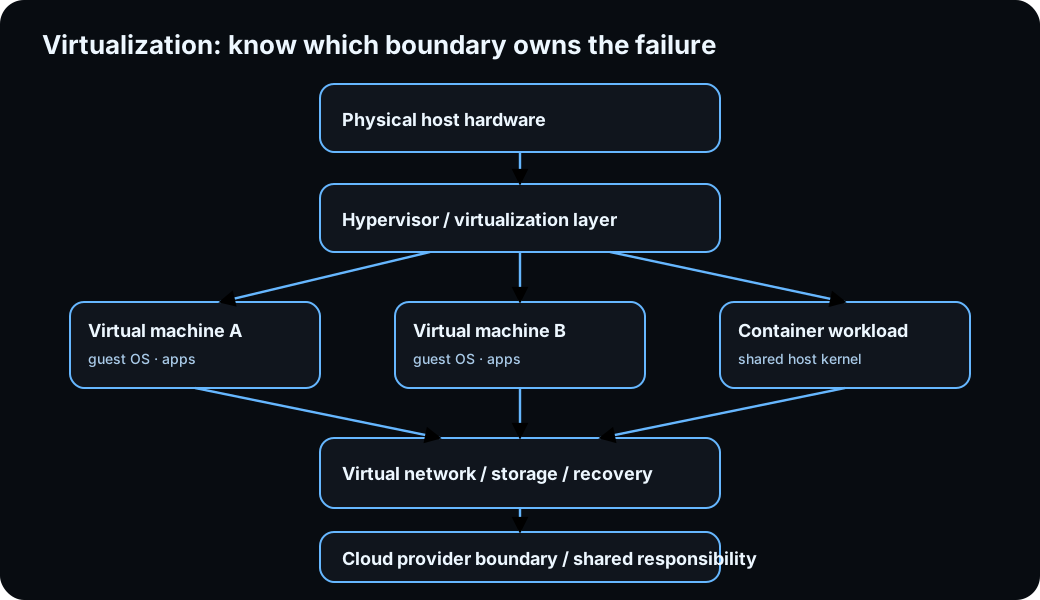
Diagrams open at a readable shape-aware scale. Zoom or expand when you need more detail.
Sandboxing creates a bounded environment
A sandbox separates a test environment from the normal host workflow.
That can reduce the impact of configuration experiments, software testing, operating-system practice, and development work.
Isolation reduces risk. It does not create perfect safety.
The VM still depends on hypervisor security, host security, virtual networking, storage, shared folders or devices, and what the guest is allowed to reach.
In this course, sandboxing is an architecture concept, not permission to run unknown or malicious software on school systems.
Test and development can become repeatable
Imagine validating software across three Windows configurations.
Physical approach:
3 separate computers
3 installations
3 hardware inventories
Virtual approach:
1 capable host
3 controlled guest environments
The virtual model can make resets, snapshots, cloning, and repeatability easier.
That does not mean performance is identical to three dedicated physical machines.
Resource contention is the tradeoff.
Legacy compatibility can outlive support
An organization may still need an application that only works in an older operating system.
A VM can preserve that environment after the main desktop platform moves on.
Important distinction:
Virtualization preserves compatibility. It does not make unsupported software secure.
A legacy guest may need strict network isolation and a narrow purpose.
Running an old OS inside a modern hypervisor does not erase the old OS's risk.
Cross-platform use can reduce extra hardware
A Windows workstation can host a Linux practice VM for training, testing, or application compatibility work.
The guest is still constrained by host CPU architecture, virtualization support, memory, storage, and workload.
You cannot assume any guest will run well on any host because the software lets you click New VM.
Application virtualization moves a smaller boundary
A full VM usually creates a complete virtual machine with a guest OS.
Application virtualization changes how an application and its dependencies are delivered or isolated without requiring the same full guest-machine boundary.
Do not use a full VM when the requirement only needs an application boundary unless another requirement justifies the extra overhead.
Resource allocation is not free capacity
Suppose the host has:
32 GB physical RAMYou configure:
VM A: 12 GB
VM B: 12 GB
VM C: 12 GB
Did the computer gain 36 GB of memory?
No.
The host still needs memory, and the platform still has to handle simultaneous guest demand.
Technician planning includes physical CPU capacity, memory, storage capacity and I/O, network capacity, host overhead, and workload demand.
Snapshots preserve state, not every failure domain
A snapshot can preserve VM state before a risky configuration change.
Useful.
Now suppose the VM and snapshot are both stored on the same physical SSD and that SSD fails.
What survived?
Nothing on that drive.
The snapshot helped with state rollback.
It was not an independent backup against host-storage failure.
Same lesson as RAID: rollback and redundancy features are not automatically backup.
Worked case: every guest becomes slow at once
Evidence:
host RAM usage: extremely high
host paging: heavy
VM A: slow
VM B: slow
VM C: slow
problem began after VM D started
The strongest shared boundary is the host resource pool.
Four unrelated guest failures are possible, but shared host-memory pressure is stronger evidence.
Now change the evidence:
host resources: normal
VM A: normal
VM B: normal
VM C: slow
VM C virtual disk: nearly full
The shared host is no longer the strongest suspect.
Move into the affected guest's storage and resource boundary.
Scope matters.
Decide whether virtualization fits
For each scenario, choose the stronger first model and defend the requirement:
- Three clean Windows environments for driver testing.
- One unsupported legacy application that must remain available but isolated.
- Linux training on a Windows lab host.
- Application delivery without a full independent guest OS.
- GPU-heavy workload requiring direct hardware performance the proposed virtual platform cannot provide adequately.
Do not write "VM because virtualization is flexible."
Say what boundary or operating problem the VM solves.
Before you move on
A virtual machine changes where the system boundary is drawn.
It does not remove CPU, RAM, storage, network, security, backup, or support requirements.
Next we compare the virtualization models, because a Type 1 host, Type 2 VM, VDI desktop, and container fail in different places.
Read it. Prove it.