Week 16 · lesson
Lesson 1: Documentation, Assets, and Change Management
A technician fixes a laptop, closes the lid, and walks away.
The user is happy.
Two days later the same symptom returns and another technician opens the ticket.
The note says:
Fixed.
That is not documentation. It is a dead end.
Support systems exist because technical work has memory. Tickets, asset records, SOPs, knowledge articles, SLAs, and change records capture different parts of that memory.
A ticket preserves the incident story
A useful support ticket usually tells the next person:
- who reported the issue;
- which asset or service is affected;
- what the user actually observed;
- how severe or urgent the issue is under policy;
- what evidence was collected;
- what actions were attempted;
- whether the case was escalated;
- what resolved it;
- how the result was verified.
Compare these two notes.
Weak
Fixed computer.
Useful
User reported no Ethernet after docking. Dock power and USB devices worked. Network adapter was absent in Device Manager after the approved driver update. Restored the approved dock driver package per SOP. Adapter returned, DHCP lease obtained, intranet and approved external site verified.
The second note lets another technician reconstruct the reasoning.
That is the point.
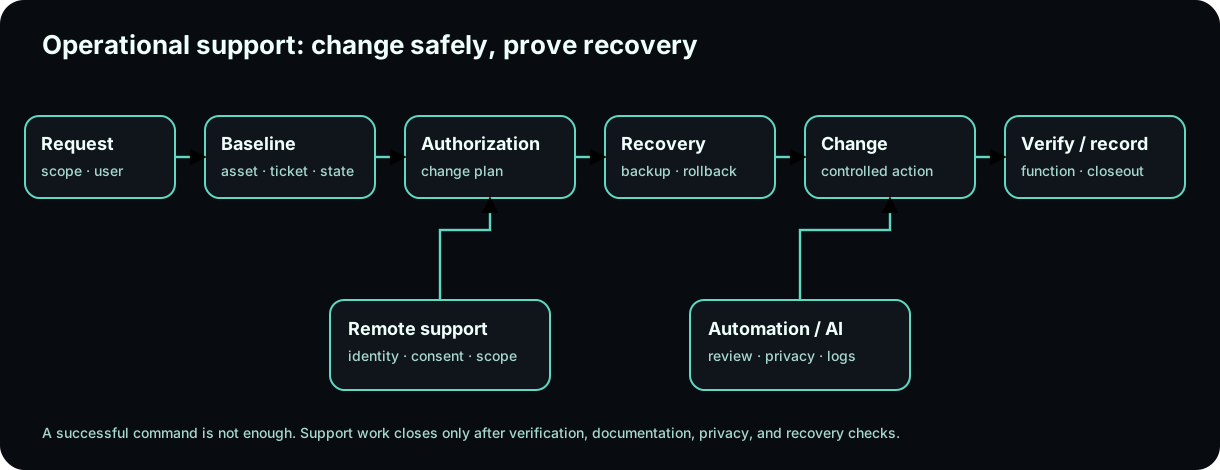
Diagrams open at a readable shape-aware scale. Zoom or expand when you need more detail.
Severity and escalation describe impact, not drama
A loud user does not automatically create a high-severity ticket.
Organizations normally define severity or priority based on factors such as:
- number of users affected;
- criticality of the service;
- business or safety impact;
- available workaround;
- security or data risk;
- SLA requirements.
Escalation means the incident needs another level of authority, expertise, ownership, or response.
Examples:
- a hardware replacement may require warranty/vendor escalation;
- suspected data exposure may require security or management escalation;
- a school-wide outage belongs above a single desktop queue.
Good escalation preserves the work already done so the next team does not start from zero.
Asset management answers a different question
A ticket describes a support event.
An asset record describes the thing being supported.
Organizations may track:
- asset ID or tag;
- serial number;
- model;
- assigned user;
- location;
- hardware and software configuration;
- warranty state;
- licensing;
- procurement date;
- lifecycle or disposal state.
A CMDB, or configuration management database, can track systems and their relationships depending on the organization.
The useful question is:
What is this asset, who owns it, what depends on it, and where is the authoritative record?
A hostname can change. A user can change. A sticker can fall off.
Asset management exists so support does not depend on one label.
Procurement is part of the lifecycle
Hardware does not appear magically on a desk.
A lifecycle can include:
requirement
→ approval / procurement
→ receiving / asset tagging
→ deployment
→ assignment
→ maintenance / warranty
→ reassignment
→ retirement
→ sanitization / disposal
Licenses, warranties, and assigned users belong to that story.
A technician ordering an incompatible replacement part is not only a hardware mistake. It can become a procurement and inventory problem too.
SOPs turn repeatable work into a controlled process
A standard operating procedure, or SOP, describes an approved method for repeatable work.
Examples:
- laptop deployment;
- malware-removal workflow;
- printer-driver installation;
- battery replacement;
- user onboarding;
- user offboarding.
The SOP reduces variation.
It also creates a baseline. If the technician must deviate, that deviation should have a reason and appropriate authority.
Knowledge-base articles capture reusable understanding
A knowledge-base article is not the same thing as a ticket.
A ticket says:
What happened to this user or asset?
A knowledge article says:
What repeatable problem, explanation, or procedure can help future cases?
A strong knowledge article may include:
- symptom pattern;
- affected systems;
- cause or mechanism;
- approved resolution;
- verification;
- known limitations;
- update/review date.
Copying a one-off ticket into the knowledge base without cleaning it up just creates permanent clutter.
Incident reports preserve larger events
Some cases deserve a formal incident report because the event has broader security, safety, operational, or compliance significance.
An incident report may preserve:
- timeline;
- scope;
- affected services or assets;
- impact;
- actions taken;
- escalation;
- recovery;
- lessons learned.
That is different from a normal single-user ticket.
SLAs define service expectations
A service-level agreement, or SLA, defines agreed service expectations between parties.
It may cover things such as:
- response time;
- restoration targets;
- uptime;
- support hours;
- escalation conditions.
An SLA does not mean every incident is fixed instantly.
It defines what the parties agreed the service process should deliver.
Onboarding and offboarding are operations, not just account creation
Onboarding can involve:
- identity creation;
- device assignment;
- software licensing;
- permissions;
- MFA enrollment;
- required training;
- equipment handoff.
Offboarding can involve:
- disabling identities;
- removing access;
- recovering devices;
- transferring approved data;
- reclaiming licenses;
- preserving records according to policy.
Missing one offboarding step can leave active access after the person is gone.
Operational checklists exist because human memory is unreliable under time pressure.
Change management: the system before the change matters
A technically simple change can create a large operational failure.
Updating one application on one test laptop is different from updating forty classroom machines during a school day.
A controlled change considers:
System process animation
Controlled change with a rollback path
A professional change is an evidence chain with authorization, recovery, execution, and verification.Technician question: What must exist before the change modifies the system?
Change type affects the process
Organizations may define categories such as:
- standard change: preapproved, repeatable, low-risk work under an established process;
- normal change: evaluated and approved through the normal workflow;
- emergency change: urgent work using an accelerated but still controlled process.
The exact definitions are organization-specific.
Emergency does not mean:
Skip documentation because everyone is stressed.
It means use the emergency-change process.
Scope tells you how large the blast radius is
Suppose an application update has a 5% chance of breaking its reporting module.
On one test machine, that is manageable.
On forty computers five minutes before class, the same technical risk has a very different operational impact.
Risk depends on more than the installer itself.
Ask:
- How many systems?
- Which users?
- Which critical workflow?
- Is there a workaround?
- Can the change be staged?
- What is the stop condition?
Sandbox and pilot testing reduce uncertainty
A test environment can reveal:
- application compatibility;
- restart behavior;
- configuration changes;
- driver issues;
- unexpected user impact.
A pilot group reduces production risk further by testing the change on a small controlled subset before broad deployment.
Testing does not guarantee success everywhere.
It gives you better evidence before increasing scope.
Backup and rollback are not the same thing
A backup protects recoverable data or state.
A rollback plan explains how the change will be undone if the result is unacceptable.
Example:
backup: preserve application configuration and user data
rollback: uninstall new version and restore approved previous version/configuration
You may need both.
Maintenance windows and change freezes protect timing
A maintenance window identifies when disruption is acceptable or expected.
A change freeze restricts changes during sensitive periods such as major events, exams, financial close, or other high-risk windows.
"The installer takes only two minutes" does not override timing policy.
The business impact matters more than the click count.
Approval defines authority
Who may approve the change depends on the organization and risk.
A technician discovering a better configuration does not automatically have authority to deploy it everywhere.
This is a recurring theme in professional IT:
Capability is not authorization.
Peer review and acceptance add independent verification
Another technician can catch assumptions the original author missed.
An end user or service owner may also need to confirm that the real business function works after the change.
A deployment tool saying Success proves that the deployment tool completed its task.
It does not prove the accounting report opens correctly tomorrow morning.
Verification should return to the actual requirement.
Worked case: forty-workstation update
Request:
Update an approved classroom application on forty workstations. The installer takes about two minutes.
A professional plan asks:
purpose: why is the update needed?
scope: all 40 systems or pilot first?
risk: what could break?
test: has the package been tested?
rollback: how do we restore the previous version?
window: when can users tolerate interruption?
approval: who authorizes broad deployment?
verification: what user function proves success?
The size of the installer tells you almost nothing about the size of the change.
Build one complete operations record
Use a fictional support request and create linked artifacts:
TICKET
requester
asset ID
symptom / request
severity
progress evidence
escalation condition
resolution / verification

ASSET
asset identity
assigned user / location
warranty / license state
relevant configuration

CHANGE
purpose
scope
impact / risk
change type
backup
rollback
test / pilot
approval
window / freeze check
implementation
verification
acceptance
documentation
Then identify which parts belong in an SOP, a knowledge-base article, or an incident report if the case becomes repeatable or broader.
Before you move on
Documentation is not paperwork after the technical work.
It is how the organization knows:
- what exists;
- what happened;
- what changed;
- who approved it;
- how to recover;
- whether the problem is actually solved.
Next we protect the other thing support work can accidentally destroy: data, equipment, and people.
Read it. Prove it.