Week 17 · lesson
Lesson 2: Choose the Evidence
A tool does not make an investigation technical.
A question does.
If the question is weak, the tool usually produces more noise. If the question is precise, even a simple observation can move the diagnosis forward.
That is the point of evidence selection.
Evidence should be able to change your mind
Suppose a user says:
The network is slow.
You could open a Wi-Fi analyzer, run a cable test, inspect DNS, check Task Manager, look at switch logs, inspect the ISP status, or stare at the blinking lights until they confess.
Only one of those may answer the next useful question.
The evidence you choose should distinguish between competing explanations.
A useful pattern is:
current theory
      ↓
competing theory
      ↓
question that separates them
      ↓
evidence source
      ↓
result
      ↓
updated model
If the result would not change what you believe, it is probably not the next test.
Visual reference
See the system before you troubleshoot it

Professional IT work is a chain of evidence: request, authorization, baseline, controlled change, verification, documentation, and escalation.
Use it for: Make operational procedure artifacts visible before integrated technician scenarios.
Server rack and network closet inspection board
Identify the role of each rack component, then use physical placement and dependency clues to choose the next evidence source during an incident.
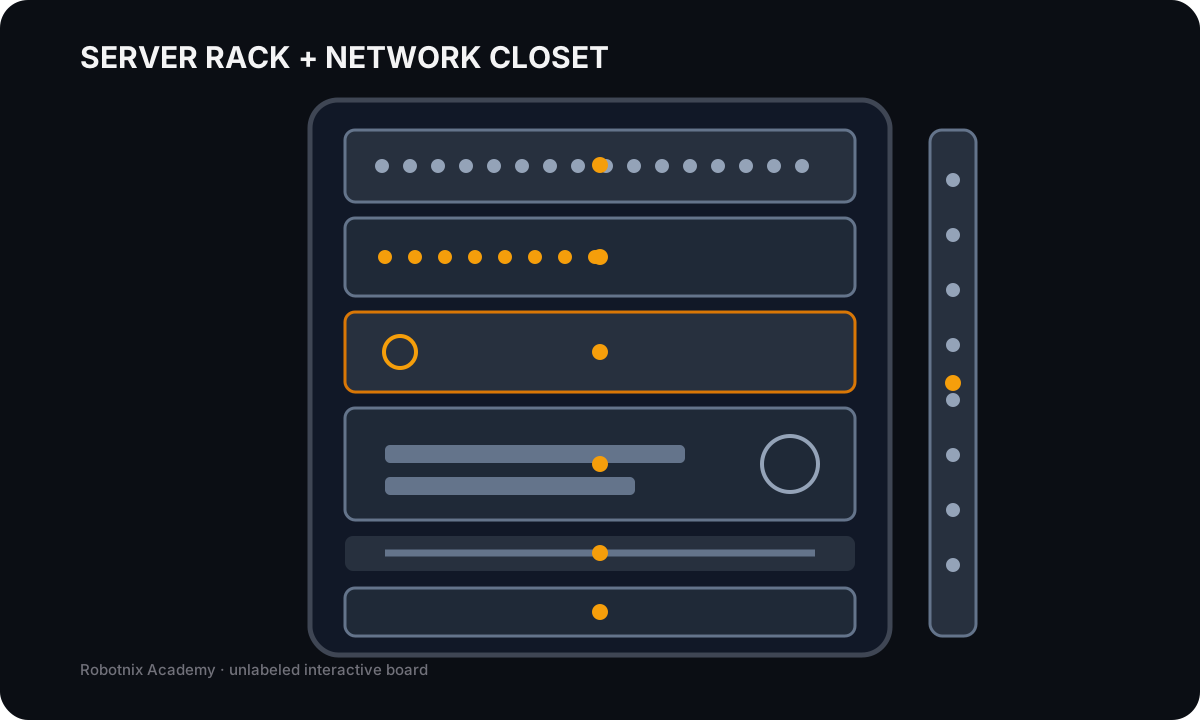
Patch panel
Job: Terminates permanent building cabling and presents ports for patching into active network equipment.
Service clue: A link problem can exist in the horizontal cable, jack, patch panel, patch cord, or switch port; the patch panel itself does not route traffic.
Read the inspection board as text
- Patch panel: Terminates permanent building cabling and presents ports for patching into active network equipment. Service clue: A link problem can exist in the horizontal cable, jack, patch panel, patch cord, or switch port; the patch panel itself does not route traffic.
- Ethernet switch: Provides active Layer-2 connectivity between local Ethernet devices and uplinks. Service clue: Check link/activity state, port/VLAN configuration, PoE where relevant, and whether the problem is one port or the whole switch.
- Firewall / router appliance: Connects networks and enforces the approved routing/security boundary. Service clue: If local switching works but remote access fails, gateway, route, firewall policy, NAT, or upstream service evidence becomes more important.
- Rack server: Hosts an application, service, storage role, or virtualized workload for clients. Service clue: Reachable host does not prove the application service is listening; separate hardware, OS, network, and service evidence.
- Cable management: Keeps patch cords routed and strain-controlled so service changes remain traceable. Service clue: Good cable management reduces accidental disconnects and makes port tracing more reliable during troubleshooting.
- UPS: Provides battery-backed power and short-term continuity for supported rack equipment. Service clue: UPS alarms, load state, battery health, and outlet groups matter when multiple devices lose power together.
- Vertical PDU: Distributes rack power from the approved source/UPS to installed equipment. Service clue: A single dead device can still be a local power cord or outlet-group problem; do not assume the entire rack lost power.
Narrow a network failure from surviving behavior
Local addressing and routing work, but name resolution does not. Use the evidence to avoid the lazy diagnosis: 'the internet is down.'
Ghostty Web renders the terminal, but this lesson still uses a controlled Robotnix command engine. No unrestricted operating-system shell is connected.
ip addrip routeping -c 2 192.168.10.1nslookup example.testcurl -I https://example.testcurl -I http://203.0.113.10
Read a deterministic terminal transcript
This fallback runs the same bounded Robotnix simulation against the suggested command sequence. It does not connect to an operating-system shell or network.
Robotnix network diagnosis simulation
The failure is deterministic and isolated to lesson state. Type 'help' for available evidence commands.

$ ip addr
2: eth0: <UP> mtu 1500
    inet 192.168.10.25/24

$ ip route
default via 192.168.10.1 dev eth0
192.168.10.0/24 dev eth0 scope link

$ ping -c 2 192.168.10.1
64 bytes from 192.168.10.1: icmp_seq=1 ttl=64 time=0.9 ms
64 bytes from 192.168.10.1: icmp_seq=2 ttl=64 time=0.8 ms
2 packets transmitted, 2 received, 0% packet loss

$ nslookup example.test
;; connection timed out; no servers could be reached

$ curl -I https://example.test
curl: (6) Could not resolve host: example.test

$ curl -I http://203.0.113.10
HTTP/1.1 200 OK
content-type: text/html
server: robotnix-sim
Start from the last boundary already proven
Do not restart the investigation at the bottom every time.
If a machine reaches the BIOS, detects storage, loads Windows, authenticates the user, and only then one application crashes, you have already proven a lot.
The evidence path has climbed this far:
power
→ POST
→ storage detection
→ Windows boot
→ user sign-in
→ application launch
→ application failure
Replacing the power supply at that point would ignore every surviving layer.
Good technicians preserve what the system has already proved.
Physical evidence answers physical questions
Physical evidence includes things such as:
- cable or connector condition;
- link/activity state;
- POST indicators;
- fan or pump behavior;
- temperature;
- visible damage;
- printer control-panel messages;
- known-good substitution under an approved procedure.
Consider this case:
new Ethernet wall run
endpoint NIC: known-good
switch port: known-good
link: absent
A cable tester is useful because the unanswered question is physical continuity and termination.
nslookup is not useful yet because the endpoint does not even have a working link.
The tool choice follows the boundary.
Firmware and device state answer a different class of question
Firmware and device evidence can include:
- UEFI/BIOS device detection;
- boot order;
- diagnostic LEDs or codes;
- firmware revision;
- Device Manager or platform-equivalent state.
Suppose Windows reports No operating system found, but UEFI does not detect the SSD at all.
The investigation is earlier than Windows boot repair.
Now change the evidence:
UEFI: SSD detected
boot entry: missing
storage was repartitioned yesterday
Same user symptom.
Different boundary.
The new evidence moves the investigation toward boot/partition state rather than physical storage detection.
Storage evidence is more than “drive present”
Useful storage evidence can include:
- SMART state;
- controller/RAID status;
- drive detection;
- free capacity;
- latency or I/O behavior;
- partition/volume state;
- filesystem/mount state;
- backup/recovery state.
Worked case: “The server is slow”
Supplied evidence:
network latency: normal
host CPU: normal
host RAM: normal
RAID state: degraded
member drive SMART warning: present
application log: storage timeouts
A DNS test adds almost nothing.
The storage subsystem is now the strongest shared boundary.
The next useful evidence belongs around the degraded array, member health, backup state, and approved recovery path.
Notice what happened: the user reported performance, but the evidence moved the problem away from networking and toward storage.
Network evidence should prove distance through the path
Useful network evidence can include:
link / association
IP configuration
same-subnet reachability
default gateway
remote IP path
DNS
transport endpoint
application service
Suppose:
IPv4: valid
gateway: reachable
remote documentation IP: reachable
portal hostname: fails to resolve
What is already working?
- interface and local link;
- usable IP configuration;
- route through the gateway;
- at least one remote IP path.
The failure has climbed to name resolution.
A cable tester would be measuring a boundary that has already passed several stronger tests.
Operating-system evidence should match the scope
Windows, macOS, and Linux expose different evidence surfaces, but the principle is the same.
Useful OS/application evidence may include:
- Event Viewer or platform logs;
- process/resource views;
- service state;
- update history;
- startup items;
- application logs;
- account/permission state;
- Safe Mode or recovery behavior.
Worked case: Windows is slow after sign-in
Evidence:
boot to sign-in: normal
sign-in completes
slow period begins after desktop loads
startup applications: several high-impact entries
CPU/disk spike: matches startup period
free storage: healthy
The evidence points toward post-sign-in workload.
Updating the BIOS may be possible someday.
It is not the current question.
Virtualization evidence must include the host
A VM is not a complete island.
Useful evidence includes:
- host CPU/RAM/storage pressure;
- hypervisor state;
- virtual disk state;
- virtual NIC state;
- virtual network mode;
- shared storage;
- provider or VDI service status.
Worked case: one VM has no internet
Evidence:
host network: healthy
VM A: healthy
VM B: healthy
VM C: no internet
VM C virtual NIC: connected
VM C network mode: host-only
The system may be working exactly as configured.
The failed requirement is external reachability, not NIC detection.
The next question is whether the network mode matches the intended design.
Do not reset the physical router because one isolated VM cannot reach the internet.
Security evidence must not turn suspicion into certainty
Security evidence may include:
- endpoint-protection state;
- firewall or policy state;
- authentication logs;
- permissions;
- unexpected MFA prompts;
- browser-extension state;
- recent application source;
- managed-device policy;
- ticket/change history.
Suppose a user receives three unexpected MFA prompts.
What is proven?
Someone or something initiated authentication attempts that reached the approval stage.
What is not proven?
- the laptop contains malware;
- the password was definitely stolen;
- the user caused the attempts;
- the identity provider is compromised.
The correct next step is account-security evidence and escalation under policy, not disabling MFA because the prompts are annoying.
Operational evidence can explain a technical symptom
A change record may be more useful than a diagnostic command.
Consider:
service worked yesterday
approved firewall rule changed at 18:00
service stopped working immediately afterward
network path otherwise healthy
The change history is strong evidence.
It does not prove the rule is wrong by itself, but it tells you where to test first.
Support history is part of system state.
Rejecting a tool is part of good reasoning
For each incident, be able to say:
I am not using this tool yet because the boundary it tests is already proven or not yet relevant.
Examples:
- no link → do not start with DNS;
- one application crashes → do not start with PSU wattage;
- host network healthy and one VM isolated → do not start with ISP status;
- direct IP works but hostname fails → do not start with cable replacement;
- user authenticates but folder denies access → do not reset the password first.
Knowing what not to test saves time and preserves the evidence trail.
Build the evidence decision
For four supplied incidents, document:
current theory:
competing theory:
last proven-good boundary:
question that separates the theories:
best evidence source:
expected result if theory A is stronger:
expected result if theory B is stronger:
irrelevant tool rejected:
why it is irrelevant right now:
Do not list every tool you know.
Choose the one that can change the model.
Before you move on
Evidence is useful when it narrows uncertainty.
The technician habit is:
preserve what is already proven
→ identify the first unknown boundary
→ ask a question that can separate theories
→ choose the smallest evidence source
→ update the model
Next we deal with the second half of diagnosis: changing the system without destroying the evidence or the recovery path.
Read it. Prove it.