Week 06 · lesson
Lesson 2: Print Mechanisms and Maintenance
Printer symptoms stop looking random when you know what has to happen to create the page.
A repeated line, loose toner, blank section, jam, or feed failure is evidence about where the process stopped behaving normally.
Different printer technologies create images differently, so they do not share one universal maintenance routine.
Laser printing is a sequence of stages
A simplified laser path is:
page data
   ↓
charging / conditioning
   ↓
laser exposure
   ↓
latent image on drum
   ↓
toner development
   ↓
transfer to paper
   ↓
fuser heat + pressure
   ↓
output
You do not need to rebuild a laser printer from memory. You do need to understand why a symptom can point toward a particular stage.
Visual reference
See the system before you troubleshoot it

Portable and printer systems combine hardware, policy, consumables, connectivity, and service paths that must be isolated separately.
Use it for: Compare laptop/mobile service boundaries with printer and scanner mechanisms.
System process animation
Laser imaging and paper path
Connect print defects to the first physical stage able to create them.Technician question: Where would the page first show this failure?
The drum carries the image pattern
The imaging drum participates in creating and transferring the toner image.
If a rotating component develops a defect, you can see repeated marks at regular intervals down the page.
That pattern is useful.
A random one-time smudge and a mark that repeats every few inches are not the same evidence.
The repetition suggests a rotating component in the print path.
Toner has to be transferred and fused
Toner is a fine powder, not liquid ink.
After the toner image reaches the paper, the fuser uses heat and pressure to bond it to the page.
If toner wipes or rubs off unusually easily, the fusing stage becomes worth inspecting.
Do not touch a hot fuser.
Power down and allow the printer to cool before approved service.
Laser maintenance belongs to the model
Depending on the printer, service may include:
- replacing toner;
- replacing a model-specific maintenance kit;
- cleaning approved internal areas;
- calibrating color or image registration;
- servicing feed rollers;
- replacing drum, transfer, or fuser components where the model exposes them as service units.
Not every laser printer combines these parts in the same way.
Use device documentation.
Laser printer path inspection board
Trace paper and image formation through a laser printer so print defects can be tied to a physical stage instead of guessed from the symptom alone.
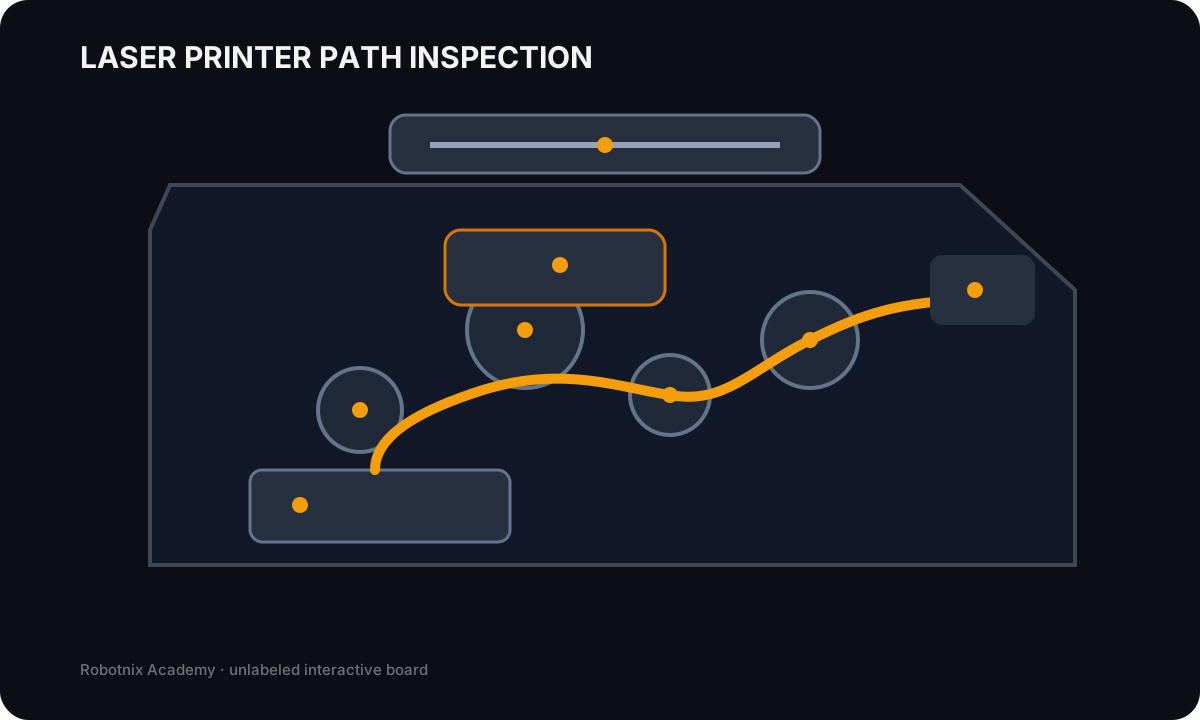
Paper tray
Job: Stores the selected media before pickup into the paper path.
Service clue: Wrong size/type settings, empty trays, overfilled trays, or damaged media can look like a printer-engine fault.
Read the inspection board as text
- Paper tray: Stores the selected media before pickup into the paper path. Service clue: Wrong size/type settings, empty trays, overfilled trays, or damaged media can look like a printer-engine fault.
- Pickup rollers: Feed one sheet from the tray into the printer path. Service clue: Failure to feed, repeated misfeeds, or jams near the tray often point toward worn/dirty rollers or media handling.
- Imaging drum: Carries the electrostatic image that toner will follow before transfer to paper. Service clue: Repeating defects at a regular interval often implicate a rotating imaging component such as the drum.
- Toner supply: Provides the fine powder used to form the image on the drum and paper. Service clue: Faded output, uneven density, low-toner warnings, or cartridge problems should be separated from fuser and transfer faults.
- Transfer stage: Moves toner from the imaging surface onto the paper. Service clue: Image transfer faults can create missing or uneven areas even when the toner and drum are present.
- Fuser: Uses heat and pressure to permanently bond toner to the paper. Service clue: Toner that rubs or smears off the page strongly points toward the fusing stage rather than the network or print queue.
- Output path: Guides the finished sheet through exit rollers to the output tray. Service clue: Late-path jams or wrinkling should be isolated from earlier feed and imaging stages.
- Automatic document feeder: Feeds source pages across the scanner for multi-page scan/copy jobs. Service clue: ADF-only scan failures should be separated from flatbed glass, network destination, authentication, and scan-engine problems.
Paper has its own mechanical path
Paper must move through pickup, registration, imaging, duplex, fuser, exit, and sometimes finishing systems.
A jam location matters.
Compare:
- paper never leaves tray;
- multiple sheets feed together;
- paper jams at duplex unit;
- paper reaches output but finisher jams.
Calling all four "paper jam" throws away useful evidence.
Inkjet printing has a different mechanism
A simplified inkjet path is:
page data
   ↓
printhead / nozzles
   ↓
ink delivery
   ↓
carriage movement
   ↓
paper feed
   ↓
output
Common maintenance includes:
- replacing ink cartridges or servicing tanks;
- printhead cleaning;
- printhead alignment or calibration;
- cleaning or replacing rollers where supported;
- checking the feeder and paper path;
- clearing jams using the approved direction and access points.
Running a laser maintenance routine on an inkjet would make no sense because the mechanism is different.
Faded or missing colors need pattern evidence
Suppose an inkjet prints black correctly but cyan is missing.
That does not immediately suggest a network problem.
The job reached the printer and other colors printed.
The failure narrows toward:
- cyan ink supply;
- cyan nozzles or printhead path;
- color-specific configuration or maintenance.
Positive evidence is doing the narrowing for you.
Thermal printers depend on heat and the correct media
Direct thermal printing uses heat-sensitive paper.
Thermal-transfer printing uses a ribbon and media mechanism.
A basic thermal path includes:
page / label data
   ↓
thermal printhead
   ↓
correct media / ribbon
   ↓
feed assembly
   ↓
output
Maintenance may include:
- verifying the correct special media;
- cleaning the heating element or printhead using the approved method;
- removing label adhesive, dust, or debris;
- inspecting and cleaning the feed assembly;
- replacing worn media or ribbon supplies.
The wrong media can create what looks like a failed printhead when the real problem is simply that the material is not designed for the printing method.
Impact printers use physical force
Impact printers use a printhead that strikes an inked ribbon against paper.
That mechanical design is useful for multipart forms.
Maintenance can involve:
- replacing the ribbon;
- replacing or servicing the printhead where supported;
- loading or replacing multipart paper;
- checking tractor or feed alignment;
- cleaning the paper path.
A worn ribbon and a failing printhead can both create poor output, but they are different boundaries.
Worked case: repeated speckles at regular intervals
Evidence:
page completes normally
network / queue: normal
same defect repeats at consistent spacing
The consistency points toward a rotating imaging component rather than network corruption.
A technician should inspect the model-specific drum, imaging, or roller path before touching IP settings.
Worked case: toner rubs off the page
Evidence:
image appears complete
loose toner wipes from paper
printer recently reports fuser temperature warning
The print job reached the imaging stage.
The bonding step is the stronger boundary.
That makes the fuser path more plausible than a driver reinstall.
Worked case: three sheets feed at once
This is different from a jam halfway through the printer.
The problem begins at pickup or separation.
Useful evidence includes:
- paper condition;
- tray loading;
- pickup and separation rollers;
- media settings;
- humidity or environment when relevant.
Build the maintenance map
For laser, inkjet, thermal, and impact printers, record:
- how the image is created;
- primary consumable;
- main feed mechanism;
- two technology-appropriate maintenance actions;
- one symptom that points toward the mechanism;
- one safety concern.
Then take one symptom such as faded output and explain why its likely causes change depending on the printer technology.
That is the important part.
Before you move on
Printer maintenance should follow the machine's mechanism.
A symptom is useful when you can connect it to a stage:
data
image creation
transfer / marking
paper movement
fusing / drying
finishing
output
Next we move above the mechanics and look at the layers that can fail even while the printer itself makes perfect pages.
Read it. Prove it.