Week 01 · overview
Week 1: Digital Foundations and Google Chrome
This week is about judgment, not button memorization. You will use Google tools, but the real target is deciding what the tool is doing, what information moves through it, who can access that information, and what evidence supports your decision.
The question
What makes someone digitally literate if knowing where to click is not enough?
What you will understand
Digital work is a system of people, devices, accounts, applications, information, permissions, and audiences. Chrome and Google Workspace are connected tools, not isolated apps.
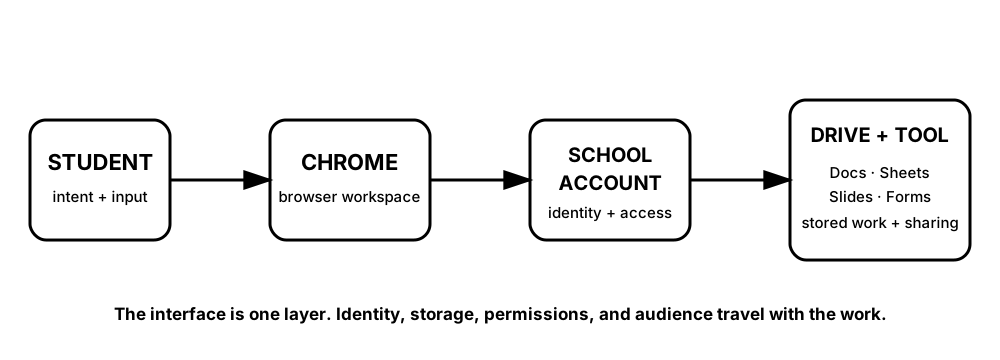
Diagrams open at a readable shape-aware scale. Zoom or expand when you need more detail.
Use the diagram as a dependency map. When something fails, ask which layer owns the problem instead of treating the visible app as the entire system.
What you will do
Map a digital task, inspect how Google tools connect, organize Chrome for school work, and complete the DigitalLearn Intro to Google Tools and Google Chrome activities with school-safe account rules.
What you will produce
Digital Workspace Baseline: an organized course Drive structure, browser bookmark set, workspace connection map, and short evidence record.
Source activity
DigitalLearn Intro to Google Tools and DigitalLearn Google Chrome. DigitalLearn material stays attributed to DigitalLearn. Any Robotnix classroom adaptation is identified in the lesson and in the Week 1 source map.
School-account boundary
Use school-managed Google Workspace tools when an account is required. Never create a personal account for this course just to satisfy an older source instruction. Do not place passwords, student IDs, medical information, private contact details, or another student's private data into a course artifact.
Key vocabulary
digital literacy, account, application, browser profile, bookmark, permission, audience, cloud.
Pacing
Five lessons at approximately 42 minutes each. Some source activities may take less time; use the remaining time to complete the evidence check rather than rushing ahead.
How this week connects
This baseline becomes the workspace used for every later week.