Week 08 · overview
Week 8: The Connected Digital Workspace
The final week removes the training wheels. There is no new Google app to memorize. Your job is to choose the right tools, connect them deliberately, and defend the decisions with evidence.
The question
Can you choose the right tool, connect the workflow, and defend your decisions?
What you will understand
Digital literacy is visible in tool choice, access decisions, information verification, privacy, accessibility, and the ability to explain limitations.
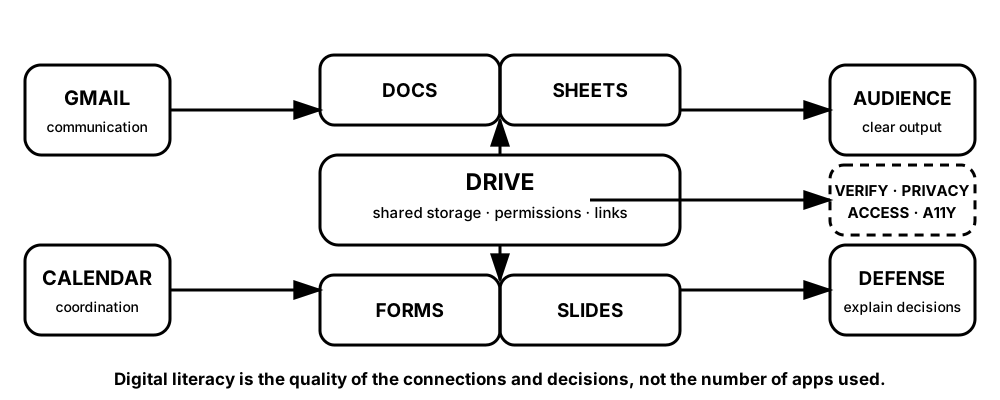
Diagrams open at a readable shape-aware scale. Zoom or expand when you need more detail.
The capstone is not a checklist of Google apps. Every connection has to earn its place by solving a job, preserving the right access, and producing evidence you can defend.
What you will do
Compare tool choices, audit digital citizenship decisions, verify sources and AI-assisted claims, build a connected workspace, and defend it.
What you will produce
Digital Workspace Portfolio and Defense for a fictional student technology event.
Source activity
Week 8 introduces no new DigitalLearn course. It synthesizes the attributed source activities already completed in Weeks 1–7.
Key vocabulary
tool selection, digital citizenship, lateral reading, verification, access, accessibility, workflow, defense.
Pacing
Five lessons at approximately 42 minutes each.
How this week connects
This week turns separate Google-tool skills into one evidence-based digital workflow.