Week 02 · lesson
Lesson 2: CPU Architecture, Sockets, Cores, and Cooling
Core path: 42 minutes
A CPU is not compatible with a motherboard because the brand name matches.
The architecture, socket, platform, firmware support, power delivery, and cooling all have to line up.
Architecture first
At A+ recognition depth, you should distinguish:
- x86/x64 — the dominant desktop/laptop PC architecture family used by current Intel and AMD systems;
- ARM — a different processor architecture common in mobile systems and increasingly present in laptops/desktops and embedded devices.
Software, drivers, and operating systems must support the intended architecture. A program compiled only for one architecture may not run natively on another.
Platform and socket
The CPU must match the motherboard socket and supported processor family.
You will encounter both Intel and AMD desktop platforms. The exact socket names change over time, so technicians verify the motherboard CPU-support list rather than memorizing one generation forever.
Some workstation/server boards can support more than one physical CPU socket. A multisocket platform introduces additional compatibility, power, cooling, and memory-layout requirements.
What the CPU contributes
Important processor characteristics include:
- cores — independent execution resources;
- threads — logical execution paths exposed by the processor;
- clock speed — operating frequency, useful but not a complete performance measure;
- cache — very fast memory close to the execution units;
- architecture/platform — determines compatibility and supported features;
- thermal design requirements — influence cooling and power planning.
More cores do not automatically make every program proportionally faster. Workload and software design still matter.
Cooling is part of compatibility
A processor installation is incomplete without an appropriate cooling solution.
The heat path is:
CPU package
→ thermal interface material
→ heatsink/cold plate
→ airflow or liquid loop
→ surrounding air
Common cooling components include:
- fans;
- heatsinks;
- thermal paste or thermal pads;
- liquid-cooling components where appropriate.
Common technician checks include:
- cooler seated correctly;
- fan or pump connected;
- thermal interface material present and applied correctly;
- airflow unobstructed;
- firmware reports reasonable temperatures and fan operation.
Guided case
A replacement processor fits the motherboard family name in a shopping listing, but the motherboard support page shows a different socket/revision and no firmware support.
The correct action is to stop the installation. Marketing similarity is not compatibility evidence.
Student action
Build a CPU compatibility checklist for one hypothetical system:
- architecture: x64 or ARM;
- vendor/platform: Intel or AMD where applicable;
- motherboard/socket;
- supported CPU family;
- firmware support;
- cooler mounting compatibility;
- CPU power connection;
- expected thermal load;
- one firmware temperature/fan check after installation.
Then write one incompatible example and explain exactly where the compatibility chain fails.
Evidence checkpoint
You should be able to defend this statement:
A processor choice is an architecture and platform decision, not an isolated component decision.
Visual reference
See the system before you troubleshoot it
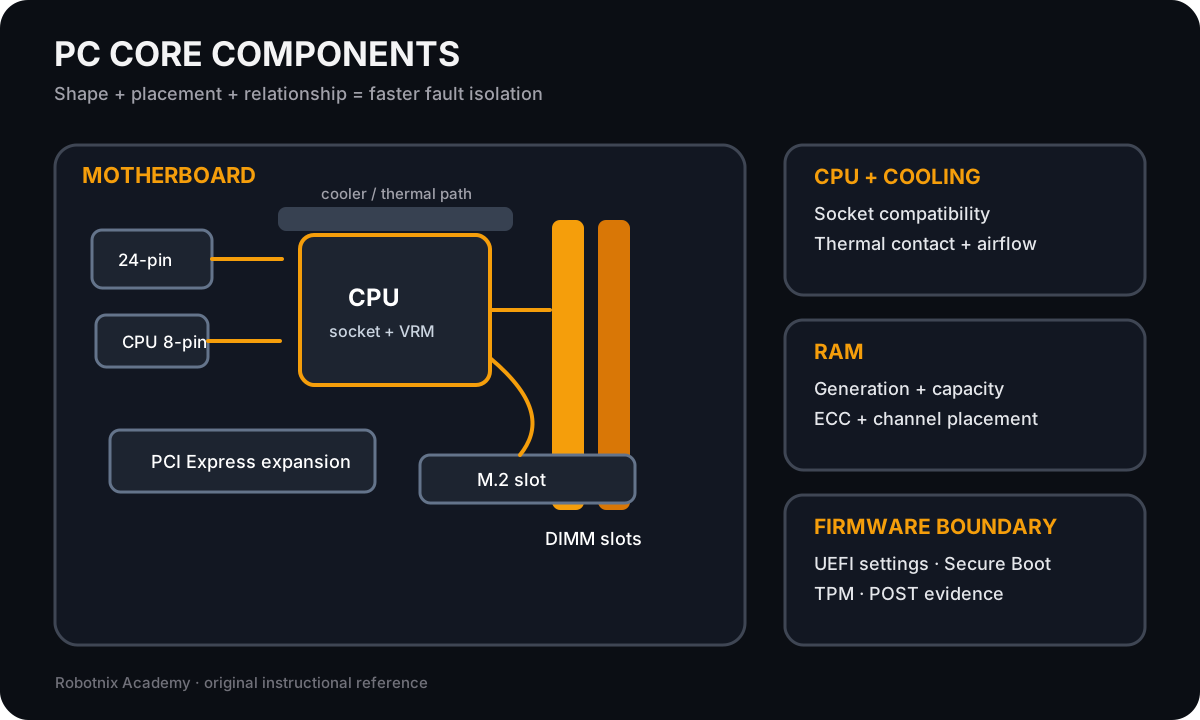
Use component shape, placement, and relationship clues to separate motherboard, CPU, memory, and cooling faults.
Use it for: Compare core PC components before compatibility and no-POST troubleshooting.
Read it. Prove it.