Week 05 · lesson
Lesson 2: Batteries, Displays, Cameras, and Input Hardware
Core path: 42 minutes
Portable computers trade easy access for integration.
That makes power, displays, digitizers, cameras, keyboards, touchpads, and styluses part of the repair story in a way desktop technicians do not always encounter.
Battery first
Laptop batteries are commonly lithium-ion or lithium-polymer packs.
Treat damaged or swollen batteries as hazards. Do not puncture, bend, crush, or pry open a battery pack. If a pack is swollen, stop normal service and follow the device/school handling procedure.
A charging problem can involve several boundaries:
wall power
→ charger
→ charging port / USB-C PD path
→ system board charging circuit
→ battery
→ operating-system reporting
A battery icon saying "not charging" does not identify which boundary failed.
Display assembly
A mobile display path can include:
- LCD/OLED panel;
- backlight system where applicable;
- display cable through the hinge area;
- GPU/display controller;
- lid sensor;
- webcam and microphone assembly;
- touchscreen digitizer where present.
If an external monitor works while the internal display stays dark, that is positive evidence that at least part of the system/graphics path works.
Digitizer and touch input
A touchscreen uses a digitizer to translate touch position into input. Common symptoms include:
- touch not responding;
- inaccurate touch position;
- cursor drift;
- calibration problems;
- cracked/broken display surface;
- stylus input failing while finger input works, or vice versa.
A broken screen and a failed digitizer can occur together, but they are not the same component function.
Keyboard, touchpad, track point, and stylus
Laptop keyboards, touchpads, and track-point devices can fail because of physical wear, liquid exposure, ribbon-cable problems, driver/settings state, or larger top-case damage.
Stylus support may depend on the specific digitizer technology and device pairing/charging requirements. A generic pen-shaped object is not automatically compatible.
Liquid and port damage
Liquid damage and physically damaged charging/data ports are explicit mobile troubleshooting concerns.
If liquid exposure is reported, stop normal powered testing and follow the approved service procedure. Do not keep powering the device on "to see if it still works."
Guided case: laptop only works on charger
Evidence:
- laptop operates normally on AC;
- battery is detected;
- battery percentage never increases;
- charger is known-good for this model.
The fault is in the charging/battery path, not the entire laptop power path.
Student action: symptom to boundary
For each symptom, identify the strongest starting boundary and one safe next check:
- Internal screen dark, external monitor works.
- Battery is swollen.
- Touchscreen cursor lands several centimeters from the finger.
- Webcam missing from applications.
- Laptop charges through one USB-C port but not another.
- Stylus stopped working after battery/charging state changed.
- Device was exposed to liquid.
Evidence checkpoint
Portable-device troubleshooting improves when you separate battery, panel, digitizer, camera, microphone, keyboard, touchpad, stylus, and physical-port paths instead of calling everything "the laptop."
Visual reference
See the system before you troubleshoot it
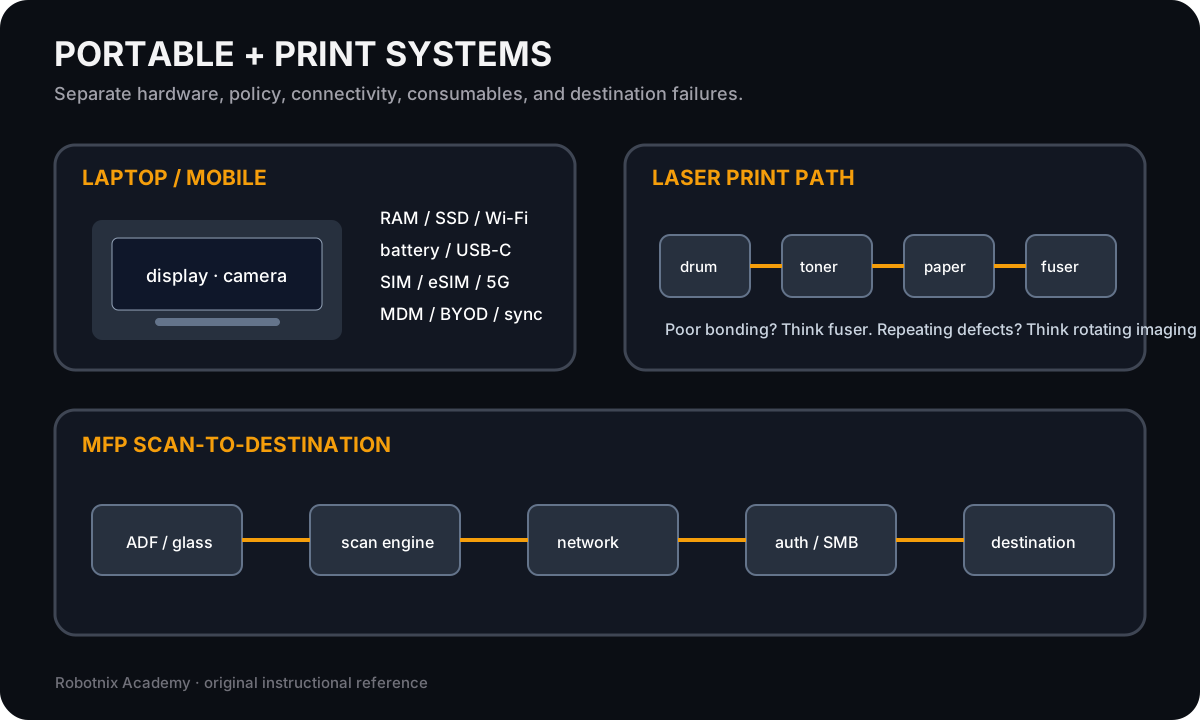
Portable and printer systems combine hardware, policy, consumables, connectivity, and service paths that must be isolated separately.
Use it for: Compare laptop/mobile service boundaries with printer and scanner mechanisms.
Read it. Prove it.