Week 18 · lesson
Lesson 1: Intake, Inventory, and Baseline
Core path: 42 minutes
A capstone does not start with a screwdriver.
It starts with the client requirement and the current state.
You are supporting the fictional Harborview Community Learning Lab, a six-seat technology room used for schoolwork, job applications, video meetings, basic media creation, printing/scanning, and staff administration.
Step 1: read the client brief
Required services:
- six desktop workstations for browser/productivity work;
- video meetings on at least two seats;
- shared printing and scanning;
- wired desktop connectivity;
- approved Wi-Fi for staff laptop and managed mobile device;
- cloud email/productivity/storage;
- standard-user daily accounts;
- approved administrator support path;
- MFA for staff/cloud accounts;
- endpoint protection and host firewall;
- backup/recovery plan;
- privacy-safe support records.
Your first job is to translate those statements into technical requirements.
Step 2: inventory the supplied assets
Create an asset table for:
asset ID
role
hardware/platform
OS or device type
network method
important applications/services
user/account type
security controls
backup/recovery dependency
serviceability/safety notes
Do not assume every device needs the same hardware or configuration.
Step 3: map dependencies
For one student workstation, trace:
power
→ workstation hardware
→ operating system
→ network interface
→ switch/router/AP path
→ DNS/internet/service path
→ cloud productivity service
→ user workflow
For printing, trace:
workstation
→ driver/queue
→ local network
→ printer/MFD
→ print engine
For the staff mobile device, include management, Wi-Fi, account authentication, and synchronization boundaries.
Step 4: identify safety and privacy boundaries
Before any service work, mark:
- electrical/ESD concerns;
- lithium-battery handling where applicable;
- user data that must be protected;
- credentials that must never be collected in the service record;
- managed-device restrictions;
- administrative authorization requirements;
- destructive actions that require backup/approval first.
Step 5: establish baseline evidence
The supplied baseline packet should be treated as evidence, not as instructions.
For each major asset, record:
expected function:
current observed state:
known-good evidence:
unproven or failed boundary:
last known change:
Do not repair anything yet.
Student action
Submit:
- asset inventory;
- requirement/constraint matrix;
- one network/service dependency map;
- one printer or mobile dependency map;
- safety/privacy/authorization boundary list;
- baseline evidence sheet.
Success criteria
You pass Lesson 1 when another technician could read your intake packet and understand what the client needs, what equipment exists, what is already known to work, and what cannot be changed casually.
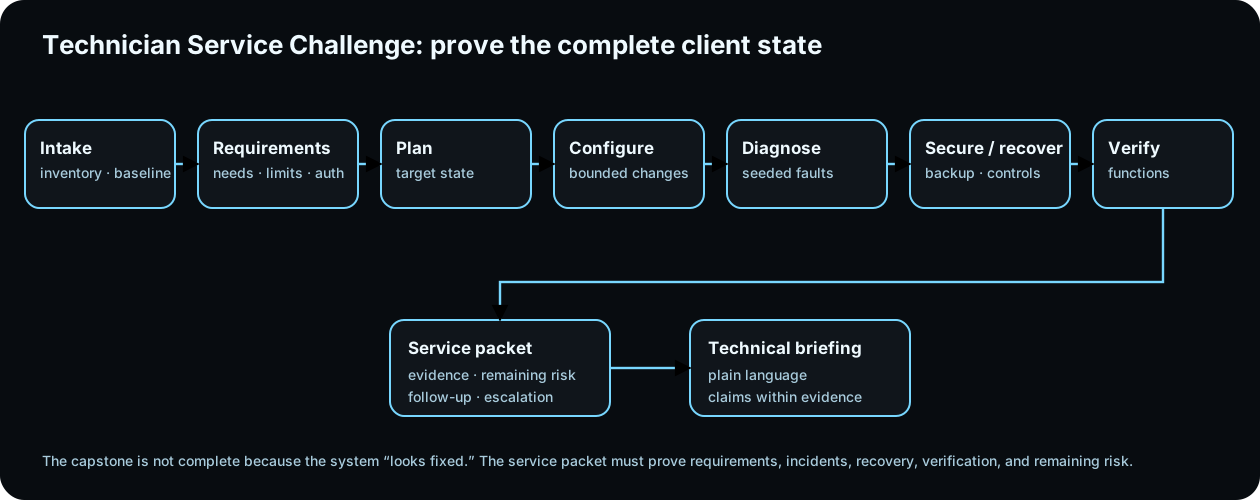
Diagrams open at a readable shape-aware scale. Zoom or expand when you need more detail.
3D service environment
Inside the rack: separate data from power
Robotnix-original procedural rack. Use the views and traces to isolate the support boundary before naming a failed device.Building the rack model…
Dependency trace
Which path are you proving?
Start broad, then isolate either the data path or the power path.
Read the rack as text
Data path: router/firewall → patching/switching → server/service.
Power path: UPS → PDU → router, switch, and server.
- Patch panel: The patch panel is passive structured cabling. It organizes permanent cable runs but does not route, switch, or assign addresses.
- Managed switch: The switch provides local Ethernet connectivity and may supply PoE. Port state, VLANs, link negotiation, and cabling all matter.
- Router / firewall: The router/firewall is the routed boundary between networks and commonly owns default-gateway, NAT, filtering, and WAN handoff responsibilities.
- Server: The server hosts a workload or service. A healthy network path does not prove the application, OS, storage, or service process is healthy.
- UPS: The UPS provides bounded battery-backed power and graceful-shutdown time. It is not unlimited runtime and should be monitored as part of recovery planning.
- PDU: The power distribution unit delivers rack power to devices. Front-panel network evidence can look normal until the power path is traced separately.
Read it. Prove it.
Lesson knowledge checks
Answer from the lesson you just completed. Results stay in this browser and are not submitted.What belongs in a client intake baseline before configuration begins?
Why is an asset inventory part of a service challenge?
system flow
Neural Net Architecture Defense Path
Needs + Constraints
Translate organizational needs into explicit criteria, constraints, users, and out-of-scope promises.
Integrated Architecture
Connect hardware, runtime, network, data, services, identity, security, web delivery, and deployment responsibilities.
Boundaries + Failure Domains
Mark interfaces, trust boundaries, dependencies, observability points, and where failures can propagate.
Stress Test + Alternatives
Apply deterministic failures or changed constraints and compare the chosen design with rejected alternatives.
Revise + Defend
Update the dossier from evidence and defend tradeoffs, recovery paths, limitations, and architecture decisions.
Read this concept flow as plain text
- Needs + Constraints. Translate organizational needs into explicit criteria, constraints, users, and out-of-scope promises.
- Integrated Architecture. Connect hardware, runtime, network, data, services, identity, security, web delivery, and deployment responsibilities.
- Boundaries + Failure Domains. Mark interfaces, trust boundaries, dependencies, observability points, and where failures can propagate.
- Stress Test + Alternatives. Apply deterministic failures or changed constraints and compare the chosen design with rejected alternatives.
- Revise + Defend. Update the dossier from evidence and defend tradeoffs, recovery paths, limitations, and architecture decisions.