Week 10 · lesson
Lesson 1: Why Virtualize?
Core path: 42 minutes
A virtual machine is a software-defined computer environment using resources supplied by a physical host.
The important A+ question is not only what is a VM?
It is also:
Why would a technician choose virtualization instead of another physical machine?
Host and guest
physical hardware
→ host / hypervisor
→ virtual CPU + RAM + disk + NIC
→ guest operating system
→ guest applications
The host owns the physical resources. The guest behaves like a separate computer environment but still depends on that host.
Use case 1: sandbox
A sandbox is an isolated environment used to reduce the effect of testing or changing software on the main host system.
Isolation reduces risk. It does not create perfect safety. A VM still depends on hypervisor configuration, network exposure, host security, and the behavior of whatever is being tested.
In this course, sandboxing is a design concept. Students do not execute unknown or malicious software on school-managed systems.
Use case 2: test and development
A developer or technician may need several clean operating-system configurations to test software, drivers, updates, or deployment procedures.
Virtual machines make it easier to create repeatable environments without buying a separate physical computer for each configuration.
Use case 3: application virtualization
Application virtualization separates an application environment from the normal local installation model. The exact implementation varies, but the technician idea is that an application can be delivered or isolated without being installed in the traditional way directly into every local OS environment.
Use case 4: legacy software and operating systems
An organization may need an older application that no longer runs correctly on the current operating system.
A virtualized legacy environment can preserve that dependency while keeping the old software separated from the modern host workflow.
That does not make an unsupported legacy OS secure. It only changes where it runs.
Use case 5: cross-platform virtualization
A technician can run a different supported guest operating system from the host platform for training, testing, or application requirements.
Examples include practicing Linux in a VM on a Windows workstation or testing a Windows application without dedicating another physical system.
Type 1 and Type 2 preview
A Type 1 hypervisor runs directly on the hardware/platform layer.
A Type 2 hypervisor runs on top of a conventional host operating system.
We will compare those architectures in the next lesson.
Student action: choose the virtualization purpose
For each scenario, choose the strongest fit:
- sandbox;
- test/development;
- application virtualization;
- legacy software/OS;
- cross-platform virtualization;
- physical machine instead.
Scenarios:
- A technician needs three clean Windows test environments for driver validation.
- A school must preserve one old application while migrating the main desktop environment.
- A student needs a bounded Linux practice environment on a Windows lab workstation.
- An application needs to be delivered without a normal full local install on every endpoint.
- A GPU-intensive workload requires hardware access that the proposed VM environment cannot provide adequately.
Defend the decision with the requirement, not a brand name.
Evidence checkpoint
Virtualization is useful because it changes how environments are isolated, deployed, and managed. It does not remove hardware, security, networking, storage, or support dependencies.
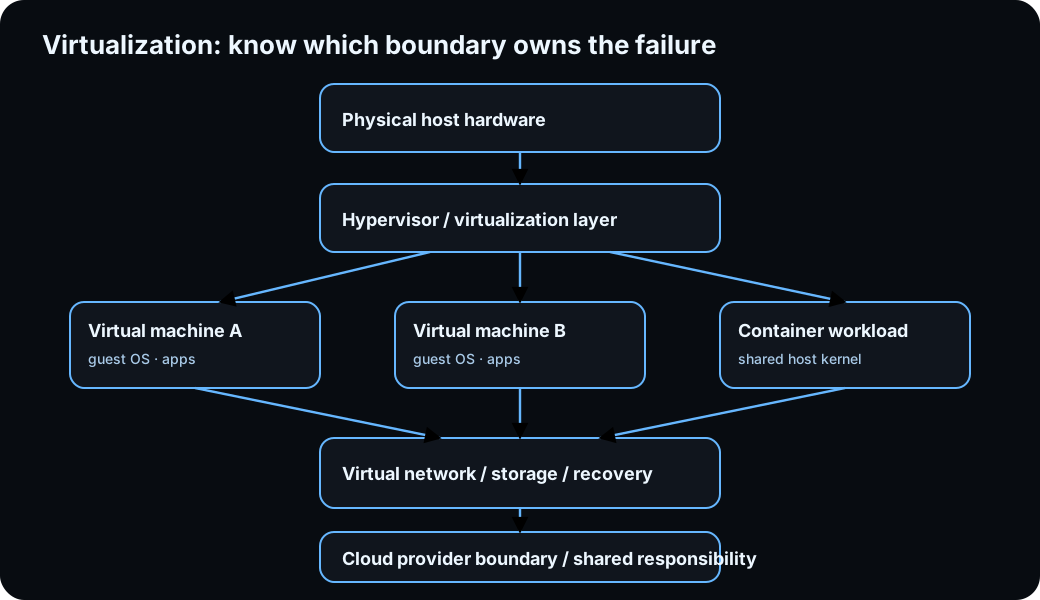
Diagrams open at a readable shape-aware scale. Zoom or expand when you need more detail.
Read it. Prove it.
Lesson knowledge checks
Answer from the lesson you just completed. Results stay in this browser and are not submitted.Why would a technician use a virtual machine for software testing?
Which use case best matches legacy application support?
system flow
Threat Model: asset to residual risk
Assets
Identify the data, services, capabilities, and people that need protection.
Exposure
Map interfaces, trust boundaries, and vulnerabilities that create attack surface.
Threat / impact
Describe a plausible adverse event and the consequence if it succeeds.
Control
Choose a safeguard that reduces likelihood, exposure, or impact.
Residual risk
State what uncertainty or risk remains after the control is applied.
Read this concept flow as plain text
- Assets. Identify the data, services, capabilities, and people that need protection.
- Exposure. Map interfaces, trust boundaries, and vulnerabilities that create attack surface.
- Threat / impact. Describe a plausible adverse event and the consequence if it succeeds.
- Control. Choose a safeguard that reduces likelihood, exposure, or impact.
- Residual risk. State what uncertainty or risk remains after the control is applied.