Week 17 · lesson
Lesson 1: Triage the Whole System
Core path: 42 minutes
The ticket says:
The computer is dead.
That sentence is not a diagnosis. It is barely a symptom.
A technician starts by converting a vague complaint into observable system state.
Step 1: separate complaint from observation
User language matters because it tells you what they experienced. But the wording may collapse several layers into one phrase.
Examples:
- "dead" might mean no power, no display, failed POST, failed boot, or frozen application;
- "no internet" might mean no Wi-Fi association, no IP address, bad gateway, DNS failure, provider outage, or one application failure;
- "phone won't charge" might mean damaged cable, contaminated port, failed adapter, battery issue, temperature protection, or software-reported charging state.
Write the complaint down, then record what you actually observe.
Step 2: establish scope
Ask:
- one device or many?
- one user or many?
- one application or the whole OS?
- local function or network-dependent function?
- wired, wireless, mobile, virtual, or cloud path?
- constant or intermittent?
Scope can eliminate entire classes of theories.
Step 3: capture the last known change
Recent changes include:
- hardware replacement;
- driver or OS update;
- application install/update;
- network change;
- printer relocation;
- account/policy change;
- virtualization resource change;
- power event;
- user configuration change.
A recent change is evidence worth testing. It is not automatic proof.
Step 4: protect the boundaries
Before touching the system, identify anything that changes what you are allowed to do:
- electrical or battery safety;
- user data at risk;
- privacy-sensitive information;
- managed-device policy;
- warranty/serviceability limits;
- required authorization;
- active security incident or evidence-preservation concern.
A fast fix that violates one of these boundaries is still a bad fix.
Step 5: mark the last proven-good layer
Think in layers:
power / physical
→ firmware / device detection
→ operating system
→ driver / service
→ network path
→ application
→ remote service
→ user workflow
You do not need to test every layer from the beginning if supplied evidence already proves some of them.
Scenario A: no POST
Evidence:
- outlet and known-good power cable verified;
- system fans start;
- monitor works on another computer;
- system produces memory-related diagnostic indication;
- RAM was reseated earlier that day.
Strong next boundary: memory installation/configuration.
Weak first action: reinstall Windows.
Scenario B: mobile charging complaint
Evidence:
- device powers on;
- battery percentage does not increase;
- known-good cable/adapter work with another device;
- visible debris is present in the charging port;
- device temperature is normal.
Strong next boundary: physical charging interface, handled under approved service/safety procedure.
Scenario C: printer "offline"
Evidence:
- printer is powered on;
- local control panel reports ready;
- another workstation can print;
- affected user has the wrong printer queue selected.
The printer hardware is not the strongest failure theory.
Scenario D: local network failure
Evidence:
- Ethernet link light present;
- interface has a valid local IP;
- gateway ping succeeds;
- DNS lookup fails;
- direct IP connectivity to the supplied remote test endpoint succeeds.
The failure boundary is now much narrower than "the network."
Student action
For all four scenarios, submit:
user complaint:
observed symptom:
scope:
last known change:
safety/privacy/authorization boundary:
last proven-good layer:
first failed or unproven layer:
strongest initial theory:
one theory you reject for now:
next evidence step:
Success criteria
You pass when your first theory is bounded by evidence and your next step can actually prove or weaken it.
Do not fix first and explain later.
Visual reference
See the system before you troubleshoot it
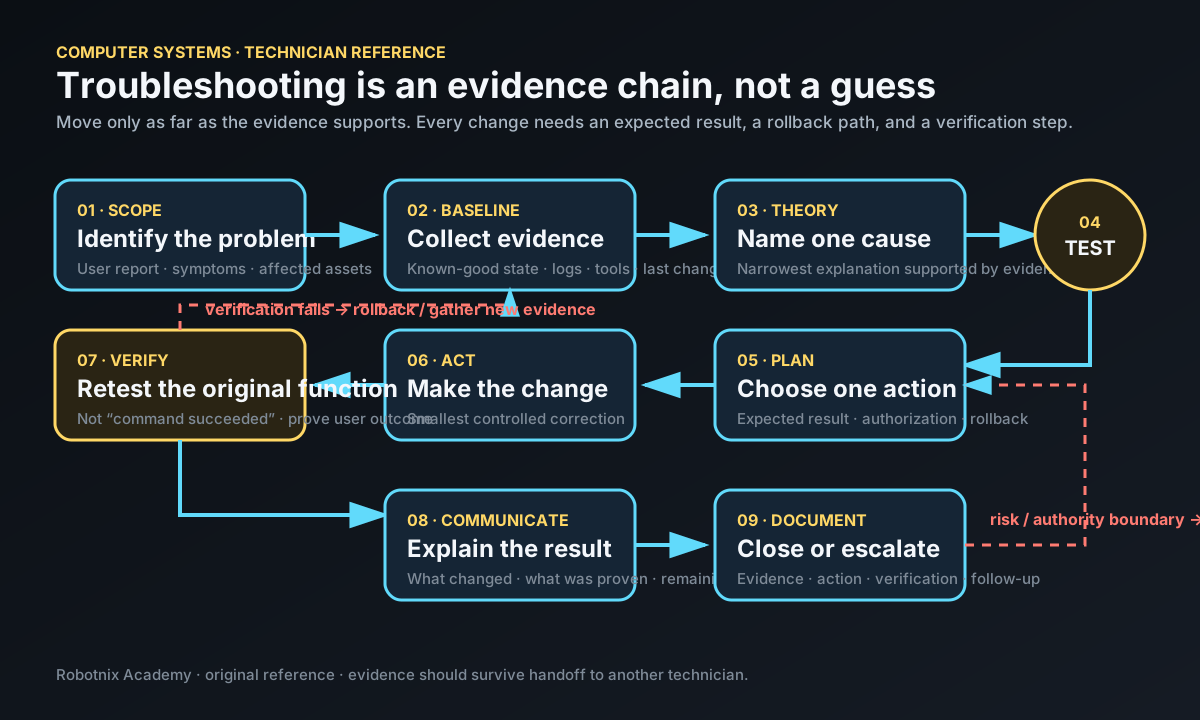
Troubleshooting is an evidence chain. Every corrective action should have an expected result, rollback path, verification step, and handoff-ready record.
Use it for: Give students a printable technician workflow for integrated troubleshooting and review.
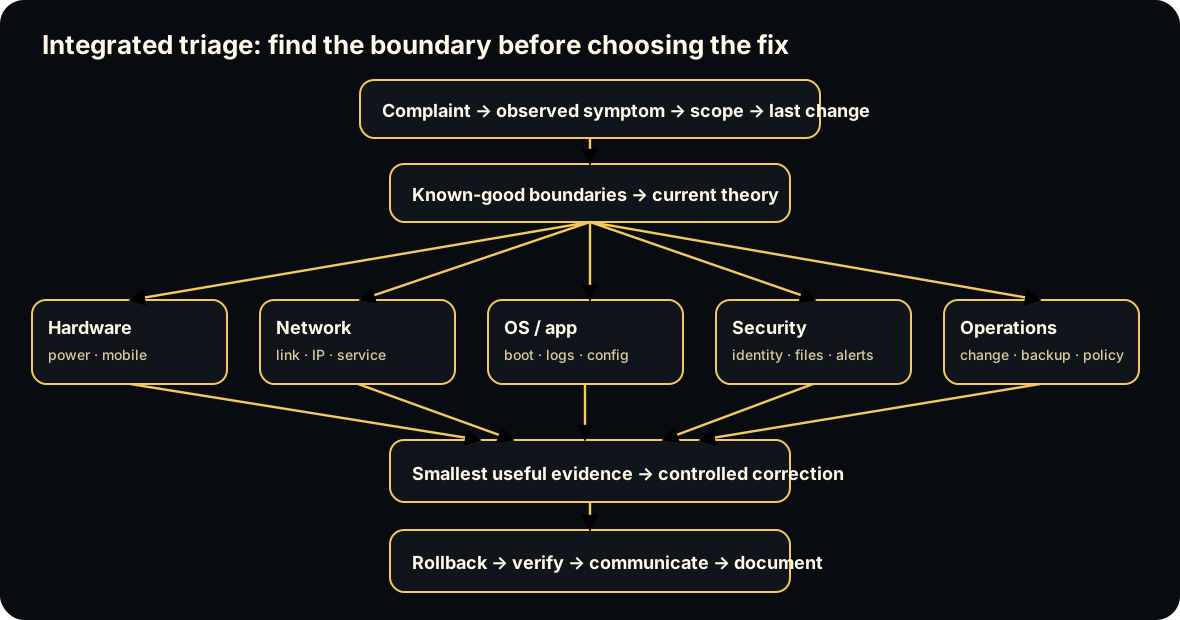
Diagrams open at a readable shape-aware scale. Zoom or expand when you need more detail.
Read it. Prove it.
Lesson knowledge checks
Answer from the lesson you just completed. Results stay in this browser and are not submitted.A user says, ‘The internet is broken.’ What should the technician record first?
Why mark known-good boundaries during mixed-incident triage?
system flow
Execution and Isolation Boundaries
Physical Host
Hardware and a host operating environment provide compute, memory, storage, and network resources.
Isolation Model
Choose a guest-OS virtual machine boundary or a container/process boundary based on the workload.
Image / Guest State
Define the reusable software environment separately from a currently running instance.
Running Workload
Start the VM or containerized process and observe runtime state, dependencies, and resource use.
Operate + Recover
Evaluate portability, isolation, updates, state, recovery, operations, and cost before defending the deployment choice.
Read this concept flow as plain text
- Physical Host. Hardware and a host operating environment provide compute, memory, storage, and network resources.
- Isolation Model. Choose a guest-OS virtual machine boundary or a container/process boundary based on the workload.
- Image / Guest State. Define the reusable software environment separately from a currently running instance.
- Running Workload. Start the VM or containerized process and observe runtime state, dependencies, and resource use.
- Operate + Recover. Evaluate portability, isolation, updates, state, recovery, operations, and cost before defending the deployment choice.