Week 09 · lesson
Lesson 1: Troubleshoot in Layers
Core path: 42 minutes
The fastest way to waste a support period is to change five network settings before proving what failed.
Use a layered evidence order instead.
1 physical / radio link
2 interface and IP configuration
3 local destination
4 default gateway
5 DNS if a name is involved
6 remote host / path
7 service port / application
The exact order can change with the symptom. The discipline does not.
Start with the user report
"The internet doesn't work."
Translate that into an observation:
- Ethernet disconnected?
- Wi-Fi not associated?
- APIPA address?
- gateway unreachable?
- DNS failure?
- remote host unreachable?
- port refused?
- application error?
Those are different incidents.
A+ troubleshooting method
Use the technician loop:
- identify the problem;
- establish a theory of probable cause;
- test the theory;
- establish a plan and implement the safe solution;
- verify full functionality and preventive measures where appropriate;
- document findings, actions, and outcomes.
Robotnix adds one rule: preserve the baseline before the change whenever practical.
Guided case
Evidence:
Ethernet link: up
IPv4: 169.254.42.18
Default gateway: none
A reasonable theory is failed expected DHCP configuration.
A poor first action is replacing the router because "internet is down."
Student action
Build a troubleshooting ladder for these symptoms:
- no Ethernet link;
- APIPA address;
- local printer works but gateway fails;
- remote IP works but hostname fails;
- host reachable but TCP service is refused.
For each, write the next smallest useful test.
Evidence checkpoint
A good technician can say:
Here is the last boundary I proved good. Here is the next boundary I have not proved.
That sentence is more useful than ten random fixes.
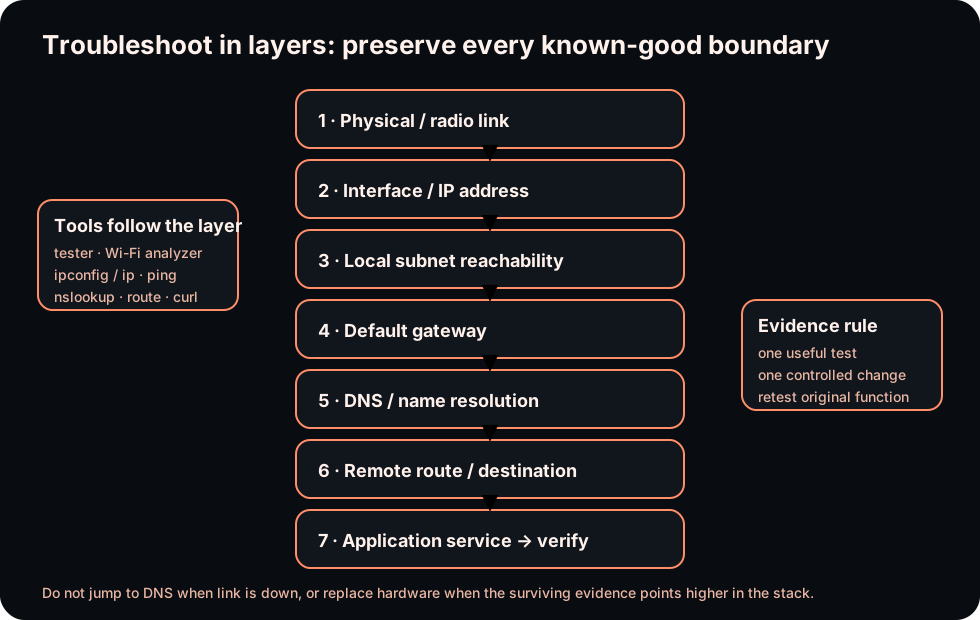
Diagrams open at a readable shape-aware scale. Zoom or expand when you need more detail.
Read it. Prove it.
Lesson knowledge checks
Answer from the lesson you just completed. Results stay in this browser and are not submitted.What is the benefit of troubleshooting a network in layers?
If link lights are down, what should usually be checked before DNS?
system flow
Network Diagnosis: evidence before changes
Symptom
Define what failed and what still works before changing configuration.
Address / route
Inspect interface addressing and the path the host intends to use.
Name resolution
Check whether the destination name maps to the expected address.
Port / service
Determine whether the remote service is reachable and listening where expected.
Diagnosis
Use surviving communication and packet-style evidence to bound the failure and uncertainty.
Read this concept flow as plain text
- Symptom. Define what failed and what still works before changing configuration.
- Address / route. Inspect interface addressing and the path the host intends to use.
- Name resolution. Check whether the destination name maps to the expected address.
- Port / service. Determine whether the remote service is reachable and listening where expected.
- Diagnosis. Use surviving communication and packet-style evidence to bound the failure and uncertainty.