Week 14 · lesson
Lesson 1: Social Engineering, Attacks, and Vulnerabilities
Core path: 42 minutes
A technician does not need to reproduce an attack to recognize the evidence that something is wrong.
This lesson stays defensive: identify the threat category, protect the asset, verify through a known channel, and escalate when appropriate.
Phishing family
Recognize:
- phishing — broad deceptive email/web messaging;
- vishing — voice-based deception;
- smishing — SMS/text deception;
- QR phishing — malicious/deceptive QR-code destination;
- spear phishing — targeted phishing toward a specific person/group;
- whaling — targeted social engineering aimed at high-value executives/decision makers.
The safer response is independent verification, not replying to the suspicious message for confirmation.
Physical/social techniques
- shoulder surfing — observing sensitive information directly;
- tailgating — following an authorized person into a controlled area;
- impersonation — pretending to be a trusted person/service;
- dumpster diving — recovering useful information from discarded material.
Secure disposal and access-control habits matter because not every information leak comes from software.
Network/service threats
At recognition depth, know these categories:
- DoS / DDoS — attempts to make a service unavailable through overwhelming/disruptive activity;
- evil twin — deceptive wireless network made to resemble a legitimate one;
- zero-day — vulnerability/exploit condition not yet addressed through the normal known-fix cycle;
- spoofing — falsifying an identity/source characteristic;
- on-path — an attacker positions between communicating parties to observe or alter traffic;
- brute-force / dictionary attacks — repeated credential guessing approaches;
- insider threat — risk originating from someone with legitimate internal access.
We identify these categories so technicians can protect users and escalate. This course does not teach operational attack execution.
Application/web vulnerability recognition
SQL injection
Improperly handled input can alter database queries. The defensive lesson is input validation/parameterized application design and escalation to the software/security owner.
Cross-site scripting (XSS)
Improperly handled web content/input can cause untrusted script content to execute in a user's browser context. The technician role is recognition, safe browser/user response, patching, and escalation.
Business email compromise
BEC uses impersonation/social engineering to manipulate business processes such as payment, account, or sensitive-information requests.
A familiar display name is not strong identity proof.
Supply-chain / pipeline compromise
Risk can enter through trusted software suppliers, updates, dependencies, build pipelines, or vendors.
"It came from our normal supplier" is useful context, not proof of safety.
Vulnerability states
Recognize risk created by systems that are:
- non-compliant;
- unpatched;
- unprotected;
- end-of-life;
- BYOD devices outside required management/security policy.
Guided case
A finance employee receives an urgent email from a familiar executive display name requesting a payment-account change.
Indicators:
- unexpected request;
- financial impact;
- urgency;
- sender identity not independently verified.
Safe response:
Verify using the organization's known approval/contact process before changing payment information.
Student action
Classify twelve fictional artifacts/scenarios:
threat/vulnerability category:
asset at risk:
observable indicator:
what is NOT proven:
safe immediate response:
verification/escalation path:
Evidence checkpoint
Threat recognition should lead to safer verification and containment, not curiosity-driven interaction with the suspicious artifact.
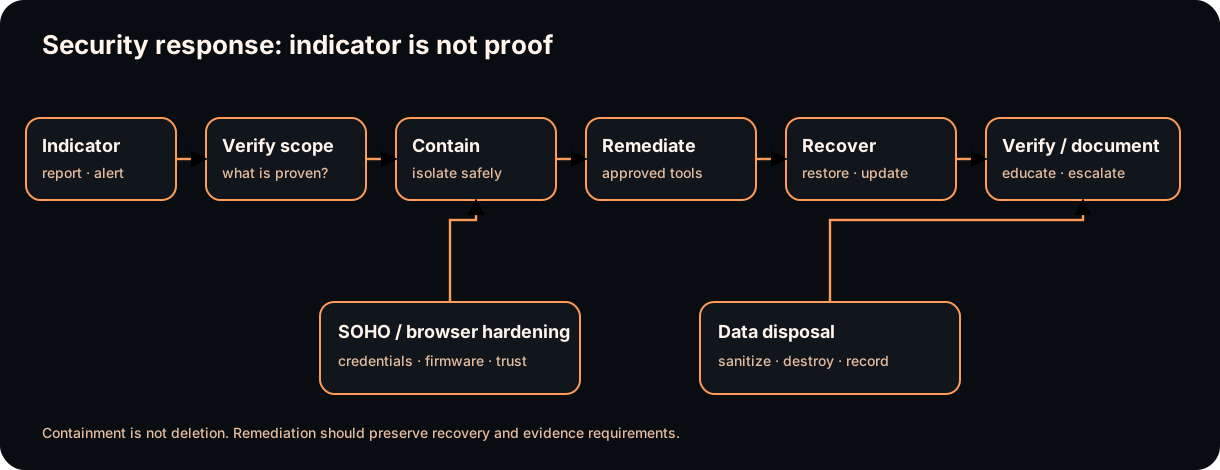
Diagrams open at a readable shape-aware scale. Zoom or expand when you need more detail.
Read it. Prove it.
Lesson knowledge checks
Answer from the lesson you just completed. Results stay in this browser and are not submitted.Which behavior is a common social-engineering warning sign?
Why is one suspicious message not automatically proof of a larger compromise?
system flow
Relational Data Evidence Path
Entities
Identify the real things the system must represent, such as devices, users, or events.
Schema + Keys
Define attributes and stable primary/foreign-key relationships instead of relying on position or guesswork.
Persistent Rows
Store structured records under the declared data contract.
Precise Query
Ask a bounded SQL question with explicit conditions and selected fields.
Result + Limits
Connect returned rows to the query and underlying data while recording data-quality or schema limitations.
Read this concept flow as plain text
- Entities. Identify the real things the system must represent, such as devices, users, or events.
- Schema + Keys. Define attributes and stable primary/foreign-key relationships instead of relying on position or guesswork.
- Persistent Rows. Store structured records under the declared data contract.
- Precise Query. Ask a bounded SQL question with explicit conditions and selected fields.
- Result + Limits. Connect returned rows to the query and underlying data while recording data-quality or schema limitations.