Week 18 · lesson
Lesson 2: Configure the Service Environment
Core path: 42 minutes
Today you turn the client requirements into a supportable target state.
This is not a shopping list. Every decision must connect to a requirement from Lesson 1.
Workstation roles
The six desktops do not all need identical priorities.
At minimum, define:
- standard productivity seats;
- two seats capable of reliable video meetings;
- any seat needing additional media-creation performance.
For each role, justify:
CPU/platform need:
RAM need:
storage need:
display/peripheral need:
network need:
serviceability consideration:
Do not use brand names as the reason.
Network and service plan
The desktops use wired connectivity. The staff laptop and managed mobile device use approved Wi-Fi.
Your plan must identify:
- router/firewall role;
- access-point role;
- DHCP addressing;
- default gateway;
- DNS service;
- secure wireless configuration;
- network profile/sharing expectations;
- cloud service dependency;
- printer/MFD network path.
Use fictional/documentation-range addressing in any diagram.
Operating-system and application state
For supported workstations, define the target state for:
- supported OS release;
- current updates;
- required drivers;
- browser/productivity/video applications;
- startup/application expectations;
- standard-user daily account;
- approved admin-support path.
Do not grant permanent administrator rights simply to avoid support tickets.
Printer and mobile support
Printer/MFD plan should include:
- approved driver/queue;
- wired/wireless/network placement as supplied;
- print/share model;
- scan destination/process;
- firmware/update responsibility;
- secure-print/authentication setting if required by the case.
Managed mobile plan should include:
- approved Wi-Fi;
- MDM/policy state;
- account/MFA requirements;
- sync requirements;
- application source/update expectations;
- data/privacy boundary.
Security target state
Document:
- least privilege;
- MFA for staff/cloud identity;
- host firewall enabled;
- endpoint protection enabled/current;
- updates current;
- disk/data protection where appropriate;
- screen lock/session protection;
- approved software sources;
- secure wireless settings;
- recovery-key/process ownership where encryption is used.
Virtualization/cloud boundary
The practice VM is for bounded testing/support work.
Define:
- host resource budget;
- guest resource allocation;
- network mode;
- what data may or may not enter the VM;
- snapshot vs independent backup distinction.
For cloud productivity, record the customer/provider responsibility split at technician depth.
Backup and documentation plan
Define:
- what data/configuration must be backed up;
- backup destination/type;
- restore-verification expectation;
- when change records are required;
- what must never be written into the ticket, such as passwords or unnecessary sensitive data.
Student action
Submit the target-state service plan:
workstation role decisions
network/service plan
OS/application checklist
printer/mobile plan
security checklist
VM/cloud responsibility notes
backup/recovery plan
change/documentation plan
Peer review
A partner must challenge two decisions with:
Which client requirement justifies this?
If you cannot answer, revise the decision.
Success criteria
You pass when the target state is supportable, safe, and traceable back to the client requirements rather than personal preference.
Visual reference
See the system before you troubleshoot it
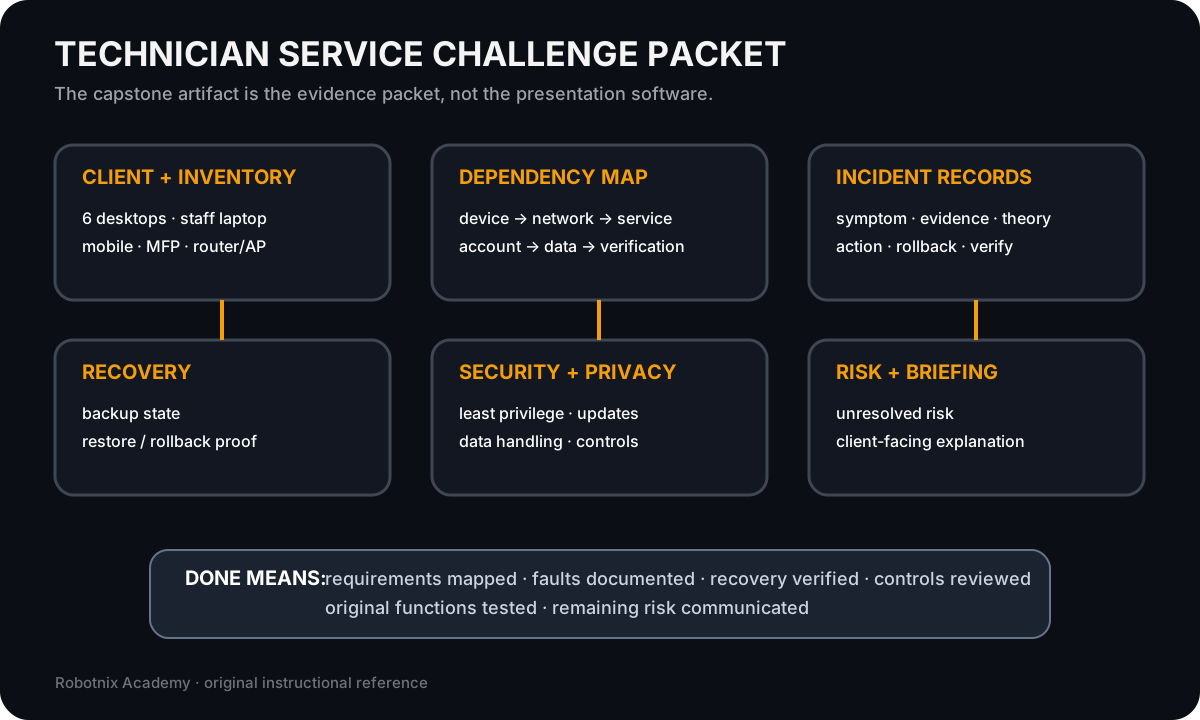
The capstone is not a slide deck. It is a service record that proves requirements, incidents, recovery, security, verification, and remaining risk.
Use it for: Show how the Week 18 evidence packet fits together before students configure and diagnose the capstone environment.
Read it. Prove it.