Week 06 · lesson
Lesson 1: Printer Technologies and Deployment Decisions
Core path: 42 minutes
A printer is not just "the thing that puts words on paper."
Different technologies solve different workloads, and a good deployment starts before the device is plugged in.
Printer technologies
Laser
Uses toner and an electro-photographic process. Common where speed, text quality, and higher volume matter.
Inkjet
Uses liquid ink through print heads. Common for lower-volume color/photo work and general classroom/home use.
Thermal
Uses heat-sensitive media or thermal-transfer methods. Common for receipts and labels.
Impact
Physically strikes an inked ribbon against paper. Still useful for multipart forms and specialty workflows.
Choose based on workload
Ask about:
- print volume;
- color requirement;
- media type;
- speed;
- quality;
- consumable cost;
- maintenance environment;
- shared vs dedicated use;
- scan/copy requirements;
- security/privacy needs.
"Laser is better" is not a universal answer.
Setup location matters
Before unboxing/deployment, consider:
- stable surface and clearance;
- ventilation and heat;
- nearby power;
- USB/Ethernet/Wi-Fi availability;
- paper/consumable access;
- whether confidential output will sit in a public area;
- room for ADF/scanner lids and service panels;
- traffic, dust, moisture, and environmental risk.
A perfectly configured device in the wrong location can still be a poor deployment.
Guided case: front office MFP
Requirements:
- hundreds of black-and-white pages daily;
- occasional color not required;
- shared by multiple users;
- scan-to-email and secured-print capability desired;
- confidential documents should not sit unattended.
A high-volume laser multifunction device is a stronger fit than a small photo inkjet, but the recommendation must also include network, scanning, authentication/secured-print, and placement requirements.
Student action: deployment decision
Choose a printer technology for four fictional locations:
- front office;
- library receipt/label station;
- art classroom color station;
- legacy multipart-form workflow.
For each record:
technology:
workload:
location concern:
connection method:
shared or dedicated:
security/privacy need:
maintenance concern:
Evidence checkpoint
A printer recommendation is a deployment decision, not just a technology label.
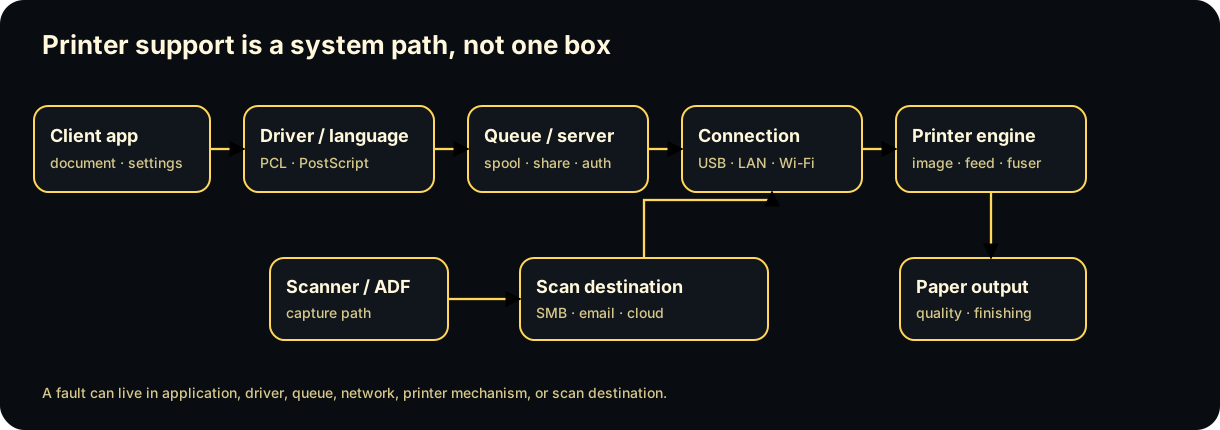
Diagrams open at a readable shape-aware scale. Zoom or expand when you need more detail.
Read it. Prove it.
Lesson knowledge checks
Answer from the lesson you just completed. Results stay in this browser and are not submitted.Which printer technology uses toner and an imaging process rather than liquid ink?
Which printer technology is commonly chosen for multipart forms because it physically strikes the paper?
system flow
Diagnose a Running-System Failure
Program / Service
A program becomes a running process, while a service may continue in the background without direct user interaction.
Symptom + Baseline
Record what is failing and compare it with a known-good or expected state before changing anything.
Status + Logs
Inspect process state, service status, timestamps, sources, and events without treating one log line as automatic root cause.
Hypothesis + One Change
Choose the smallest evidence-supported explanation and change one bounded variable.
Restart / Verify
Re-run the same check and compare the new evidence with the original symptom to confirm or reject the diagnosis.
Read this concept flow as plain text
- Program / Service. A program becomes a running process, while a service may continue in the background without direct user interaction.
- Symptom + Baseline. Record what is failing and compare it with a known-good or expected state before changing anything.
- Status + Logs. Inspect process state, service status, timestamps, sources, and events without treating one log line as automatic root cause.
- Hypothesis + One Change. Choose the smallest evidence-supported explanation and change one bounded variable.
- Restart / Verify. Re-run the same check and compare the new evidence with the original symptom to confirm or reject the diagnosis.