Week 06 · lesson
Lesson 2: Print Mechanisms and Maintenance
Core path: 42 minutes
Printer troubleshooting gets easier when you know how the image is created and what maintenance belongs to that technology.
Laser print path
A simplified laser path is:
page data
→ charging/exposure
→ drum imaging
→ toner development/transfer
→ paper path
→ fuser
→ output
Technician maintenance can include:
- replace toner;
- apply the model's maintenance kit when required;
- calibrate;
- clean approved components/paths.
Examples: repeated marks can suggest a rotating component; loose toner can point toward fusing; jams can occur at feed, registration, duplex, fuser, or exit stages.
Inkjet
A simplified path is:
page data
→ printhead/nozzles
→ ink delivery
→ carriage/media movement
→ paper
→ output
Key parts include:
- ink cartridge/tank;
- printhead;
- rollers;
- feeder.
Maintenance can include cleaning printheads, replacing cartridges, calibration/alignment, roller/feed inspection, and approved jam clearing.
Thermal
Thermal devices depend on:
- feed assembly;
- special thermal paper or transfer media depending on design;
- heating element/printhead;
- clean media path.
Maintenance includes replacing the correct paper/media, cleaning the heating element under approved procedure, and removing debris.
Impact
Impact printers commonly use:
- ribbon;
- printhead;
- tractor/feed mechanism;
- multipart paper in appropriate workflows.
Maintenance includes ribbon, printhead, and paper replacement as the device requires.
Consumable vs maintenance component
Do not call every replaceable item a consumable.
toner / ink / ribbon / paper = consumable examples
drum / fuser / roller / maintenance kit = service/maintenance examples depending on model
Always use model-specific documentation.
Safety boundary
Laser fusers can remain hot. Printers contain moving mechanisms and electrical components. Power down and allow cooldown before approved service. Do not reach into a running printer to clear a jam.
Student action: maintenance map
For laser, inkjet, thermal, and impact printers, record:
marking mechanism:
primary consumable:
feed component:
maintenance action:
one common failure clue:
safety concern:
Then explain why the same maintenance procedure cannot be applied to every printer technology.
Evidence checkpoint
A technician should be able to connect the symptom to a print stage and the maintenance task to the actual technology.
Visual reference
See the system before you troubleshoot it
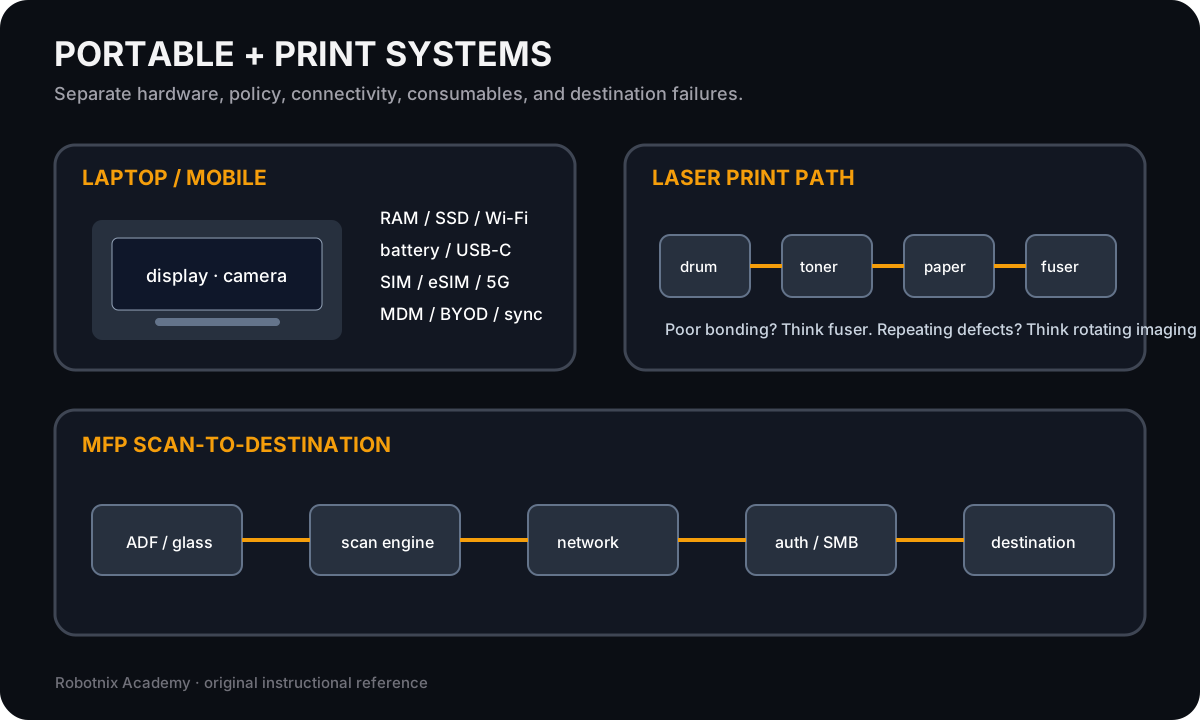
Portable and printer systems combine hardware, policy, consumables, connectivity, and service paths that must be isolated separately.
Use it for: Compare laptop/mobile service boundaries with printer and scanner mechanisms.
System process animation
Laser printer imaging and paper path
Follow a page through the major laser-print stages and connect symptoms to the physical stage that can create them.Technician question: Where would the page first show evidence of this failure?
Laser printer path inspection board
Trace paper and image formation through a laser printer so print defects can be tied to a physical stage instead of guessed from the symptom alone.
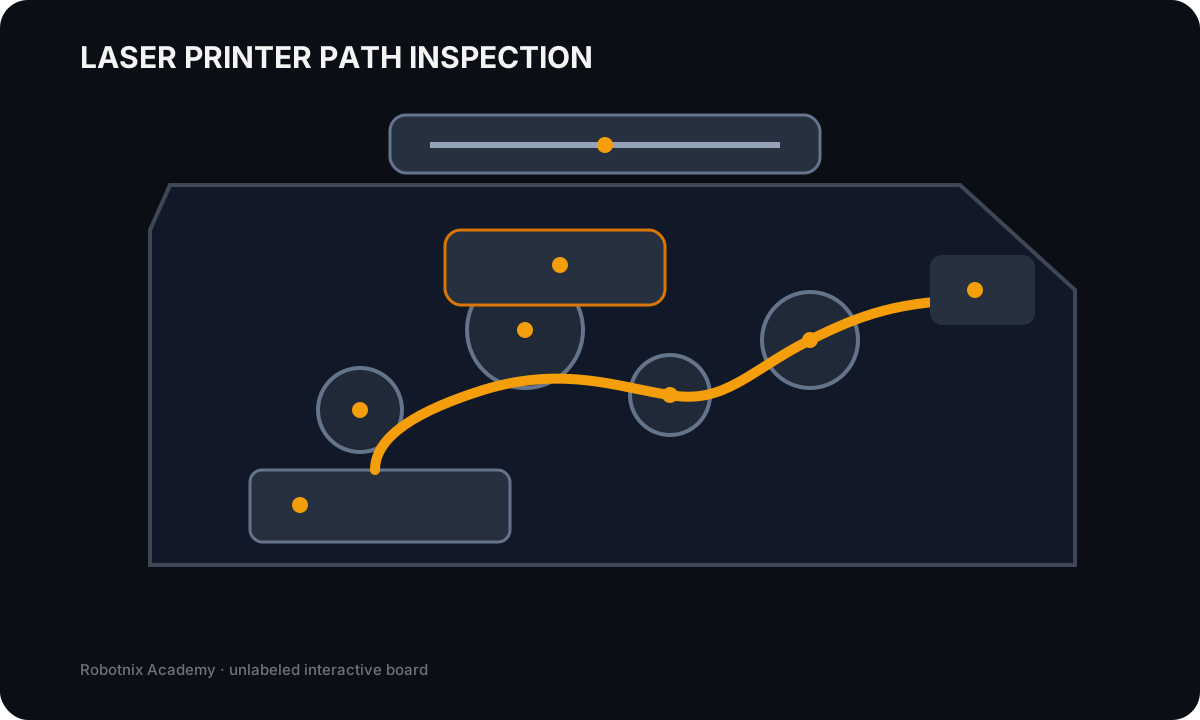
Paper tray
Job: Stores the selected media before pickup into the paper path.
Service clue: Wrong size/type settings, empty trays, overfilled trays, or damaged media can look like a printer-engine fault.
Read the inspection board as text
- Paper tray: Stores the selected media before pickup into the paper path. Service clue: Wrong size/type settings, empty trays, overfilled trays, or damaged media can look like a printer-engine fault.
- Pickup rollers: Feed one sheet from the tray into the printer path. Service clue: Failure to feed, repeated misfeeds, or jams near the tray often point toward worn/dirty rollers or media handling.
- Imaging drum: Carries the electrostatic image that toner will follow before transfer to paper. Service clue: Repeating defects at a regular interval often implicate a rotating imaging component such as the drum.
- Toner supply: Provides the fine powder used to form the image on the drum and paper. Service clue: Faded output, uneven density, low-toner warnings, or cartridge problems should be separated from fuser and transfer faults.
- Transfer stage: Moves toner from the imaging surface onto the paper. Service clue: Image transfer faults can create missing or uneven areas even when the toner and drum are present.
- Fuser: Uses heat and pressure to permanently bond toner to the paper. Service clue: Toner that rubs or smears off the page strongly points toward the fusing stage rather than the network or print queue.
- Output path: Guides the finished sheet through exit rollers to the output tray. Service clue: Late-path jams or wrinkling should be isolated from earlier feed and imaging stages.
- Automatic document feeder: Feeds source pages across the scanner for multi-page scan/copy jobs. Service clue: ADF-only scan failures should be separated from flatbed glass, network destination, authentication, and scan-engine problems.
Read it. Prove it.