Week 05 · lesson
Lesson 1: Laptop Hardware and Replacement Decisions
Core path: 42 minutes
A laptop uses familiar computer components, but the repair decision is different because portability forces tighter integration.
The technician question is not just:
What part is this?
It is:
Can this part be monitored, accessed, replaced, and verified safely on this exact model?
The replaceable-component map
A+ expects technicians to recognize these mobile-device hardware areas:
- battery;
- keyboard and keys;
- RAM;
- HDD/SSD;
- wireless card;
- Wi-Fi antenna connector/placement;
- camera/webcam;
- microphone;
- physical privacy/security components.
Some systems expose these as field-replaceable modules. Others solder or integrate them into larger assemblies.
RAM and storage
Many serviceable laptops use SO-DIMMs and M.2 or 2.5-inch storage. Others solder RAM or storage to the board.
Before ordering anything, verify:
model/service manual
→ component is replaceable?
→ form factor/interface
→ supported generation/capacity
→ access procedure
→ replacement verification
A correct component that cannot be serviced independently is still the wrong repair plan.
Wireless cards and antennas
A removable wireless card may connect to one or more small antenna leads routed through the chassis/display area.
A Wi-Fi problem can therefore involve:
- wireless card hardware;
- antenna connector seating;
- antenna placement/damage;
- driver/OS state;
- radio settings;
- external network conditions.
Do not diagnose the wireless card from signal strength alone.
Camera and microphone
Integrated webcams and microphones may share cabling or modules around the display assembly. Symptoms can come from hardware, privacy switches, permissions, drivers, or application settings.
Privacy and security components
Mobile systems may include:
- fingerprint or facial-recognition hardware;
- privacy shutters;
- near-field scanner features used for badges or tap-based identity/access workflows.
Recognize the component and its purpose. Do not enroll real biometrics or credentials in this classroom lesson.
Guided case: wireless upgrade request
A student wants to replace a laptop wireless card.
Before service, verify:
- whether the card is removable or soldered;
- supported interface/form factor;
- antenna connectors and routing;
- firmware/platform restrictions if any;
- driver support;
- the approved disassembly procedure.
Student action: replaceability matrix
For these components, mark replaceable, integrated, or model-dependent for a supplied laptop service diagram:
- battery;
- keyboard;
- RAM;
- SSD;
- wireless card;
- camera;
- microphone;
- biometric reader.
For each, record one verification step after service.
Evidence checkpoint
You should be able to explain why "I know what the component is" and "I know how to replace it on this model" are two different technician claims.
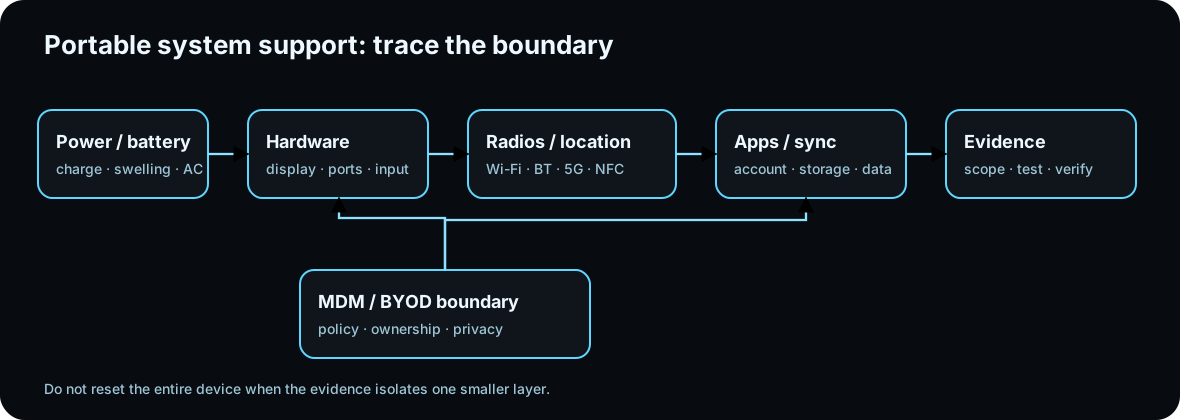
Diagrams open at a readable shape-aware scale. Zoom or expand when you need more detail.
Laptop internals inspection board
Identify serviceable laptop parts and separate a physical hardware problem from a policy, power, or wireless problem.

Battery
Job: Stores DC energy for portable operation and feeds the laptop power-management system.
Service clue: Unexpected shutdowns, swelling, charging failures, or rapid discharge require power-state evidence before blaming the motherboard.
Read the inspection board as text
- Battery: Stores DC energy for portable operation and feeds the laptop power-management system. Service clue: Unexpected shutdowns, swelling, charging failures, or rapid discharge require power-state evidence before blaming the motherboard.
- Fan and heat pipe: Moves heat from CPU/GPU surfaces to a radiator and out of the chassis. Service clue: Thermal shutdowns, throttling, loud fans, or high temperatures point toward airflow, dust, fan operation, thermal contact, or firmware controls.
- SODIMM memory: Provides removable system memory in a compact laptop form factor. Service clue: Memory symptoms still require generation, capacity, seating, and supported configuration checks; desktop DIMMs are physically different.
- M.2 SSD: Provides compact solid-state storage using the supported M.2 interface. Service clue: A missing boot device can be storage hardware, interface support, firmware boot order, partition/OS state, or drive failure.
- Wi-Fi card and antenna leads: Provides wireless network connectivity and connects to chassis antennas. Service clue: Weak or missing Wi-Fi after service can come from a loose antenna lead, disabled radio, driver problem, policy state, or access-point issue.
- Speaker assembly: Provides local audio output through compact chassis speakers. Service clue: No sound is not automatically a failed speaker; verify mute/volume, output device, driver state, application routing, and only then the hardware path.
Read it. Prove it.
Lesson knowledge checks
Answer from the lesson you just completed. Results stay in this browser and are not submitted.Why should a technician check a laptop service manual before replacing an internal part?
Which component is commonly field-replaceable on some laptops but soldered on others?
system flow
Resolve a File Access Decision
Path
The system resolves the requested absolute or relative path through the filesystem hierarchy.
Identity
The current user and group memberships establish which permission category applies.
Ownership + Mode
Owner, group, and other bits define read, write, or execute permissions for the resource.
Allow / Deny
The operating system evaluates the requested action against the applicable access rule.
Evidence
A successful operation or permission-denied result becomes evidence for the least-privilege decision.
Read this concept flow as plain text
- Path. The system resolves the requested absolute or relative path through the filesystem hierarchy.
- Identity. The current user and group memberships establish which permission category applies.
- Ownership + Mode. Owner, group, and other bits define read, write, or execute permissions for the resource.
- Allow / Deny. The operating system evaluates the requested action against the applicable access rule.
- Evidence. A successful operation or permission-denied result becomes evidence for the least-privilege decision.