Week 16 · lesson
Lesson 1: Documentation, Assets, and Change Management
Core path: 42 minutes
A technician can make the correct repair and still create a support failure if nobody can tell what changed, who owns the device, what the ticket status is, or how to undo the work.
Documentation is part of the system.
A useful ticket tells the next technician what matters
A support ticket should capture enough context to make the work reproducible and understandable.
Common fields include:
- user/requester information;
- device or asset information;
- clear description of the issue;
- category;
- severity/priority under the organization's process;
- escalation level;
- progress notes;
- final resolution.
Bad note:
Fixed computer.
Better note:
User reported no Ethernet after docking. Verified dock power and USB devices. Network adapter absent in Device Manager. Reconnected approved dock firmware/driver package per SOP, adapter returned, DHCP lease obtained, intranet and approved external site verified.
The second note preserves evidence and action without becoming a novel.
Asset management answers: what is this thing and who owns it?
Organizations may track:
- inventory lists;
- asset tags or IDs;
- assigned users;
- configuration state in a CMDB or similar system;
- procurement lifecycle;
- warranty state;
- software/hardware licensing.
A hostname is not always the asset identity. A sticker is not always the only source of truth. The technician follows the organization's asset process.
Support documents reduce repeated guessing
Examples include:
- incident reports;
- standard operating procedures (SOPs);
- approved software-installation procedures;
- new-user/onboarding checklists;
- offboarding checklists;
- service-level agreements (SLAs);
- knowledge-base articles.
An SLA describes agreed service expectations. It does not mean every ticket is solved instantly.
Change management protects the environment
A change that is technically simple can still create business risk.
A controlled change can include:
request
→ purpose
→ scope / affected systems
→ change type
→ risk analysis
→ backup / rollback plan
→ sandbox or pre-deployment test
→ approval
→ maintenance window / change freeze check
→ implementation
→ peer review / verification
→ end-user acceptance when appropriate
→ documentation
Common change categories include standard, normal, and emergency changes. Exact definitions depend on the organization.
Emergency does not mean "skip all documentation." It means the organization uses its emergency-change process.
Guided case
A technician wants to update a classroom application on 40 workstations during the school day because the installer takes only two minutes.
Questions before implementation:
- What is the purpose?
- Which devices/users are affected?
- Is this a standard, normal, or emergency change under policy?
- Has the package been tested in a safe/sandboxed environment?
- What is the backup or rollback path?
- Is there a maintenance window or change freeze?
- Who approves the change?
- What proves success?
"It is a tiny update" does not answer those questions.
Student action: build the support record
You receive this fictional ticket:
Staff laptop cannot print to the front-office printer after an approved driver update.
Create:
Ticket record
requester:
device/asset ID:
issue description:
category:
severity:
progress note:
escalation condition:
resolution/verification field:
Change record
purpose:
scope:
affected systems:
change type:
risk:
backup/rollback:
test plan:
approval:
implementation window:
verification:
Evidence checkpoint
You should be able to explain why these are different artifacts:
- a support ticket;
- an asset record;
- an SOP;
- an SLA;
- a knowledge-base article;
- a change request.
Professional IT work leaves enough evidence that someone else can understand what happened without guessing.
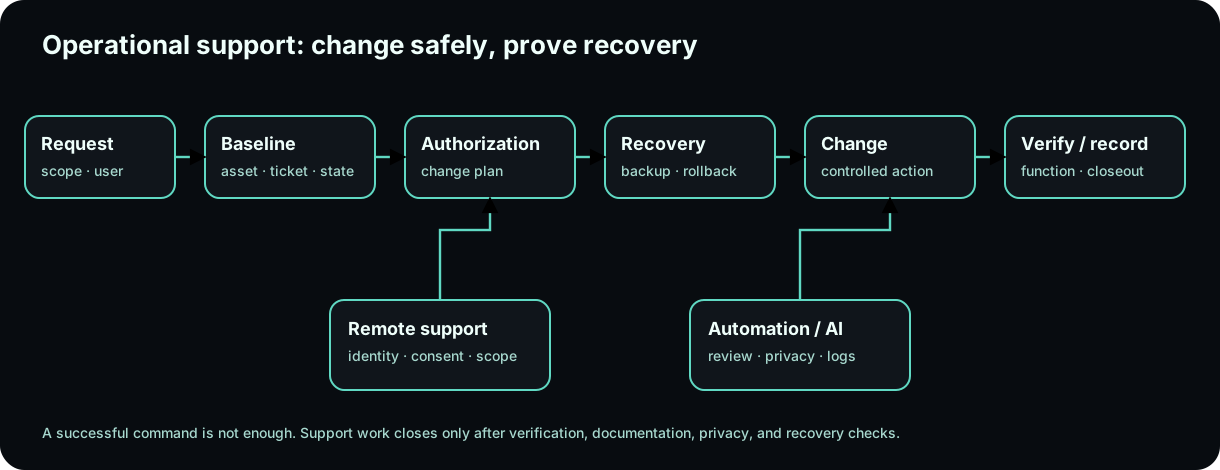
Diagrams open at a readable shape-aware scale. Zoom or expand when you need more detail.
System process animation
Controlled change with a rollback path
A professional change is not just an action; it is an evidence chain with authorization, recovery, execution, verification, and rollback.Technician question: What evidence must exist before the change is allowed to modify the system?
Read it. Prove it.
Lesson knowledge checks
Answer from the lesson you just completed. Results stay in this browser and are not submitted.What makes a change record useful to another technician?
Why should asset records include serial/asset identifiers and assigned location or user?
system flow
Browser-to-Service Web Path
Browser Client
The browser begins with a URL and acts as a client rather than the entire web system.
DNS + Transport
Name resolution finds an address and protected transport establishes the communication path.
HTTP Boundary
The client sends an HTTP request with explicit method, target, headers, and optional body.
Web/App + Data
Server and application responsibilities process the request and may depend on persistent data or other services.
Response + Diagnose
The response returns through the path; failures are localized from the last confirmed-good boundary.
Read this concept flow as plain text
- Browser Client. The browser begins with a URL and acts as a client rather than the entire web system.
- DNS + Transport. Name resolution finds an address and protected transport establishes the communication path.
- HTTP Boundary. The client sends an HTTP request with explicit method, target, headers, and optional body.
- Web/App + Data. Server and application responsibilities process the request and may depend on persistent data or other services.
- Response + Diagnose. The response returns through the path; failures are localized from the last confirmed-good boundary.