Week 13 · lesson
Lesson 2: Windows Security, Permissions, and Identity
Core path: 42 minutes
Windows security is not one antivirus toggle.
The technician has to separate malware protection, firewall rules, account type, sign-in method, permissions, elevation, encryption, and centralized management.
Microsoft Defender Antivirus
Recognize:
- protection enabled/disabled state;
- security intelligence/definition updates;
- scan/status evidence.
A disabled or outdated protection state deserves investigation. Do not disable endpoint protection on a real managed device for classroom practice.
Windows Defender Firewall
The firewall can control traffic by application, service, port, protocol, and network profile.
If one approved application is blocked, the goal is the smallest justified rule change, not disabling the entire firewall.
Local vs Microsoft account
A local account is managed on the individual Windows device.
A Microsoft account connects Windows sign-in/services to a Microsoft cloud identity.
Organizations can also use domain or other managed identities. Identify which identity system owns the account before resetting or changing access.
Account roles
Recognize:
- standard user;
- administrator;
- guest account;
- power-user terminology/legacy role at recognition depth.
Daily users should not receive administrator rights simply to avoid support tickets.
Sign-in options
Windows can support:
- password;
- PIN;
- fingerprint;
- facial recognition;
- SSO;
- passwordless/Windows Hello concepts on supported hardware/configurations.
Authentication method and authorization are separate. Signing in successfully does not mean the user can perform every action.
NTFS vs share permissions
When accessing a shared folder, more than one permission boundary may apply:
user identity
→ share permission
→ NTFS permission
→ file/folder access
The effective access is constrained by the permissions that apply to the path.
Attributes and inheritance
Permissions can be inherited from parent folders. File attributes can also affect behavior, but attributes are not a replacement for access-control permissions.
Run as administrator vs standard user
"Run as administrator" elevates a process under the approved account/UAC model. It should be used only when the task actually requires elevated authority.
User Account Control (UAC)
UAC helps separate normal user activity from administrative elevation and prompts for approval/credentials when required.
Turning off UAC to stop prompts weakens a control instead of fixing the task design.
Encryption
BitLocker
Full-volume encryption for supported Windows editions/configurations.
BitLocker To Go
Encryption for supported removable storage.
EFS
Encrypting File System can encrypt files/folders within NTFS under supported configurations.
All encryption creates key/recovery dependencies. Protect recovery material before enabling or changing encryption.
Active Directory concepts
At technician depth, recognize:
- joining a domain;
- login scripts;
- moving directory objects into organizational units (OUs);
- home folders;
- Group Policy;
- security groups;
- folder redirection.
A domain-managed setting may override a local setting. Repeatedly changing the endpoint locally may be the wrong boundary.
Guided case
A user can reach \\filesrv\dept but receives Access Denied on one folder.
Do not change DNS. The server/share path already works. Investigate identity, group membership, share permission, and NTFS permission/inheritance.
Student action
For ten fictional Windows security tickets, complete:
security boundary:
Windows feature/tool:
current state:
smallest justified change:
recovery/key concern:
verification:
Evidence checkpoint
Windows security support means knowing which control owns the decision before changing settings.
Visual reference
See the system before you troubleshoot it
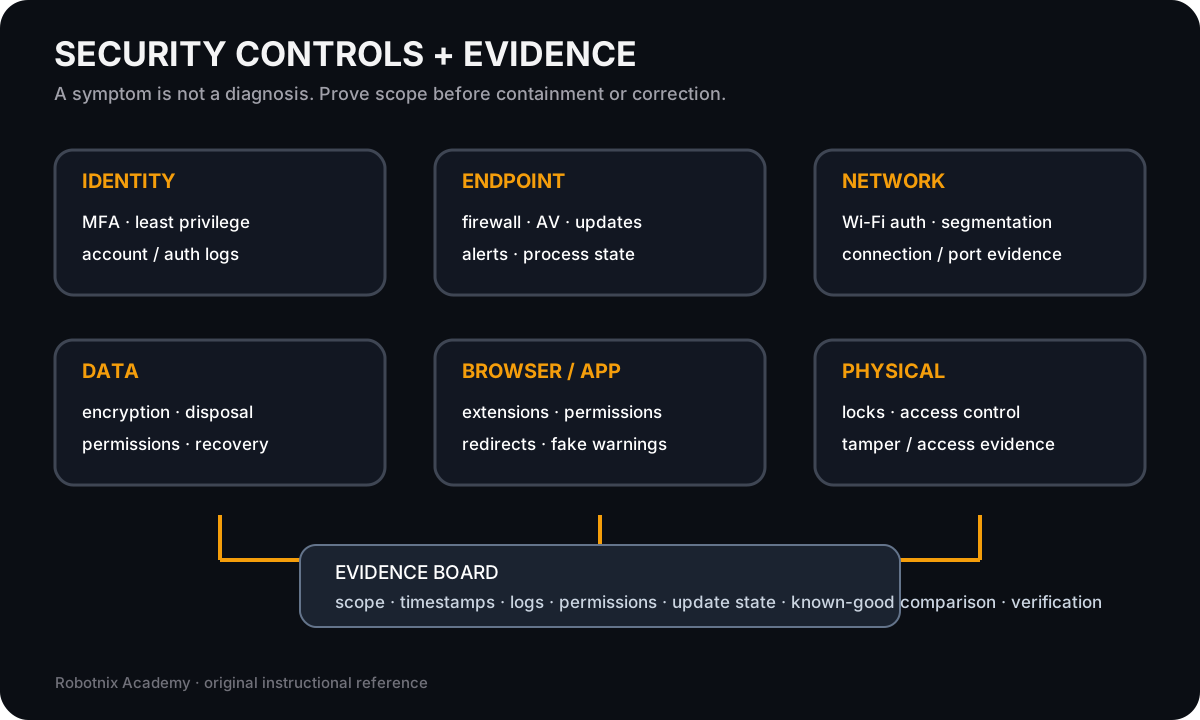
A security symptom is not a diagnosis. Controls and evidence help prove scope before a technician contains or corrects anything.
Use it for: Connect defensive controls to the evidence used in security and software troubleshooting.
Read it. Prove it.