Week 10 · lesson
Lesson 2: Hypervisors, VDI, Containers, and VM Requirements
Core path: 42 minutes
Virtualization is not one technology with one shape.
A technician needs to recognize where the virtualization boundary lives, what it depends on, and what kind of environment it is delivering.
Type 1 vs Type 2 hypervisors
A Type 1 hypervisor runs directly on the hardware/platform layer in a dedicated virtualization architecture.
A Type 2 hypervisor runs as software on top of a conventional host operating system.
The distinction matters because the dependency chain changes.
Type 1:
hardware → hypervisor → guest

Type 2:
hardware → host OS → hypervisor application → guest
A host-OS failure can therefore affect a Type 2 environment even when the guest itself is healthy.
VM resources
A guest may receive:
- virtual CPU;
- virtual RAM;
- virtual disk/storage;
- virtual NIC;
- virtual optical/installation media;
- access to virtual switches or defined network modes.
Those virtual resources still consume or depend on real host resources.
Security requirements
Virtualization does not eliminate security requirements.
A technician still asks:
- Is the hypervisor supported and updated?
- Is the host protected?
- Which users may create/start/change VMs?
- Is the guest isolated from networks it should not reach?
- Are snapshots, images, and virtual disks protected?
- Does an unsupported legacy guest create risk?
Network requirements
Common virtual-network modes include:
- bridged/external;
- NAT/shared;
- host-only;
- internal/private virtual networking.
The exact name depends on the hypervisor. The technician task is to understand what the guest can reach and which network boundary owns that decision.
Storage requirements
Virtual disks can consume large amounts of host storage. Technicians must plan for:
- capacity;
- performance;
- backup/export needs;
- snapshot growth;
- permissions;
- host-storage failure.
A snapshot stored on the same failed storage is not an independent backup.
Virtual Desktop Infrastructure (VDI)
VDI delivers a desktop environment from centralized virtualization infrastructure rather than relying entirely on the local endpoint to host the desktop workload.
The endpoint still matters, but the desktop/session may depend on:
endpoint
→ network
→ authentication/access
→ VDI service/infrastructure
→ virtual desktop/session
A healthy local laptop with a failed network or VDI service can still leave the user without the expected desktop.
Containers
Containers isolate applications and their dependencies while sharing more of the underlying host operating-system environment than a full VM typically does.
At A+ depth, keep the distinction simple:
- VM: virtualizes a complete machine environment with a guest OS;
- container: isolates an application/runtime environment while sharing the host kernel/platform more directly.
Containers are not automatically "lighter VMs." The architecture and isolation boundary are different.
Guided comparison
Choose the better fit:
- Run a complete second operating system with its own kernel → VM.
- Deliver a centralized desktop session to many endpoints → VDI.
- Package an application and dependencies into an isolated runtime unit → container.
Student action
Create a comparison table for:
- Type 1 hypervisor;
- Type 2 hypervisor;
- VDI;
- container.
For each record:
what is virtualized/isolated:
major dependency:
network requirement:
storage requirement:
security question:
one failure symptom:
Evidence checkpoint
Before troubleshooting a virtual environment, identify the virtualization model first. Otherwise you may test the wrong layer.
Visual reference
See the system before you troubleshoot it
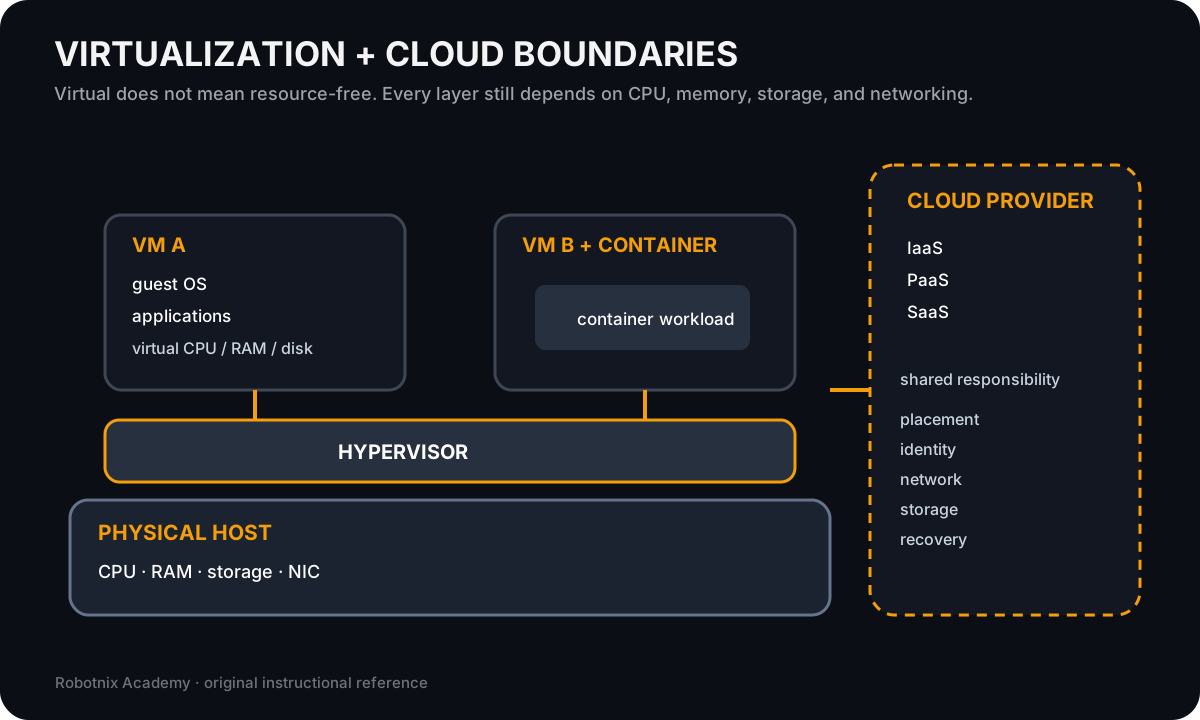
Virtualization changes where a workload runs, but CPU, memory, storage, networking, and administrative boundaries still matter.
Use it for: Distinguish host resources, guest operating systems, containers, virtual networks, and cloud responsibility boundaries.
System process animation
Virtual workload to physical host
Follow a VM request downward through virtual devices and the hypervisor to finite host resources.Technician question: Which layer can fail while the guest OS still believes it owns a normal CPU, disk, and NIC?
Inspect a simulated container lifecycle
Compare an image with a running container, then observe state changes as one bounded container starts and stops.
Ghostty Web renders the terminal, but this lesson still uses a controlled Robotnix command engine. No unrestricted operating-system shell is connected.
docker imagesdocker psdocker run --name web-demo nginx:alpinedocker psdocker stop web-demodocker ps -a
Read a deterministic terminal transcript
This fallback runs the same bounded Robotnix simulation against the suggested command sequence. It does not connect to an operating-system shell or network.
Robotnix container simulation
Ghostty renders the terminal. No Docker daemon, image pull, registry, or host container runtime is connected.

$ docker images
REPOSITORY   TAG      IMAGE ID       SIZE
nginx        alpine   4f67c83422ec   52MB

$ docker ps
CONTAINER ID   IMAGE   STATUS   NAMES

$ docker run --name web-demo nginx:alpine
a13f7c2b8d11 (simulated container started)

$ docker ps
CONTAINER ID   IMAGE          STATUS        NAMES
a13f7c2b8d11   nginx:alpine   Up 8 seconds   web-demo

$ docker stop web-demo
web-demo

$ docker ps -a
CONTAINER ID   IMAGE          STATUS                     NAMES
a13f7c2b8d11   nginx:alpine   Exited (0)                 web-demo
Read it. Prove it.