Week 03 · lesson
Lesson 1: Storage Media, Form Factors, and Workloads
Core path: 42 minutes
Storage decisions are not just about how many gigabytes fit on the label.
A technician also cares about interface, performance, durability, physical size, power, cost, and what the user actually needs.
Hard disk drives
A hard disk drive uses spinning magnetic platters and moving read/write heads.
Two common desktop/laptop form factors are:
- 3.5-inch — common in desktops and bulk-storage systems;
- 2.5-inch — common in laptops and compact systems.
Common spindle speeds you may encounter include 5400 RPM and 7200 RPM. Higher spindle speed can improve some HDD performance characteristics, but workload, cache, interface, drive design, and access pattern still matter.
Strengths:
- low cost per gigabyte;
- large capacities;
- useful for bulk storage and archives.
Tradeoffs:
- slower random access than SSDs;
- mechanical parts;
- vulnerable to shock;
- audible/mechanical failure symptoms can occur.
Solid-state drives
An SSD uses flash memory and has no moving read/write mechanism.
Strengths:
- low access latency;
- fast startup and application loading;
- silent operation;
- better shock resistance.
Tradeoffs:
- cost per gigabyte can be higher;
- endurance/controller behavior still matter;
- performance depends heavily on interface and workload.
Removable storage
A+ expects technicians to recognize removable storage such as:
- USB flash drives;
- memory cards.
These are useful for transfer, imaging, cameras, embedded devices, and portable storage, but removable media creates loss, malware, privacy, and compatibility concerns.
Optical drives
Optical media such as CD/DVD/Blu-ray is less common in new systems but still appears in support environments, archives, installation media, and legacy workflows.
A technician should recognize that optical drives are separate from magnetic HDDs and flash-based SSDs.
Capacity does not describe performance
A 4 TB hard drive can hold more data than a 1 TB NVMe SSD.
That does not make it faster.
Likewise, a fast SSD is not automatically the best bulk archive if cost per gigabyte matters more than access speed.
Student action
Choose the better first storage fit for each case and defend it:
- student laptop boot drive;
- large local video archive;
- esports game library;
- school lab imaging repository;
- inexpensive backup target;
- camera that uses removable memory;
- legacy software distributed on optical media.
Then build a storage decision table covering:
- media type;
- form factor;
- performance expectation;
- durability/mobility;
- cost/capacity;
- one support risk.
Evidence checkpoint
You should be able to explain why media type, form factor, interface, capacity, and performance are different storage decisions.
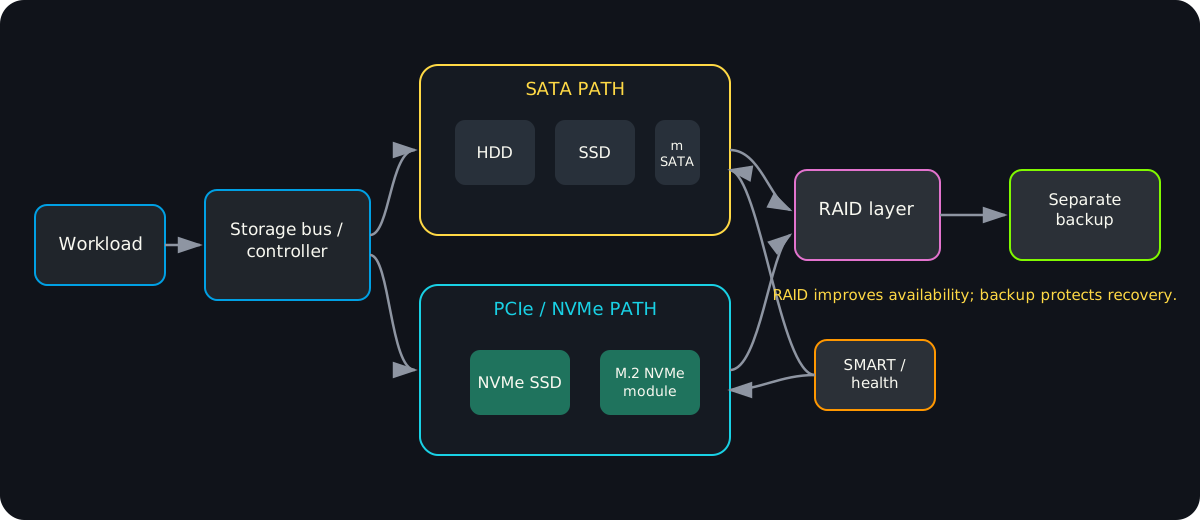
Diagrams open at a readable shape-aware scale. Zoom or expand when you need more detail.
Read it. Prove it.
Lesson knowledge checks
Answer from the lesson you just completed. Results stay in this browser and are not submitted.Which statement best describes the practical difference between an HDD and an SSD?
Which workload most clearly benefits from the low access latency of an SSD?
system flow
Meaning Becomes Representation
Meaning
A human concept such as a number, character, color, or image begins outside the machine representation.
Encoding Rule
A numeric base, character encoding, or file format defines how that meaning will be represented.
Bits + Bytes
The representation becomes binary values grouped into bytes that software can store or move.
Stored / Transmitted Data
The same byte sequence can be written to a file, held in memory, or sent across a system boundary.
Decode with Context
Software needs the correct encoding or format rules to turn raw bytes back into useful meaning.
Read this concept flow as plain text
- Meaning. A human concept such as a number, character, color, or image begins outside the machine representation.
- Encoding Rule. A numeric base, character encoding, or file format defines how that meaning will be represented.
- Bits + Bytes. The representation becomes binary values grouped into bytes that software can store or move.
- Stored / Transmitted Data. The same byte sequence can be written to a file, held in memory, or sent across a system boundary.
- Decode with Context. Software needs the correct encoding or format rules to turn raw bytes back into useful meaning.