Week 14 · lesson
Lesson 2: Malware Types, Defensive Tools, and Removal
Core path: 42 minutes
One symptom does not identify malware type or root cause.
A technician starts with evidence, containment, approved tools, and a repeatable removal process.
Malware categories
At defensive recognition depth, know:
- Trojan — malicious software disguised as or bundled with something expected;
- rootkit — malware designed to hide/control activity at privileged system layers;
- virus — malicious code that attaches to or modifies other files/software and can replicate through execution;
- spyware — software that secretly collects information/activity;
- ransomware — encrypts/locks data or systems to extort payment;
- keylogger — captures keystrokes/input;
- boot-sector malware — targets early boot/storage structures;
- cryptominer — abuses system resources for cryptocurrency mining;
- stalkerware — covert surveillance/tracking software used against a person;
- fileless malware — abuses legitimate memory/process/script mechanisms without relying primarily on a traditional malicious file;
- adware — aggressively serves advertising or changes browser behavior;
- potentially unwanted program (PUP) — software that may be technically consented to but creates unwanted/risky behavior.
Do not label a process as malware because its name is unfamiliar. Verify.
Defensive tools and methods
Recognize the role of:
- antivirus / anti-malware;
- software firewall;
- email security gateway;
- user education and antiphishing controls;
- EDR — Endpoint Detection and Response;
- MDR — Managed Detection and Response;
- XDR — Extended Detection and Response across multiple security data/control sources;
- recovery environment / recovery console / safe mode where appropriate;
- reimage/reinstall as a later remediation option.
These tools have different scopes. An email gateway cannot fix a compromised local browser profile after delivery.
A+ SOHO malware-removal procedure
Use the required sequence as a technician framework, while following organization/vendor procedures when they differ.
1. Investigate and verify symptoms
Record observed behavior, recent changes, affected scope, and known-good evidence.
2. Quarantine the affected system
Isolate the system when appropriate to reduce spread/communication while preserving evidence and data.
3. Disable System Restore where required
In the classic Windows Home remediation workflow, disable System Restore where the approved procedure requires it so infected restore state is not retained.
This is not a universal enterprise incident-response rule.
4. Remediate the infected system
Use approved removal/configuration procedures appropriate to the evidence.
5. Update anti-malware software
Ensure the defensive tool is current before relying on its detection/removal capability.
6. Scan and remove
Run the approved scan/removal process. Safe Mode or a preinstallation/recovery environment may be appropriate when normal startup interferes with remediation.
7. Reimage or reinstall if necessary
If trustworthy remediation cannot be established, reimage/reinstall from a known-good source after required data/recovery decisions.
8. Schedule scans and run updates
Restore the normal update and scan posture.
9. Re-enable System Restore and create a restore point
Where applicable, restore the protection and create a clean recovery point.
10. Educate the user and document
Record symptoms, actions, verification, remaining risk, and safer future behavior without blaming the user.
Guided case
Evidence:
- browser redirects began after an unapproved extension install;
- redirects occur only in one browser profile;
- endpoint protection is enabled;
- no system-wide evidence yet.
Start at browser/application scope, preserve evidence, remove the unapproved extension through the approved procedure, update/scan, verify, and expand scope only if evidence demands it.
Student action
For eight supplied symptom sets, document:
malware category plausible:
non-malicious alternative:
defensive tool/method:
removal step reached:
what would justify escalation/reimage:
verification:
Evidence checkpoint
Malware remediation is not "run a scanner and hope." It is a controlled process from verify → contain → remediate → restore protections → verify → educate/document.
Visual reference
See the system before you troubleshoot it
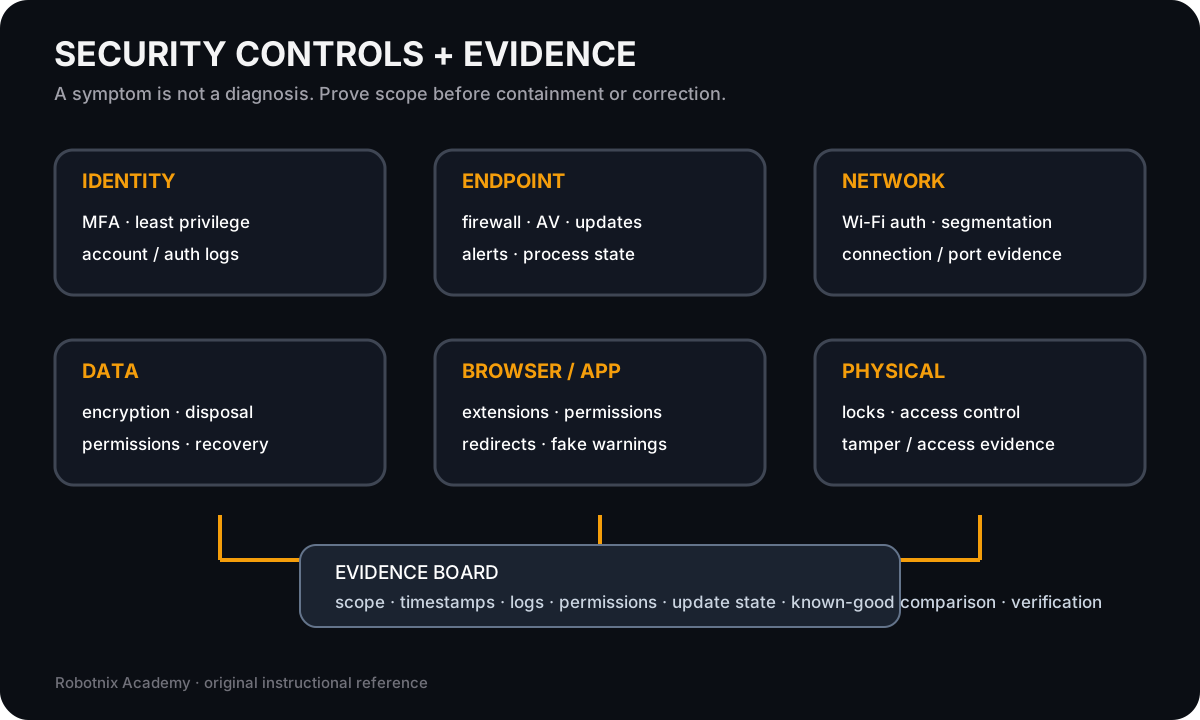
A security symptom is not a diagnosis. Controls and evidence help prove scope before a technician contains or corrects anything.
Use it for: Connect defensive controls to the evidence used in security and software troubleshooting.
System process animation
Defensive malware-response sequence
Keep the response evidence-driven: verify the symptom, contain appropriately, remediate with approved tools, recover, then verify.Technician question: Which step prevents a suspicious indicator from being treated as proof of compromise?
Read it. Prove it.