Week 08 · lesson
Lesson 1: DNS, DHCP, NAT, VLAN, and VPN
Core path: 42 minutes
Several network services can fail while the cable and Wi-Fi signal remain perfectly healthy. The technician needs to know what each configuration object is supposed to do.
DHCP
DHCP can provide endpoint configuration dynamically. Recognize:
- lease: time-limited address/configuration assignment;
- reservation: a predictable assignment for a known client;
- scope: the pool/range and related options available for a network;
- exclusion: addresses inside the overall range that DHCP should not hand out.
APIPA can be a clue that expected DHCP configuration was not obtained.
DNS records
At A+ recognition depth:
- A maps a name to IPv4;
- AAAA maps a name to IPv6;
- CNAME aliases one name to another canonical name;
- MX identifies mail-exchange destinations;
- TXT stores text data used for purposes including mail/security policy.
Mail-related TXT uses can include DKIM, SPF, and DMARC concepts. You do not need to administer a public mail domain in this course; recognize what problem those records help address.
NAT and gateway
The default gateway forwards off-subnet traffic. NAT translates address information across a boundary in common SOHO designs.
NAT is not the same thing as a firewall and does not replace access policy.
VLAN
A VLAN creates a logical Layer-2 broadcast-domain separation on supported managed network equipment. Devices can share physical switching infrastructure while belonging to different logical networks.
VLANs do not magically communicate with each other. Inter-VLAN traffic needs appropriate Layer-3 routing and policy.
VPN
A VPN creates a protected logical connection across another network under its configured security model. It can support remote-access or site-to-site use cases.
A VPN does not make a malicious destination safe or fix a broken local link.
Guided case
A printer needs a predictable address but the organization wants centralized DHCP management.
A DHCP reservation can satisfy both goals without manually configuring a random static address outside the documented plan.
Student action
Build a service/configuration map for a fictional office:
DHCP scope:
reservation use:
exclusion use:
DNS A/AAAA/CNAME/MX/TXT examples:
VLAN purpose:
VPN purpose:
default gateway:
NAT boundary:
Evidence checkpoint
You should be able to explain why DHCP assignment, DNS naming, VLAN separation, routing/gateway, NAT, and VPN solve different problems.
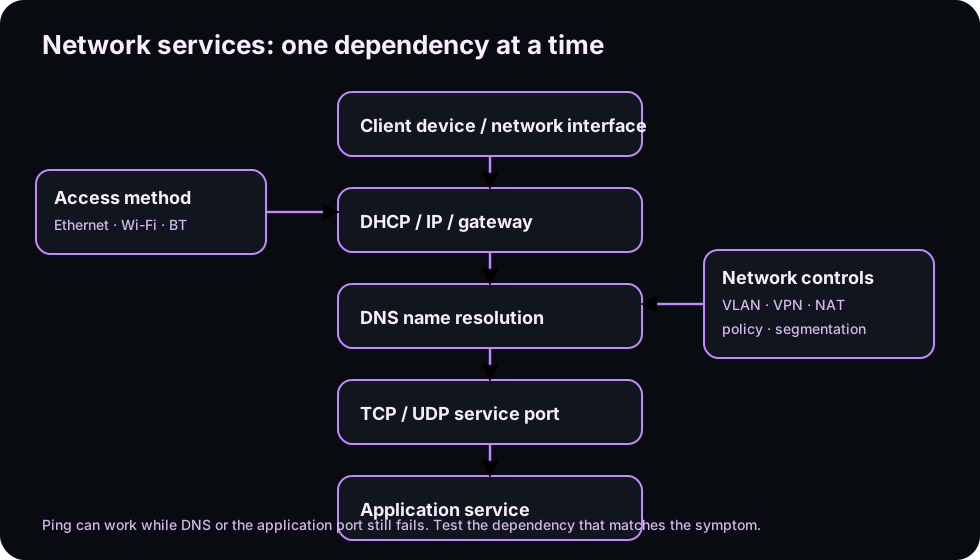
Diagrams open at a readable shape-aware scale. Zoom or expand when you need more detail.
System process animation
Name to service: DNS before the application
Trace a hostname request from local configuration through DNS resolution and then into the separate service connection.Technician question: Which successful step proves name resolution, and which later step proves the application service?
Read it. Prove it.
Lesson knowledge checks
Answer from the lesson you just completed. Results stay in this browser and are not submitted.What does DHCP provide to a client?
What is the purpose of a VLAN?
system flow
URL to Response: protocol responsibilities
Hostname
The application starts with a human-readable destination name.
DNS
Name resolution maps the hostname to an address.
Transport / TLS
The client establishes the transport and protected connection required by the application.
HTTP
The client sends an HTTP request with method, target, headers, and optional body.
Response
The server returns status, headers, and content for the client to interpret.
Read this concept flow as plain text
- Hostname. The application starts with a human-readable destination name.
- DNS. Name resolution maps the hostname to an address.
- Transport / TLS. The client establishes the transport and protected connection required by the application.
- HTTP. The client sends an HTTP request with method, target, headers, and optional body.
- Response. The server returns status, headers, and content for the client to interpret.